2 min
2 min 
Moving your store from Etsy to Shopify is a big step toward building your brand independently.
But what about all those valuable reviews you collected on Etsy? You don’t have to leave them behind.
Importing Etsy reviews to your Shopify store helps you retain trust, social proof, and the confidence of new buyers.
This post shows you how to move Etsy reviews to Shopify quickly using WiserReview, a fast, flexible review app that supports CSV uploads and gives you complete control over how reviews are shown.
Why use WiserReview for Etsy-to-Shopify imports?

WiserReview is made for Shopify merchants who want full control and fast setup.
Simple CSV import
Upload your Etsy reviews file and map fields in just a few clicks, no technical setup needed.
Clean widgets that match your store
Choose from carousels, popups, badges, floating sliders, and more.
You can display reviews anywhere using fully customizable layouts.
Review tagging & smart moderation
Automatically tag reviews by product, sentiment, or keywords.
Set moderation rules to filter by rating, media presence, or keywords.
Social sharing & marketing tools
Turn top reviews into social posts.
Offer coupons in exchange for reviews, or send automated review requests post-purchase.
Seamless Shopify integration
WiserReview installs in one click and works with your existing product pages, collections, and third-party tools like Klaviyo, Meta, WooCommerce, and more.
Affordable pricing
Start free, and upgrade only when needed.
Paid plans start at just $9/ month, making it perfect for growing brands.



All your reviews in one place
WiserReview helps you collect, manage, and display reviews without high costs.
How to import Etsy reviews to Shopify
Once you’ve exported your reviews from Etsy, the next step is getting them onto your Shopify store, where they can build trust and boost conversions.
Step 1: Export reviews from Etsy
Etsy doesn’t have a native export button, so here’s what to do:
1. Go to your Etsy dashboard
2. Use third-party tools like EtsyHunt to extract reviews.
3. Export your review data in CSV format.
4. Make sure the file includes:
- Reviewer name
- Review text
- Star rating
- Date
- Product info (optional)
Tip: Clean the file using Google Sheets or Excel to ensure it’s organized.
Step 2: Prepare your CSV file

Start by downloading your reviews from Etsy using any tool or extension that supports CSV export.
If you’re creating the file manually, make sure your CSV includes the following columns:
- review_text – The actual review content.
- Rating – Star rating (1 to 5).
- reviewer_name – Name of the reviewer.
- image_url – If the review includes a photo.
- product_id – This must match the Shopify Product ID in your store.
Make sure each row clearly connects to the correct product by using the exact product ID from your Shopify catalog.
How to Find Shopify Product ID
This is the easiest method.
Steps:
-
Log in to your Shopify Admin.
-
Go to Products → All Products.
-
Click on the product you want.
-
Look at the URL in your browser.
You will see something like:
The long number at the end is the Product ID.
Step 3: Log in to the WiserReview dashboard
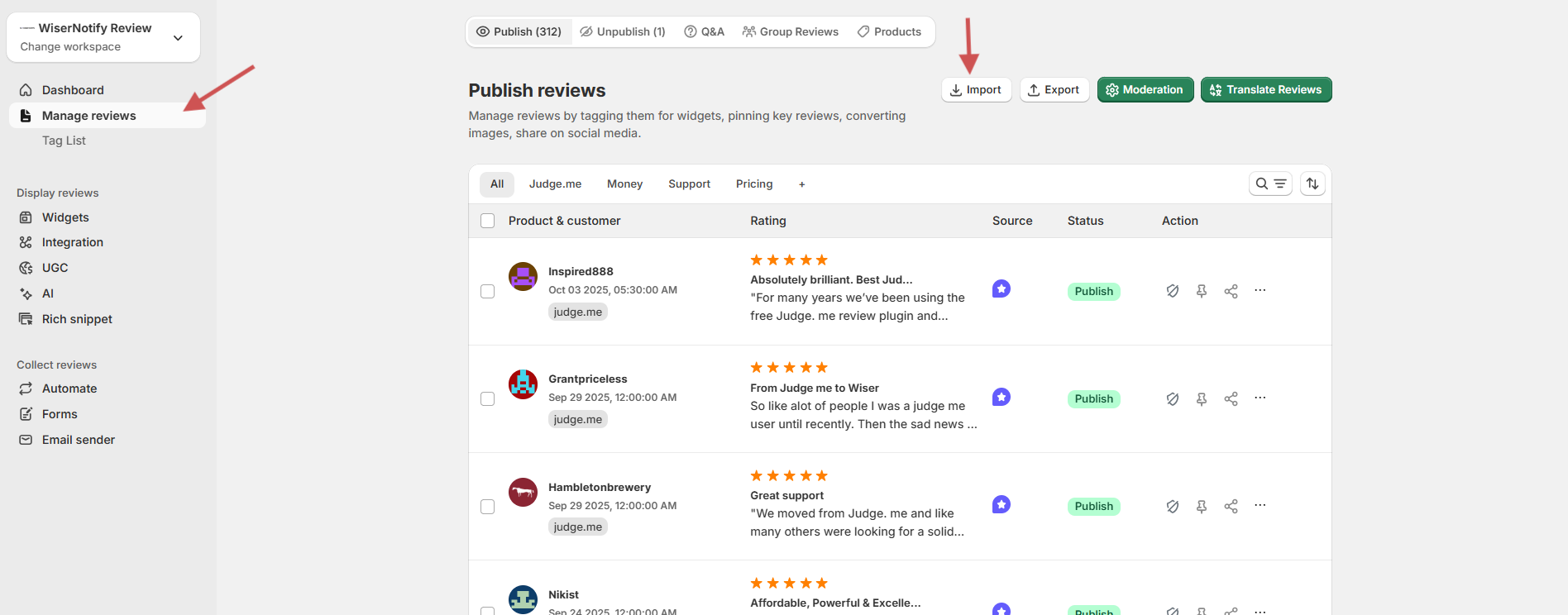
- Visit WiserReview
- Log in or create a free account.
- From the dashboard, go to Manage Reviews.
Step 4: Start the import process
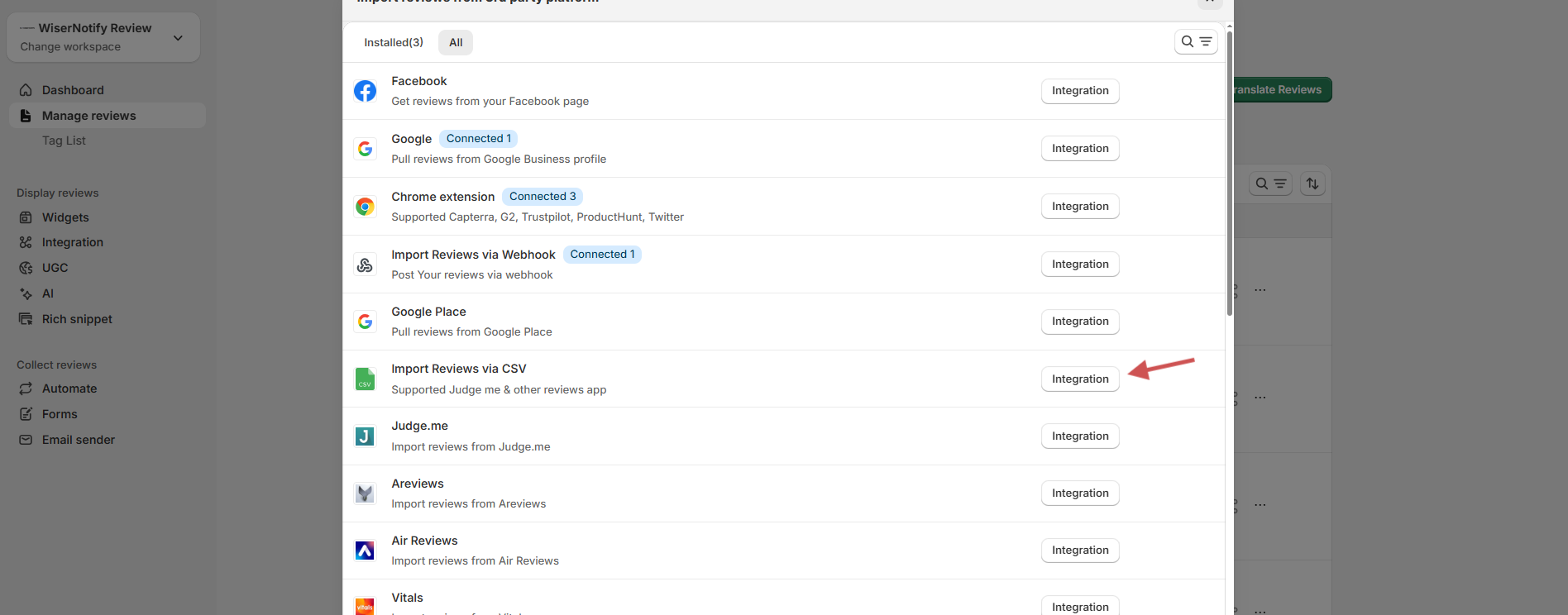
- Click on the Import Reviews button.
- Choose “Import reviews via CSV” from the available integration options.
- Select CSV File Upload as the method.
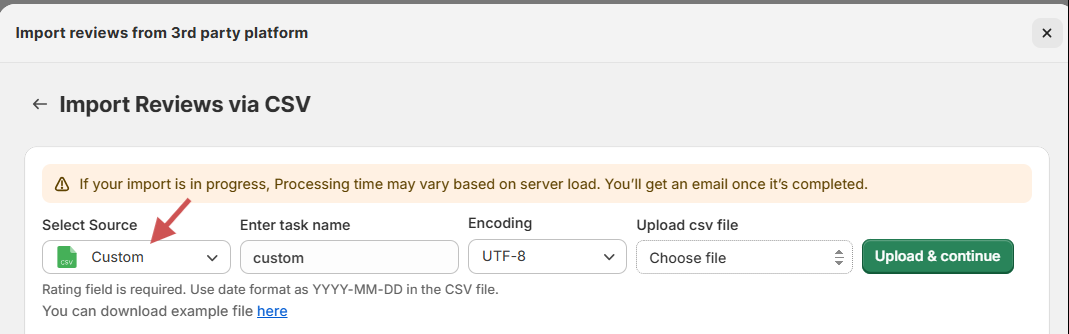
- Click Browse and upload the cleaned Etsy review CSV file.
Step 5: Next is mapping the fields
After uploading, you’ll be prompted to map each CSV column to the required WiserReview fields. For example:
Click Next when all mappings are set.
Step 6: Upload and review
- You’ll see a preview of the imported data
- Click Upload & Continue
- Once uploaded, all Etsy reviews will appear under Manage Reviews.
Optional: Tag & customize
WiserReview lets you do more:
- Tag Reviews by product, category, or sentiment.
- Apply Filters to hide low ratings or unverified reviews.
- Display Reviews using carousels, badges, popups, or floating sliders.
- Auto-share to Social Media using the Social Sharing module.
Wrap-up
You don’t have to lose the trust you built on Etsy.
With WiserReview, you can import Etsy reviews into Shopify in just a few minutes, with no technical steps, no manual copying.
Just export, upload, and go live with your reviews. It’s simple, fast, and keeps your social proof working for you.
Frequently asked questions
Shopify doesn't offer a native way to import Etsy reviews, but you can do it easily using a review app like WiserReview with a simple CSV upload.
Yes, Etsy allows shop owners to export their product reviews in CSV format from the shop dashboard.
Your CSV should include columns like product_id, reviewer_name, rating, review_text, created_at, and media_url. Most apps like WiserReview provide a sample template.
Yes, once mapped correctly, your reviews will display under the relevant products using the app’s widgets or embedded layouts.
WiserReview makes the process simple with fast CSV uploads, flexible display widgets, auto-tagging, and pricing that fits all business sizes.

Krunal