Smart customer review marketing strategies in 2025

Smart customer review marketing strategies focus on using real customer feedback to win trust, improve search results, and boost sales.

User Written By Krunal
Jul 18, 2025
Time 8 min
Boost Your Reviews

Smart businesses use reviews to support their marketing strategy.

Most businesses lack a straightforward method for managing customer feedback. In 2025, 99% of people read online reviews before making a purchase.

93% say reviews affect what they buy. If a business doesn’t collect reviews or respond to them, it loses customers.

When customers don’t leave reviews or don’t get a reply, it hurts trust. 89% of customers expect a reply. Most expect it in three days. No reply means lost sales and lower star ratings.

Effective review marketing involves sending targeted review requests, streamlining the review process, and displaying customer testimonials where they matter most.

These strategies help you garner more reviews, enhance your search engine rankings, and establish trust with online shoppers. This guide provides a step-by-step explanation.

Let’s get started!

What is review marketing?

What is review marketing?

Review marketing is the use of customer feedback and online reviews to support your marketing strategy. It helps businesses build trust, improve star ratings, and influence customers.

When you collect reviews and display them on your product pages, review page, or landing pages, you provide online shoppers with real proof from other customers.

This positive feedback works as social proof. It helps new customers feel more confident when making buying decisions.

A good review marketing strategy includes:

Review marketing helps bring in more customers, boost sales, and improve your search engine results with a steady stream of new reviews.

Icon

All your reviews in one place

Collect reviews, manage every response, and display them where they matter most.
Start Free

Why is review marketing important?

Why is review marketing important?

Here are the key reasons why review marketing matters.

1. Builds trust and credibility

Online reviews help potential customers trust your business. When new customers see positive reviews and honest feedback from other customers, they feel more confident in their decision.

This social proof builds brand credibility and helps today’s shoppers choose you over others.

2. Improves SEO and online visibility

Search engines like Google show reviews, ratings, and customer feedback in search results.

A steady stream of new reviews improves your search engine rankings and brings more organic traffic to your product pages and landing pages.

Reviews also help you show up when people search for businesses like yours.

3. Boosts conversion rates

When online shoppers read customer reviews and see high ratings, they’re more likely to buy.

Adding reviews to your website and Product sections helps reduce hesitation and leads to increased customer satisfaction and loyalty.

Review marketing supports your overall marketing tactics by helping your site convert better.

4. Provides customer insights

Reviews give you direct feedback from real customers. You learn what customers like, what they don’t, and what the product solves for different customers.

This feedback helps your marketing team improve future campaigns and understand what matters most to your target audience.

Also Read: Judge.me shutdown in WooCommerce? try 7 best alternatives

Collect reviews

collect reviews

Collecting reviews is one of the most important steps in any review marketing strategy.

To increase trust in your business, you need to collect reviews. Most online shoppers read reviews before making a purchase. They look for real feedback from other customers.

Get reviews:

Don’t make the review process hard. The simpler it is, the more reviews you’ll get. People are busy. If you ask the right way, many will write reviews, especially if they’re happy.

A tool like WiserReview lets you collect reviews without extra effort.

Slider Image

Collect Reviews with Less Effort

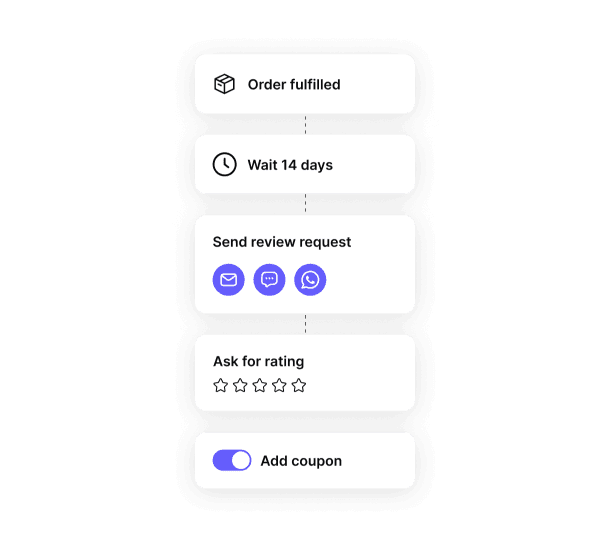
Send follow-up emails or forms automatically after a purchase and ask happy customers to leave reviews.

2. Add reviews to your brand’s social pages

Social media platforms are a direct way to collect reviews and display customer feedback.

This provides today’s shoppers with social proof, encouraging customers to leave reviews. You can also post direct links to your testimonial page to make the review process simple and fast.

3. Verbally encourage feedback

Ask for honest feedback during or after a sale or service.

This builds trust and increases positive reviews without extra tools.

4. Use business cards or flyers

Printed cards and flyers are still helpful.

It’s a simple way to ask for feedback and increase your review volume with little effort.

Manage reviews

manage reviews

Collecting reviews is the first step. Managing them the right way helps build trust and improve sales.

Go through each review and make sure it’s real and useful. Keep the ones that help other customers understand your product.

Reply to reviews when needed. A short, clear response shows you care. It also builds trust with future customers.

Sort reviews by product, rating, or type. This helps you find what customers liked or didn’t like. It also helps your team improve the product or service.

Remove fake or spam reviews. Only keep honest feedback that adds value.

Use filters to check reviews by date, rating, or channel. This makes it easier to track trends and plan your next steps.

WiserReview helps you handle everything in one place:

WiserReview makes review management clear and simple. It saves time, builds trust, and helps more shoppers buy with confidence.

Slider Image

Stay in Control of Your Reviews

Filter, tag, and manage all reviews from one clean dashboard. Control what shows and what doesn’t.

Display reviews

Display Reviews

Once you’ve collected and managed your reviews, the next step is to display them on your website, where they help build trust and convert visitors.

Add customer reviews to product pages. This helps online shoppers see real feedback before they buy. Show star ratings next to product names. Use short reviews or photos to highlight what customers liked.

Place reviews on your homepage to build trust with new visitors. Create a review page where people can read all your feedback in one place. Add reviews to your emails or landing pages to support your marketing efforts.

Make sure your reviews are clear, fresh, and easy to find.

WiserReview makes it easy to:

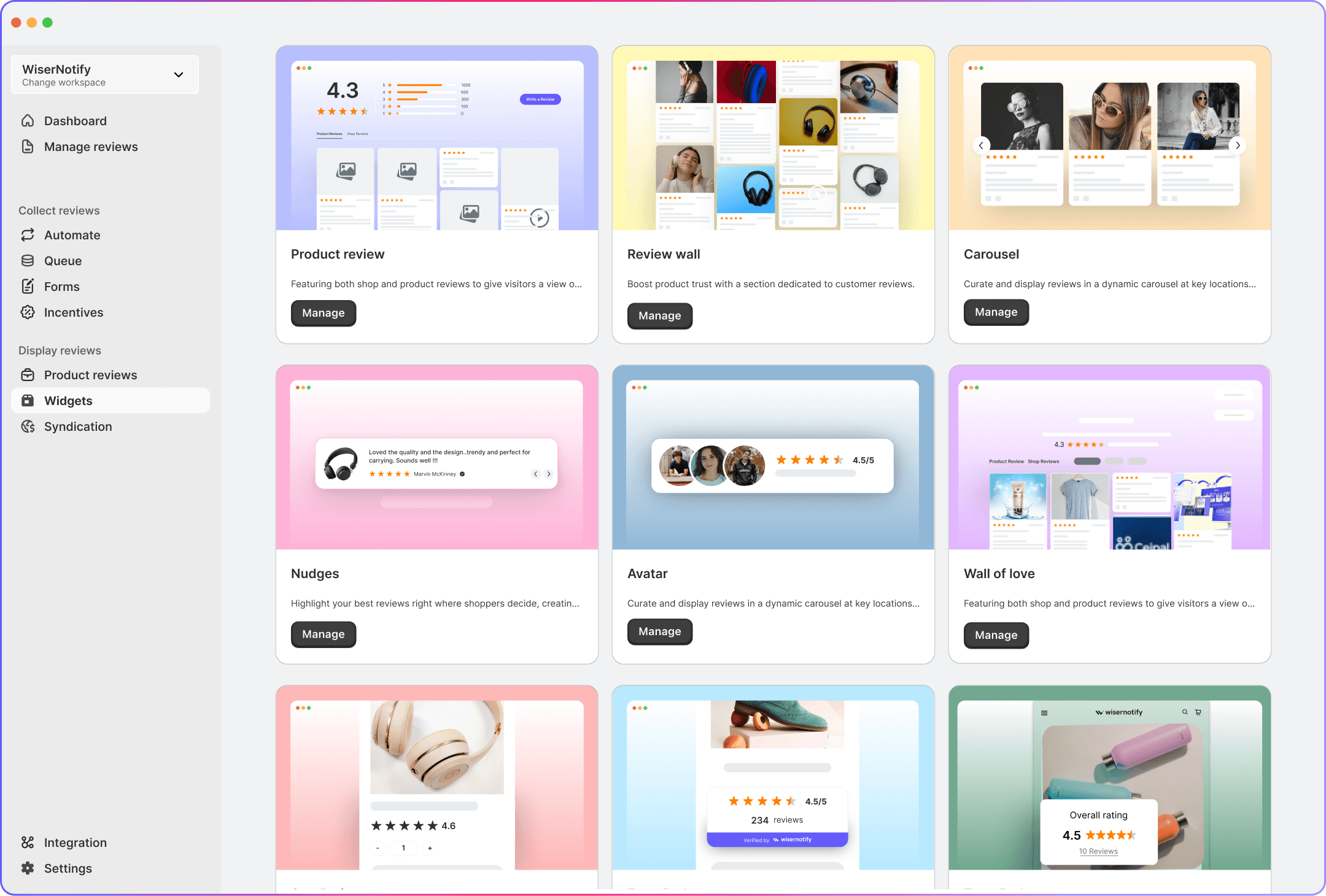
Review Widgets

1. Carousel

Carousel 

Slide customer reviews in a horizontal layout that fits on any page.

You can place it on landing pages or below product descriptions.

It runs on auto-scroll or user swipe. Great for sharing multiple reviews in a limited space.

2. Auto Slider

Auto Slider

Auto-scroll reviews without needing clicks.

This widget keeps reviews moving so visitors always see fresh feedback.

It fits well on banners, footers, or homepage sections.

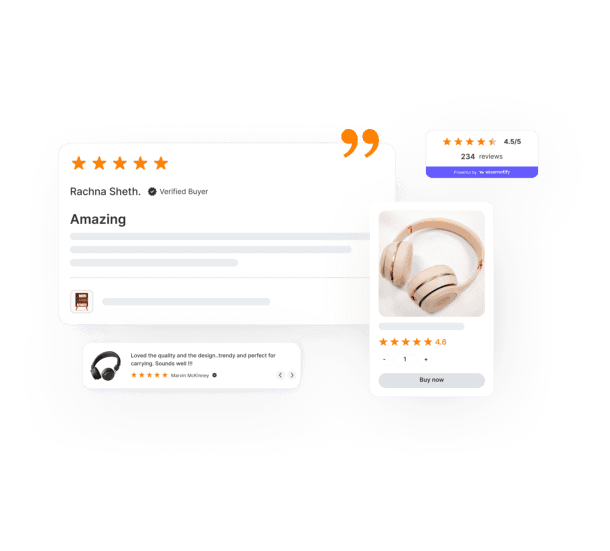
3. Trust Badge

Trust Badge

Show a badge with the total number of reviews and average star rating.

It builds trust at a glance and works well near CTAs or product cards.

The badge updates automatically as new reviews come in.

Icon

All your reviews in one place

Collect reviews, manage every response, and display them where they matter most.
Start Free

4. Review Wall

Review Wall

Display all customer reviews in a full grid layout.

Ideal for a testimonial page or review section.

Visitors can scroll through real feedback sorted by date, rating, or product.

5. Sidebar Snippet

Sidebar Snippet 

Stick a review box to the side of your site.

It stays visible as people scroll.

This helps keep social proof on-screen longer without breaking the layout.

6. Floating Badge

Floating Badge 

Show a small badge with star ratings that stays pinned across the site.

It appears at the bottom or corner and follows the user as they browse.

It works well for keeping ratings visible at all times.

7. Floating Social Badge

social Review badge-

Mix star ratings with social media icons in a floating badge.

It connects your reviews with platforms like Google or Facebook.

This builds both trust and familiarity.

8. Avatar

Avatar 

Show circular reviewer photos with names and short quotes.

It scrolls in a row and feels more real and human.

You can place it below testimonials or near pricing sections.

9. Floating Popup

Trigger small review popups while users browse.

You can set the popup to show after scroll, delay, or exit intent.

It’s a good way to grab attention without blocking the view.

Product-Specific Review Widgets

10. Product Review Section

Product Review Section 

Add full review blocks directly to product pages.

Each block shows text, photo, or video reviews.

Helps buyers see detailed feedback before purchase.

11. Star Rating

Star Rating 

Display star ratings on product cards, listings, or search results.

This helps people quickly spot highly rated products without clicking through.

12. Nudges

Nudges 

Highlight short reviews with star ratings on key pages like checkout or pricing.

These lightweight snippets push users to take action by showing trust cues.

13. Wall of Love

Wall of Love

Build a visual grid of your happiest customer reviews.

You can sort by product, service, or tag.

It’s great for showing high-volume positive feedback in one place.

Integration: Connect with platforms like Google, Facebook, G2, Trustpilot, and more. Pull in reviews from different sources to keep everything in one place.

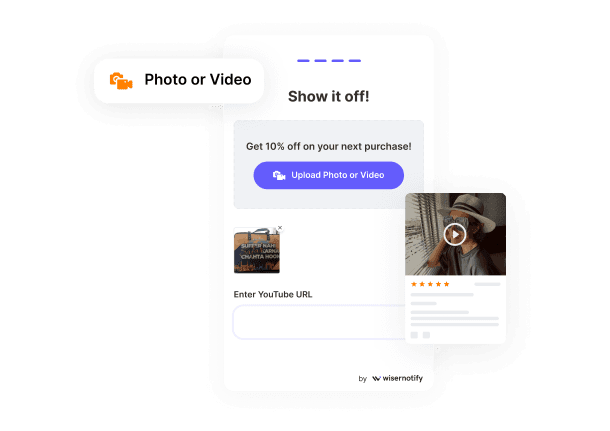
UGC: Highlight real customer photos and videos to build trust and give context to your reviews.

AI Features: Use smart filters and tools to Moderate and sort reviews automatically, so only the most helpful ones show up.

Rich Snippet: Add star ratings to your search results on Google using a simple script. This helps improve your visibility and click-through rate.

Slider Image

Display Reviews Where It Matters

Show reviews directly on your site with full control.

Reviews on website & product pages

Website and Review Section


Why it matters

Showing online reviews and customer feedback on your website helps build trust with potential customers. It supports your review marketing strategy and gives social proof where it matters most.

Where to show reviews

Benefits

Example:

1. Reviews on website – WiserNotify

Reviews on website - WiserNotify

WiserNotify shows real customer reviews in a clear and clean format using its “Wall of Love.” Each card displays a rating, reviewer name, date, and message.

Visitors can filter reviews by pricing or support. Some reviews even show how much extra revenue was earned using the tool. This layout helps future customers quickly see real feedback, build trust, and understand the benefits.

Showing reviews like this on your website boosts trust and supports your marketing strategy.

2. Reviews in product page – Velasca

Reviews in product page - Velasca

This product page from Velasca shows how to use online reviews and customer feedback in a clean and helpful way.

At the top, real customer photos give shoppers a quick look at how the product looks in real use. Below that, the review section shows a clear rating based on 312 reviews.

It also includes a visual breakdown of star ratings, which helps build trust with new customers.

Each review shows the reviewer’s name, rating, date, and a short message. Reviews like “Great product” and “Love these shoes” give quick feedback.

Reviews in email & advertising

Reviews in email & advertising

Why it matters

Including customer reviews in your emails and ads helps you build trust, show positive feedback, and support your marketing tactics. It turns real customer experiences into simple, high-impact messages for potential customers.

How to use in emails

Also Read: Top 10 product review sample letters that get responses

How to use in ads

Benefits

Example

1. Reviews in email – Huron

Reviews in Email - Huron

Huron sends a simple follow-up email after a purchase, asking for customer feedback. The message is friendly and direct.

It links to a review form and explains to the customer how their feedback will benefit other shoppers. It also offers a gift card drawing to encourage responses.

This is a great way to collect reviews and build trust with future customers via email.

2. Reviews in advertising – Zenimal

Reviews in advertising - Zenimal

Zenimal utilizes a genuine customer review in its Facebook ad to showcase the product’s value. The ad shows a rating and shares a short, personal story from a parent.

This builds trust and speaks directly to other parents with similar problems.

By adding a review at the top and a clear call to action below, Zenimal makes the ad feel more real and helpful.

Icon

All your reviews in one place

Collect reviews, manage every response, and display them where they matter most.
Start Free

Reviews in social media & UGC

Reviews in social media & UGC

Why it matters

Social media tools are where many potential customers look for real opinions. Sharing online reviews and customer feedback as user-generated content (UGC) builds trust and supports your review marketing tactics. It also helps you reach a wider target audience.

How to use reviews on social media

How UGC supports your brand

Benefits

Example:

1. Reviews in social media – Healthy Choice

Reviews in Social Media - Healthy Choice

This Instagram post from Healthy Choice features a genuine customer quote directly on the image. It shares a simple 5-star review with a photo of the product.

The brand adds a short caption that repeats the message and tags the product. This type of post is easy to create and works well on Instagram and other platforms.

It builds trust fast, shows customer satisfaction, and helps new buyers feel confident.

2. Reviews in UGC – Curology

Reviews in UGC - Curology

This page from Curology features user-generated content (UGC), including real customer photos, ratings, and written feedback.

It displays reviews with names, photos, platforms (such as Google or Twitter), and detailed comments. These help online buyers trust the product more.

The reviews utilize personal stories and positive experiences to showcase real results. This type of UGC provides social proof, enabling more customers to make informed buying decisions quickly.

Reviews in content marketing

Reviews in content marketing

Why it matters

Customer reviews add real proof to your marketing content. Including positive reviews, customer feedback, and ratings in your blogs, landing pages, and videos helps build trust with potential customers. It makes your content stronger and more useful.

How to use reviews in content

Benefits

Example:

1. Reviews in content marketing – WPX Hosting

Reviews in Content Marketing - WPX Hosting

WPX Hosting uses customer reviews as part of their regular content posts.

In this example, they feature a direct quote from a happy user in a bold, branded graphic. The language feels personal and honest, which helps show intense customer satisfaction.

Sharing reviews like this in content builds trust and gives potential buyers proof that others are happy with the service.

Best review marketing software

1. WiserReview

WiserReview

WiserReview is one of the best tools for review marketing in 2025.

It supports your full review marketing strategy, not just collecting or managing reviews.

It helps you turn customer feedback into content that supports your entire marketing workflow.

Why WiserReview works for review marketing:

Icon

All your reviews in one place

Collect reviews, manage every response, and display them where they matter most.
Start Free

Pricing:

wiserreview pricing

Challenges in reviews

Dealing with fake or fraudulent reviews

Fake reviews can damage customer trust and hurt your online reputation. They affect star ratings, confuse customers, and reduce the value of real customer feedback.

To manage this, use review software that lets you track review data, filter spam, and report suspicious reviews. Always respond to reviews with honest, thoughtful responses.

This shows customers you care and helps protect your brand credibility.

Ensuring fresh reviews

Old reviews don’t reflect your current product or service. Today’s shoppers want recent, relevant feedback. If your review page only shows old reviews, you may lose potential buyers.

Send automated review requests after every purchase to keep a steady stream of new reviews.

This improves your review volume, supports your marketing tactics, and helps new customers trust your business.

Integrating with broader marketing

Many businesses collect reviews but don’t use them in marketing campaigns. That’s a missed opportunity.

Customer reviews should support your Buy page, follow-up emails, social media, and landing pages.

Adding positive reviews and customer testimonials to marketing materials gives your target audience the proof they need to make a purchase decision.

Also Read: 53 Essential video testimonial statistics you must know for success

3 Common review mistakes to avoid

Common review mistakes to avoid

Here are three common review mistakes to avoid.

1. Not having a proper system

2. Ignoring negative reviews

3. Not using reviews the right way

Wrap up

show real customer feedback and help potential buyers make better choices.

A clear review marketing tactic should focus on collecting reviews, showcasing good feedback, and utilizing that feedback across your product section, emails, and social media.

Tools like WiserReview help you send review requests, manage review data, and display reviews where they matter most.

Keep your process simple. Ask for reviews, respond to them, and show where people look before they make a purchase. That’s how you turn reviews into results.

Frequently asked questions

Review marketing means using customer reviews to build trust, improve star ratings, and help people decide what to buy.

Reviews influence buying decisions, improve SEO, and build trust with new customers.

Use tools like WiserReview to send review requests by email, SMS, or WhatsApp and collect text, photo, or video reviews.

Ask right after a purchase or a good experience, when the customer is most satisfied.

Use review software to read, reply, tag, and publish reviews from one dashboard.

Use widgets to show reviews on product pages, landing pages, or as popups and sliders.

Krunal

Article by

Krunal

Krunal Vaghasiya is a marketing tech expert who helps businesses get more customers by using automated reviews, social proof, and smart follow-ups. He shares practical tips on review tools, marketing automation, and improving conversions.

Related blogs

Get monthly automation inspiration

Stay up to date with hand - curated business tips & advice weekly.

We care about your data in our privacy policy