You can explore the platform further or book a demo to learn how to collect more testimonials and show them where they matter most, based on our four years of experience working with over 1,100 brands.
Embed testimonials on Typedream
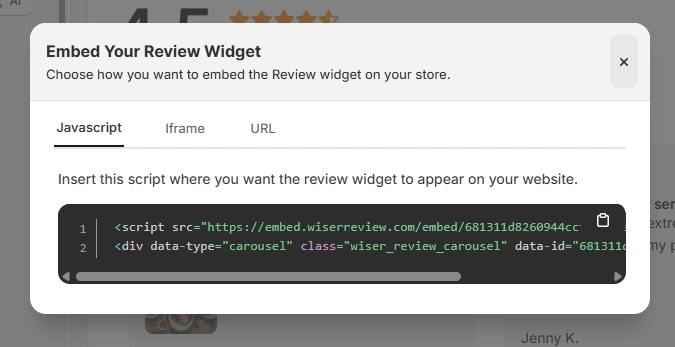
Once you have generated your WiserReview embed code, follow these Typedream-specific steps:
Log in to your Typedream account
Open the page where you want to display testimonials
Add a new Embed or Custom Code block
Paste the JavaScript embed code, iframe, or URL from WiserReview
Save and publish the page
Typedream automatically applies the embed inside your page layout without affecting design consistency.
Best places to show testimonials on Typedream
Simple layouts require precise testimonial placement to maximise impact.
Above the fold
Typedream visitors make decisions quickly. Showing testimonials near the top of the page builds trust within seconds. When visitors see real feedback immediately, they feel safer exploring the offer instead of leaving due to uncertainty.
Near primary call to action
Testimonials placed just before or after the main call to action reduce hesitation at the decision point. This placement reassures visitors that others have taken the same step and had a positive experience, which improves click-through and signups.
Feature or benefit sections
Typedream pages often explain benefits in short sections. Testimonials placed directly after key benefits act as validation. They confirm that the promised outcome actually works in real life, strengthening belief and motivation.
Footer sections
Footer testimonials work well for visitors who scroll before deciding. Even if someone skips content, seeing social proof at the end reinforces credibility and leaves a positive final impression before they exit or convert.
All your testimonials in one place
Collect testimonials, manage every response, and display them on your Typedream site.
Typedream gives you speed and clarity, but testimonials give your pages trust.
By embedding WiserReview testimonials in high-impact Typedream sections, you turn simple pages into conversion-focused experiences.
Add testimonials strategically and let real customer voices push visitors toward confident action.
Frequently asked questions
Yes. Single-page layouts benefit greatly from clear trust signals.
No. Properly embedded testimonials load smoothly without slowing pages.
Two to four focused testimonials usually perform best.
Yes. Updating them in WiserReview automatically reflects on the page.
Absolutely. Even a few testimonials help establish early credibility.
Article by
Krunal
Krunal Vaghasia is the founder of WiserReview and an eCommerce expert in review management and social proof. He helps brands build trust through fair, flexible, and customer-driven review systems. Read more.

 4 min
4 min