Shopify is one of the most popular eCommerce platforms in the world, helping entrepreneurs and businesses sell products online with ease.
But no matter how polished your storefront looks, potential buyers often hesitate without proof of trust.
Google reviews solve this by showcasing authentic customer feedback that builds credibility.
With WiserReview, embedding Google reviews into your Shopify store is effortless, boosting both trust and sales.
Why add the Google review widget on Shopify?
Adding Google reviews to your Shopify store is one of the most effective ways to increase conversions.
Here’s why:
Instant trust:74% of consumers say they trust a business more after reading positive Google reviews.
Boost in sales: Stores with 25+ reviews see more than 100% higher revenue compared to those with few.
SEO visibility: Reviews significantly impact local and product search rankings, enhancing your Shopify store’s organic visibility.
Social proof at checkout: Positive reviews help reduce cart abandonment and reassure hesitant buyers.
Use case example: A Shopify clothing store embeds Google reviews directly on product pages. Shoppers see positive reviews praising fabric quality, increasing purchase confidence.
Build trust with every visitor
In just minutes, display your Google reviews on your Shopify store.
Ok, now that you know the benefits of adding Google reviews, let’s go through the steps to add them to any website or online store.
First, sign up for WiserReview. It has a free plan, and paid plans start at just $9/month.
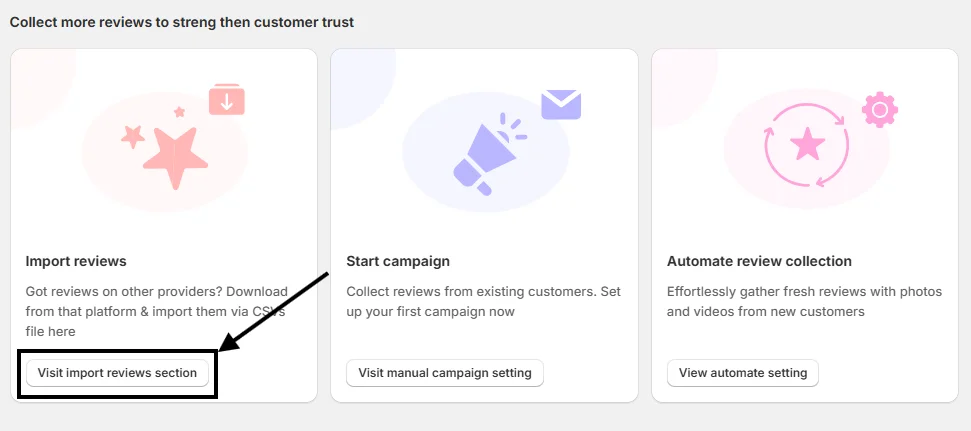
Once your account is created, you’ll land on the WiserReview dashboard. Scroll down a bit, and you’ll see this option:
Click on “Visit Import Reviews Section.”
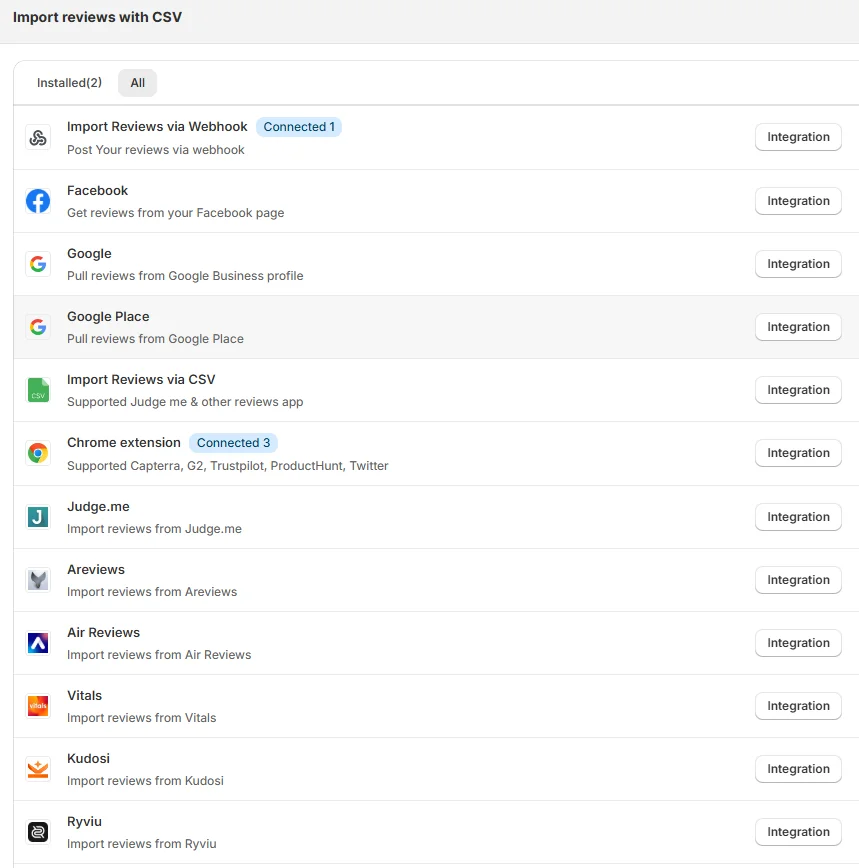
From there, you’ll find many options to pull in reviews. Choose the integration method that works best for you.
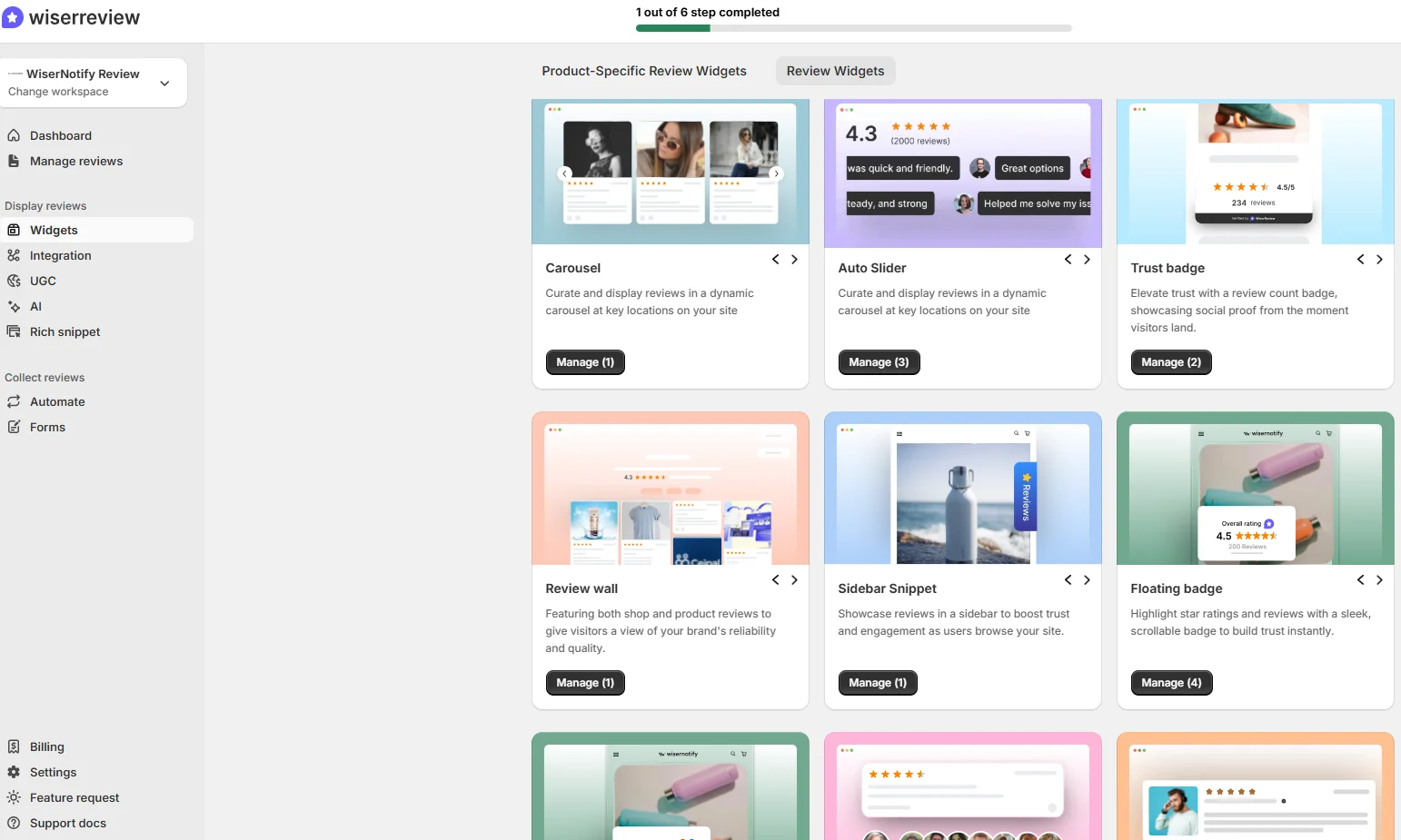
After connecting successfully, go to the Widgets section and select any widget you like.
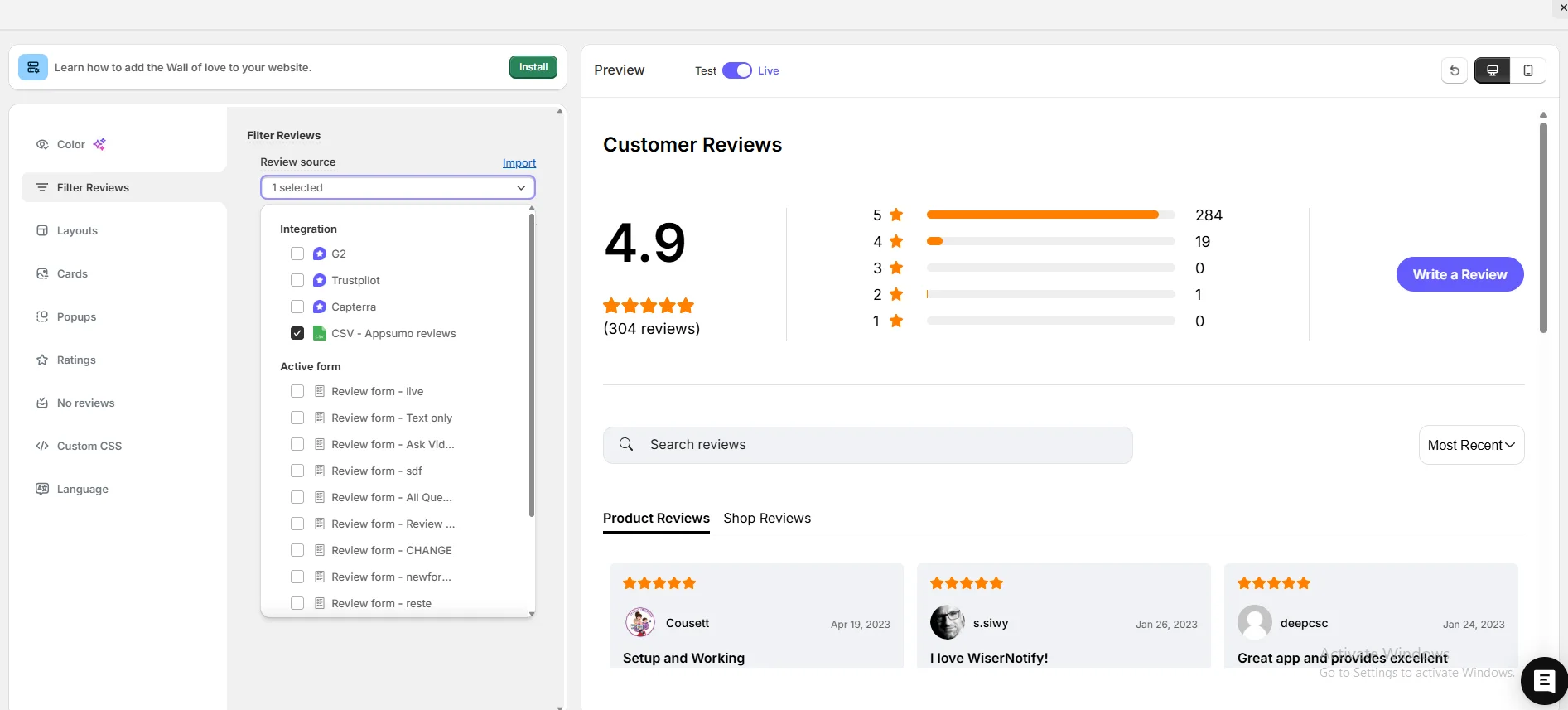
Next, go to Filter Review Options, pick your review source, and start customizing your widget.
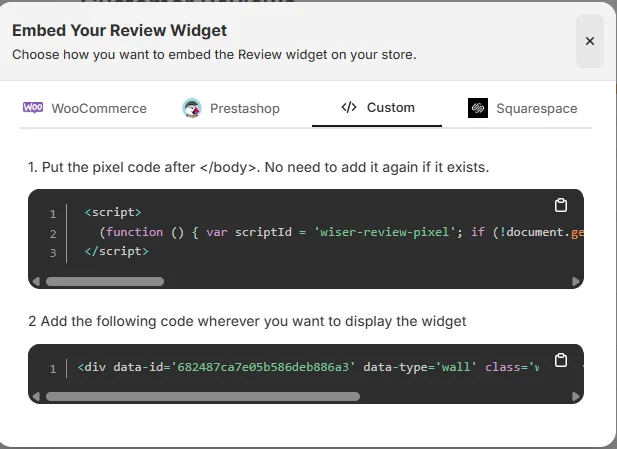
When you’re done customizing, click on Install in the upper-left corner. Copy the code and paste it where you want the Google review widget to appear on your site.
That’s it, your widget is now live and helping build trust and credibility for your site.
And here’s the best part: WiserReview offers multiple Google review widget styles you can choose from.
Plus, WiserReview doesn’t just display Google reviews; it also helps you collect and manage them. It’s a complete Google review management tool.
Here’s a video guide for reference:
How to embed Google reviews in Shopify
After generating your Google review widget code with WiserReview, embedding it on Shopify is easy:
Log in to your Shopify admin dashboard.
Go to Online Store > Themes.
Click Customize on your active theme.
Select the page or section where you want to display reviews.
Add a Custom Liquid block (or HTML section if supported).
Paste your WiserReview embed code.
Save and Publish changes.
Your reviews will now display seamlessly on your Shopify store.
Other method to add a Google review
Some Shopify users try manual methods:
1. Screenshot method
Benefit: Simple, quick.
Problem: Static, no auto-updates when new reviews come in.
2. Copy-paste method
Benefit: Easy to place reviews anywhere.
Problem: Looks less authentic since they aren’t linked to Google.
Why WiserReview is better
WiserReview is the best solution because it provides real-time, auto-updating, and verifiable Google reviews, ensuring authenticity and boosting customer trust.
3 Best Google review widget examples
Now let’s look at the best Google review widget examples from real websites.
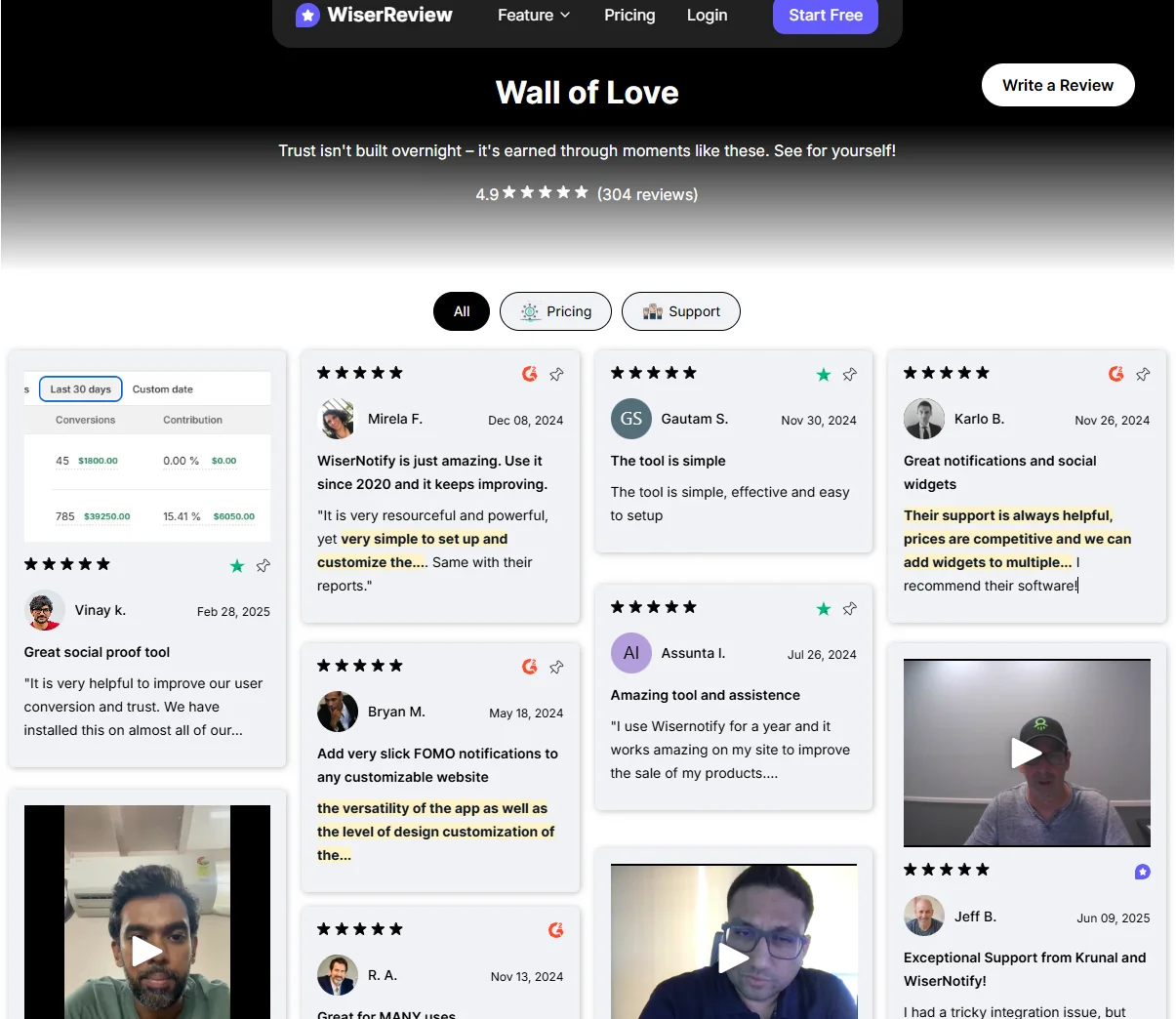
1. WiserReview
WiserReview’s Wall of Love showcases a modern, interactive widget. It combines star ratings, written feedback, and even video reviews from users.
Tabs and filters (like Pricing or Support) help visitors explore reviews by category.
This setup not only builds credibility but also makes it easy to highlight different aspects of customer experience.
2. Hotel Tashidelek
This example shows how Hotel Tashi Delek uses a clean Google review widget to display guest feedback.
The section highlights an overall rating of 4.4 stars from 1,458 reviews and showcases individual guest stories.
The design blends well with the hotel’s branding while making it easy for visitors to read reviews or write their own.
3. Perfect Gift
PerfectGift.com uses a Google Verified Reviews widget to build trust.
The layout features a bold headline, overall star rating, and multiple customer reviews displayed in a grid format.
It also includes a call-to-action button that encourages new customers to leave reviews, helping the brand continue to generate fresh feedback.
Best Places to Show Google Reviews on Shopify
Adding Google Reviews to your site is just the first step. Where you place them can make or break their impact.
To truly boost trust and drive conversions, it’s essential to display your reviews at the right moments in the visitor’s journey, where decisions are made, questions arise, or hesitation sets in.
Here are the best spots to showcase your Google Reviews on your Shopify store:
1. Homepage
It’s your storefront’s first impression. Visitors decide in seconds whether your brand feels trustworthy.
Display a Google Review widget, floating bar, or review slider just below the hero section or near trust-building content, such as guarantees and free shipping offers.
Pro Tip: Feature reviews that highlight fast shipping, product quality, or exceptional service to reinforce key selling points.
2. Product Pages
This is where conversion decisions are made. Reviews here provide the social proof shoppers need to make a purchase.
Place reviews near the “Add to Cart” button or within the product details section.
Tip: Utilize apps like WiserNotify to dynamically display product-specific Google reviews, enhancing relevance and impact even further.
3. Cart or Checkout Pages
This is the final moment of hesitation. Buyers often back out due to doubt or fear.
Show a few concise, high-rated reviews as part of your cart summary or in a floating widget during checkout.
Example: Highlight phrases like “easy purchase process” or “fast delivery” to ease checkout anxiety and reduce cart abandonment.
4. Footer Section
It’s visible across your entire site, offering subtle yet consistent reassurance.
Add a badge with your Google star rating or a small carousel of rotating reviews.
Bonus: Link it to your full Google Reviews page or a dedicated testimonials section for visitors who want to dig deeper.
5. About Us Page
Visitors here are looking to connect with your brand’s story and credibility.
Include reviews that align with your brand values, like long-term customer satisfaction or exceptional service.
Pro Tip: Enhance your review with photos of your team, behind-the-scenes shots, or customer stories to make it more authentic.
5 Google review best practices for Shopify
To make the most of Google reviews on Shopify, apply these strategies:
Place reviews near CTAs: Showcase reviews next to “Add to Cart” buttons or checkout sections.
Feature product-specific reviews: For product pages, display reviews that mention the exact product.
Use sliders or grids: Shopify stores benefit from interactive layouts that don’t clutter pages.
Match branding: Customize widget colors and fonts to align with your Shopify theme.
Encourage new reviews: Send follow-up emails after purchase with a direct Google review link to keep reviews current.
Build trust with every visitor
In just minutes, display your Google reviews on your Shopify store.
Showing outdated reviews: Reviews from years ago may not accurately reflect your current products. Solution: Use WiserReview to show the latest ones.
Overloading with too many reviews: Too much text overwhelms customers. Solution: Display 5–7 impactful reviews.
Ignoring mobile optimization: Many Shopify shoppers browse on mobile. Solution: Use WiserReview’s responsive widget for flawless mobile design.
Wrap-Up
Google reviews can significantly transform your Shopify store by building trust, enhancing conversions, and improving search visibility.
While screenshots and manual text copies are possible, they don’t deliver authenticity or automation.
WiserReview is the most professional solution, offering real-time syncing, customization, and a seamless Shopify integration.
Take your Shopify store to the next level by embedding Google reviews today with WiserReview.
Frequently asked questions
No. You just paste the WiserReview embed code into a custom block.
Yes. WiserReview syncs with Google in real time.
Yes. WiserReview allows you to adjust layouts, fonts, and colors to match your Shopify theme.
Yes. Google reviews influence search visibility.
Yes. WiserReview offers flexible pricing, making it ideal for small stores and larger Shopify brands alike.
Article by
Krunal
Krunal Vaghasia is the founder of WiserReview and an eCommerce expert in review management and social proof. He helps brands build trust through fair, flexible, and customer-driven review systems. Read more.

 6 min
6 min