Add Google reviews on Magento – Boost trust & sales
Add Google reviews on your Magento store to boost trust and sales. A strong review presence improves search visibility, builds customer confidence, and turns more visitors into buyers.
Magento is one of the most powerful eCommerce platforms available, but its flexibility and complexity also mean that building customer trust can be challenging.
Today’s shoppers don’t just rely on product details they want to see authentic customer feedback before making a purchase.
Without displaying reviews, businesses risk losing conversions. In fact, 93–98% of people read reviews before visiting a business, and 74% trust a brand more when they see positive Google ratings.
Embedding Google reviews directly into your Magento store using WiserReview helps you showcase social proof, improve SEO, and boost conversions with minimal effort.
Why add the Google review widget to Magento?
Magento powers enterprise-level stores and growing businesses worldwide. Adding a Google review widget on Magento can:
Increase trust and confidence: Over 80% of shoppers rely on Google reviews when deciding whether to buy.
Drive higher revenue: Businesses with 25+ reviews earn 108% more on average than those with fewer.
Improve SEO visibility: Google review signals account for ~20% of local search ranking factors.
Boost enterprise credibility: For multi-location stores or larger product catalogs, reviews help guide shoppers with real feedback.
For Magento merchants, embedding Google reviews means less hesitation during checkout and more loyal repeat customers.
Build trust with every visitor
In just minutes, display your Google reviews on your Magento store.
Ok, now that you know the benefits of adding Google reviews, let’s go through the steps to add them to any website or online store.
First, sign up for WiserReview. It has a free plan, and paid plans start at just $9/month.
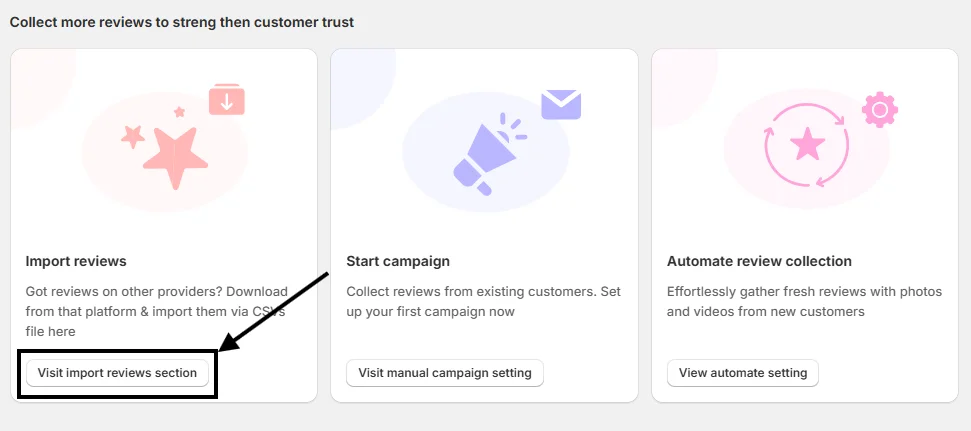
Once your account is created, you’ll land on the WiserReview dashboard. Scroll down a bit, and you’ll see this option:
Click on “Visit Import Reviews Section.”
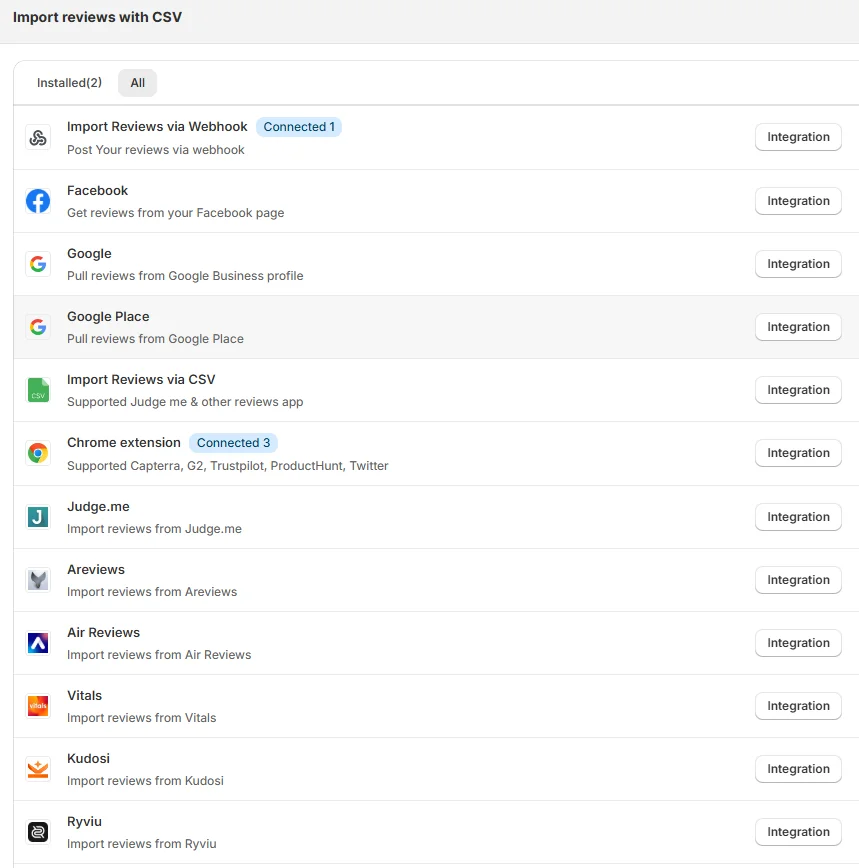
From there, you’ll find many options to pull in reviews. Choose the integration method that works best for you.
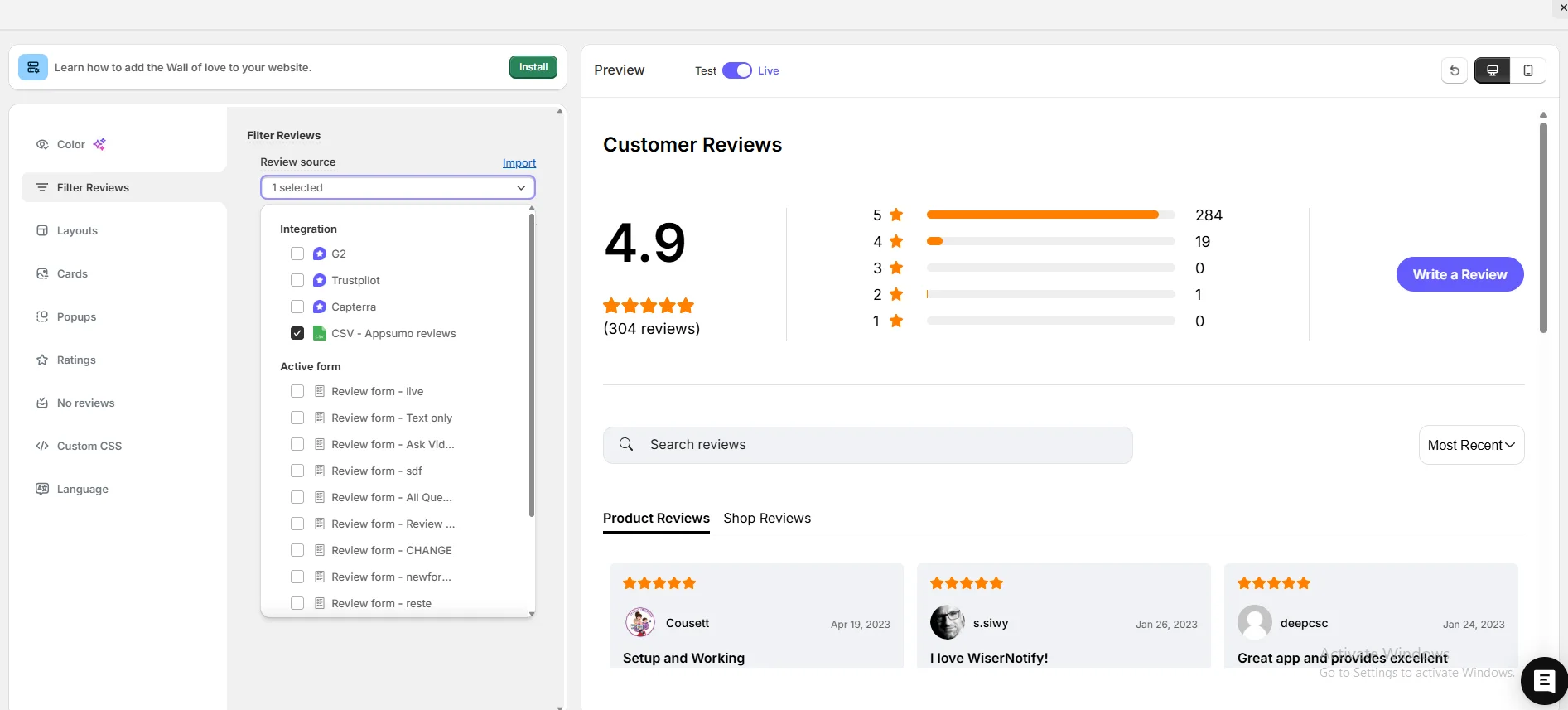
After connecting successfully, go to the Widgets section and select any widget you like.
Next, go to Filter Review Options, pick your review source, and start customizing your widget.
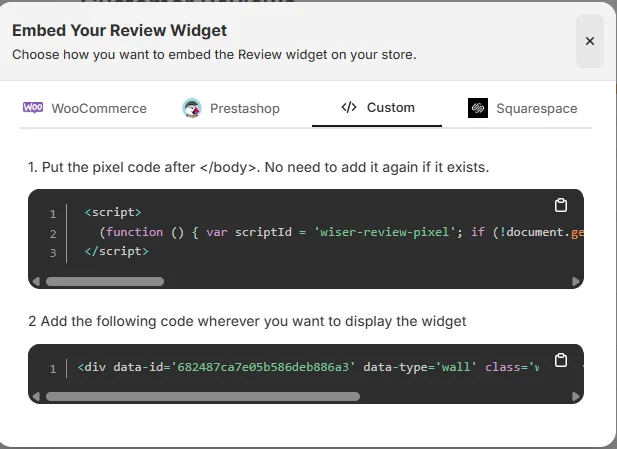
When you’re done customizing, click on Install in the upper-left corner. Copy the code and paste it where you want the Google review widget to appear on your site.
That’s it, your widget is now live and helping build trust and credibility for your site.
And here’s the best part: WiserReview offers multiple Google review widget styles you can choose from.
Plus, WiserReview doesn’t just display Google reviews; it also helps you collect and manage them. It’s a complete Google review management tool.
Here’s a video guide for reference:
How to embed Google reviews to Magento
Once you’ve generated your Google review widget code using WiserReview, embedding it into Magento is straightforward:
Log in to Magento Admin Panel: Access your Magento backend.
Navigate to Content > Widgets: Go to the widget management area.
Create a New Widget: Choose Custom HTML Block as the widget type.
Insert the WiserReview Code: Paste your generated widget embed code into the HTML editor.
Assign Widget Placement: Choose where to display reviews (e.g., homepage, product pages, or checkout page).
Save and Deploy: Save changes and clear your Magento cache to see the widget live.
This ensures your Google reviews display seamlessly and match your store’s layout across all devices.
Other method to add a Google review
While WiserReview is the best option, Magento users can also consider other approaches:
1. Manual iframe embedding
Benefit: Free and doesn’t require additional tools.
Problem: No design customization, poor responsiveness, and manual updates required.
2. Magento extensions
Benefit: Some extensions provide review embedding features.
Problem: Many focus only on product reviews, may not support Google reviews properly, and can slow down Magento sites.
Compared to these, WiserReview offers automatic syncing, customization, and a lightweight solution that fits Magento’s enterprise-level needs.
Ok, now that you know the benefits of adding Google reviews, let’s go through the steps to add them to any website or online store.
First, sign up for WiserReview. It has a free plan, and paid plans start at just $9/month.
Once your account is created, you’ll land on the WiserReview dashboard. Scroll down a bit, and you’ll see this option:
Click on “Visit Import Reviews Section.”
From there, you’ll find many options to pull in reviews. Choose the integration method that works best for you.
After connecting successfully, go to the Widgets section and select any widget you like.
Next, go to Filter Review Options, pick your review source, and start customizing your widget.
When you’re done customizing, click on Install in the upper-left corner. Copy the code and paste it where you want the Google review widget to appear on your site.
That’s it, your widget is now live and helping build trust and credibility for your site.
And here’s the best part: WiserReview offers multiple Google review widget styles you can choose from.
Plus, WiserReview doesn’t just display Google reviews; it also helps you collect and manage them. It’s a complete Google review management tool.
Here’s a video guide for reference:
5 Google review best practices for Magento
To maximize the impact of Google reviews on Magento, follow these tailored best practices:
Show reviews on high-value pages: Place reviews on product detail pages, checkout steps, and homepage banners for maximum impact.
Maintain brand consistency: Customize your review widget to align with your Magento store’s design, fonts, and colors.
Highlight the newest reviews: Shoppers value recent experiences more than outdated ones.
Engage with reviews: Replying to both positive and negative reviews increases conversions by 16%.
Optimize for mobile shoppers: Magento sites receive significant mobile traffic. Ensure your review widget is responsive across all devices.
Build trust with every visitor
In just minutes, display your Google reviews on your Magento store.
Showing only 5-star reviews: A mix of positive and neutral reviews feels more authentic than a perfect score.
Ignoring performance impact: Installing multiple review extensions can slow down Magento’s performance. Stick with one optimized solution like WiserReview.
Using static images of reviews: Screenshots look unprofessional and don’t update automatically. Use live, dynamic widgets instead.
Wrap-Up
Embedding Google reviews in your Magento store builds trust, drives conversions, and enhances SEO.
Manual methods and third-party extensions exist, but they’re often limited, outdated, or performance-heavy.
WiserReview offers a reliable, customizable, and automated solution designed to help Magento merchants showcase real customer voices.
Ready to turn Google reviews into a sales-driving asset? Start using WiserReview today and give your Magento store the credibility it deserves.
Frequently asked questions
No. WiserReview provides an embed code that can be added using Magento’s widget system.
Yes. WiserReview syncs reviews directly from your Google Business Profile.
Yes. You can place the widget on specific pages such as homepage, product detail pages, or checkout sections.
Not with WiserReview. The widget is lightweight and designed for performance.
Yes. All WiserReview widgets are responsive and adapt seamlessly to any Magento theme.
Article by
Krunal
Krunal Vaghasia is the founder of WiserReview and an eCommerce expert in review management and social proof. He helps brands build trust through fair, flexible, and customer-driven review systems. Read more.

 4 min
4 min