See how adding Google reviews to your landing pages can build instant trust and push more visitors to take action. This guide shows you the easiest ways to set it up.
Landing pages are designed with one goal in mind: conversions. Whether it’s capturing leads, driving sales, or promoting a service, trust is the biggest factor in convincing visitors to take action.
Without real customer feedback, even the most visually appealing landing page can struggle.
Studies show that 93–98% of consumers read reviews before making a purchase, and 74% say positive Google ratings increase their trust in a business.
Embedding Google reviews on your landing page with WiserReview is a proven way to boost credibility, reduce hesitation, and maximize conversions.
Why add the Google review widget to Landing Pages?
Unlike full websites, landing pages are focused on a single conversion goal. Adding a Google review widget can:
Provide instant social proof: Over 80% of consumers rely on Google reviews to make purchase decisions.
Boost conversion rates: Businesses with 25+ reviews see an average revenue increase of 108%.
Strengthen credibility quickly: With limited space on landing pages, reviews act as powerful trust signals.
Improve SEO for campaign pages: Google review signals contribute to ~20% of local ranking factors.
For marketers, embedding reviews on landing pages is an essential trust-building strategy that directly impacts conversions.
Build trust with every visitor
In just minutes, display your Google reviews on your Landing Pages.
Ok, now that you know the benefits of adding Google reviews, let’s go through the steps to add them to any website or online store.
First, sign up for WiserReview. It has a free plan, and paid plans start at just $9/month.
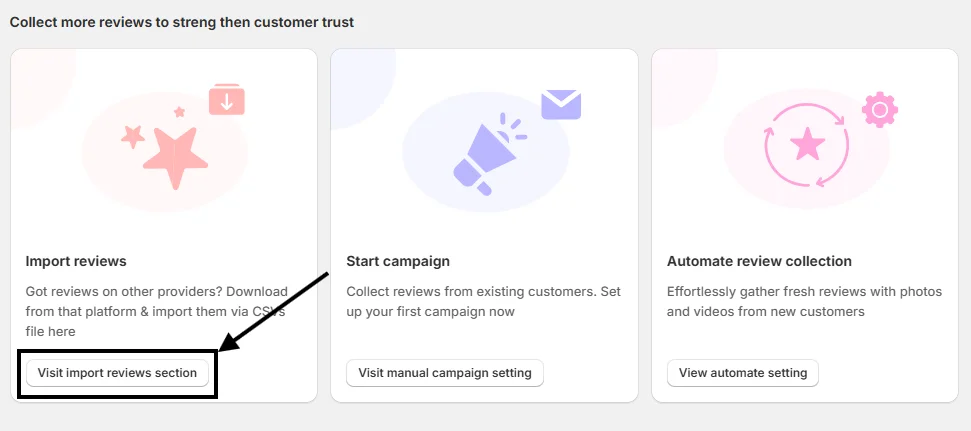
Once your account is created, you’ll land on the WiserReview dashboard. Scroll down a bit, and you’ll see this option:
Click on “Visit Import Reviews Section.”
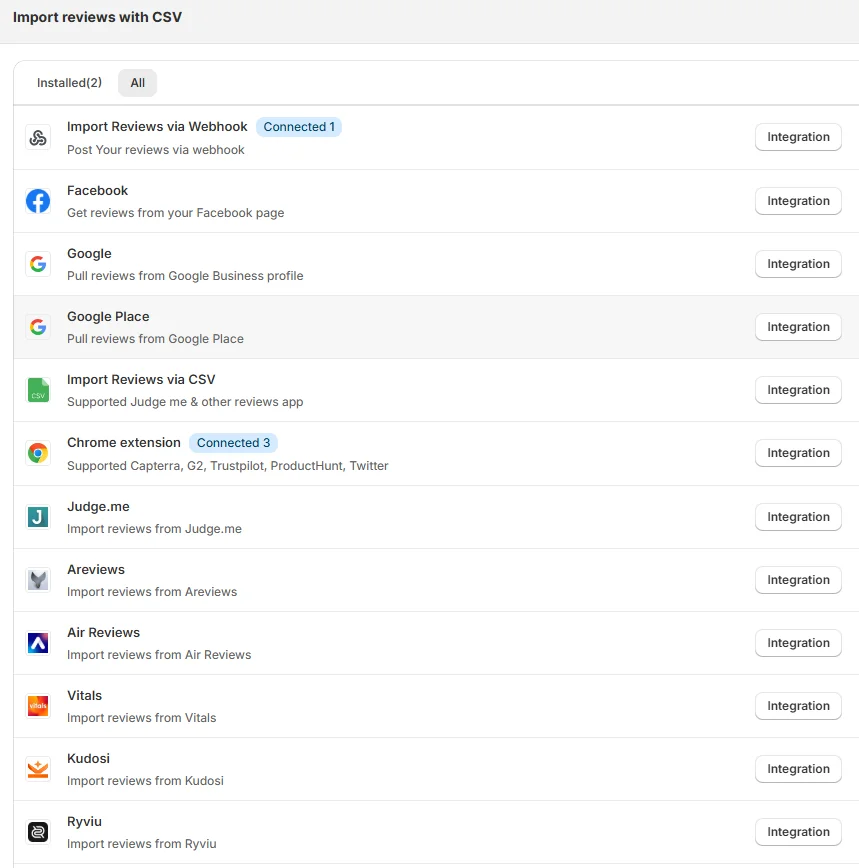
From there, you’ll find many options to pull in reviews. Choose the integration method that works best for you.
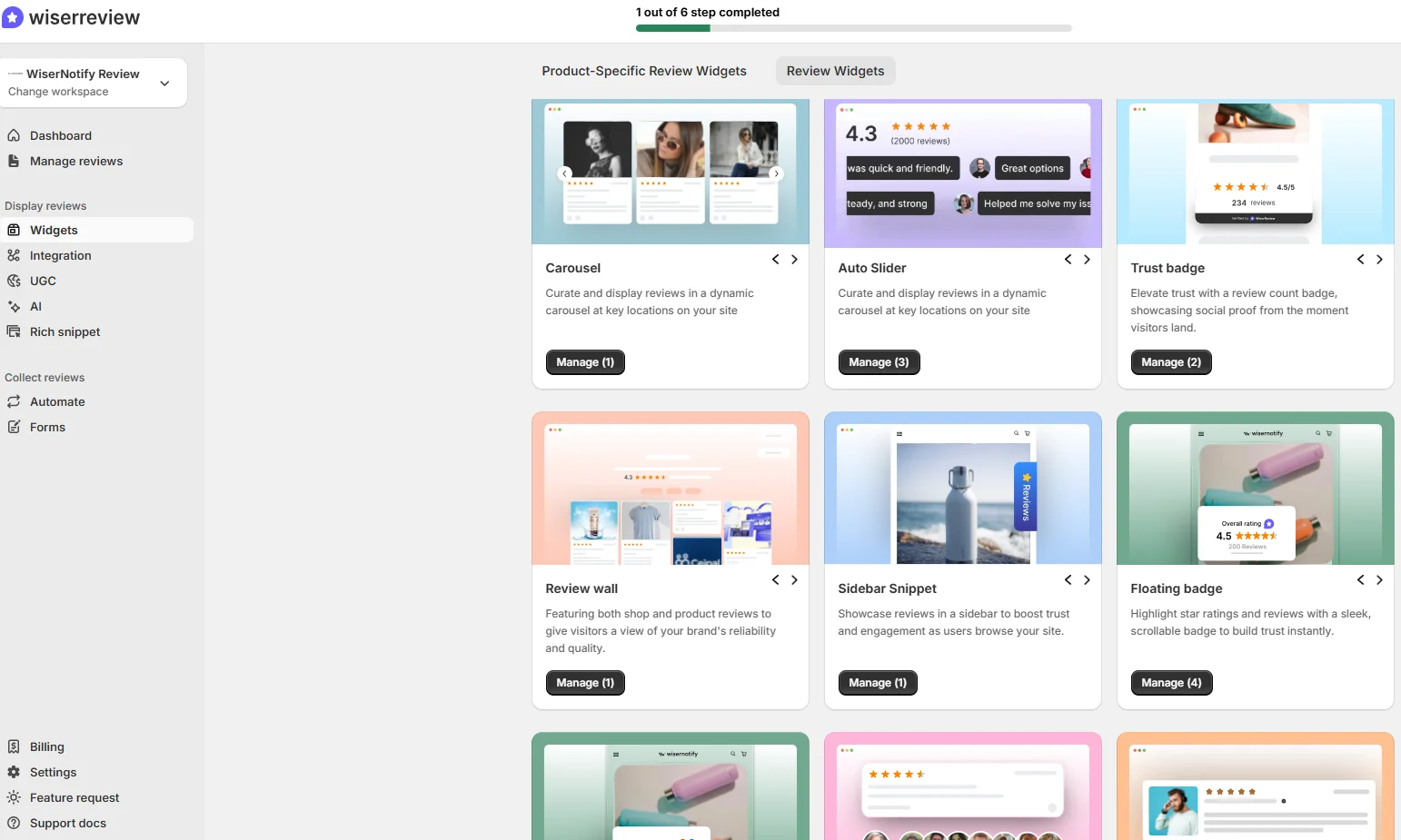
After connecting successfully, go to the Widgets section and select any widget you like.
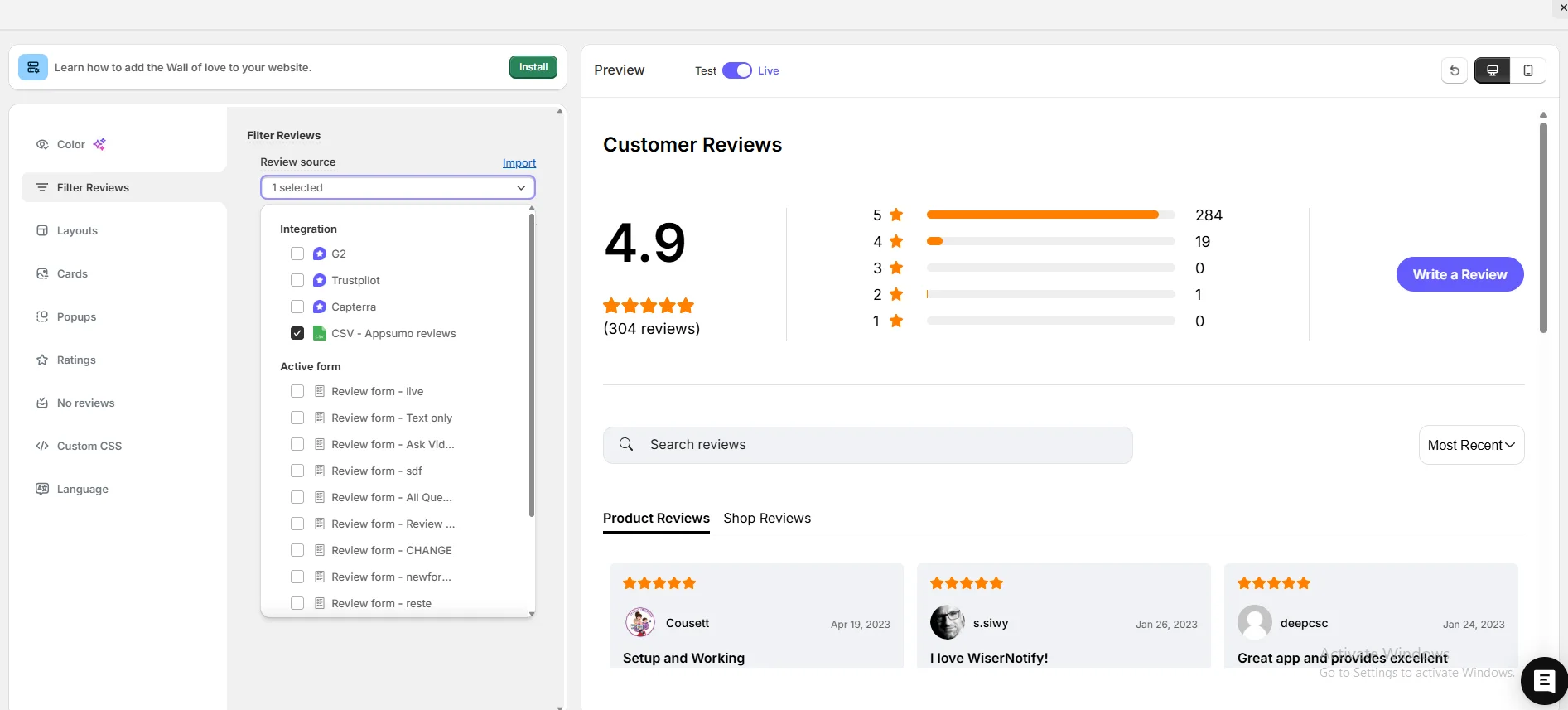
Next, go to Filter Review Options, pick your review source, and start customizing your widget.
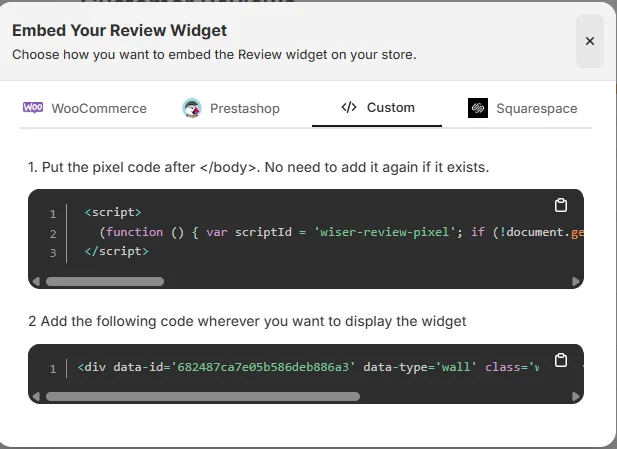
When you’re done customizing, click on Install in the upper-left corner. Copy the code and paste it where you want the Google review widget to appear on your site.
That’s it, your widget is now live and helping build trust and credibility for your site.
And here’s the best part: WiserReview offers multiple Google review widget styles you can choose from.
Plus, WiserReview doesn’t just display Google reviews; it also helps you collect and manage them. It’s a complete Google review management tool.
Here’s a video guide for reference:
How to embed Google reviews in Landing Pages
Once you’ve generated your Google review widget code with WiserReview, embedding it into a landing page builder (such as Unbounce, Instapage, or WordPress landing pages) is easy:
Open Your Landing Page Editor: Log in to your landing page platform.
Drag and Drop an HTML/Embed Element: Most landing page builders provide a custom code block.
Paste the WiserReview Code: Insert your embed code into the block.
Position Strategically: Place reviews near CTAs (like sign-up forms or purchase buttons).
Publish and Test: Save changes and preview the page to ensure reviews display correctly.
This method ensures your reviews display dynamically, fit seamlessly into your landing page, and stay mobile-friendly.
Other method to add a Google review
Aside from WiserReview, other options exist:
1. Manual iframe embedding
Benefit: Free and simple.
Problem: Not customizable, lacks responsiveness, and doesn’t update automatically.
2. Using landing page add-ons or scripts
Benefit: Some landing page tools allow custom integrations.
Problem: Often limited in features and can negatively impact load speed.
Compared to these, WiserReview offers real-time syncing, lightweight performance, and customization, perfect for conversion-focused landing pages.
3 Best Google review widget examples
Now let’s look at the best Google review widget examples from real websites.
1. WiserReview
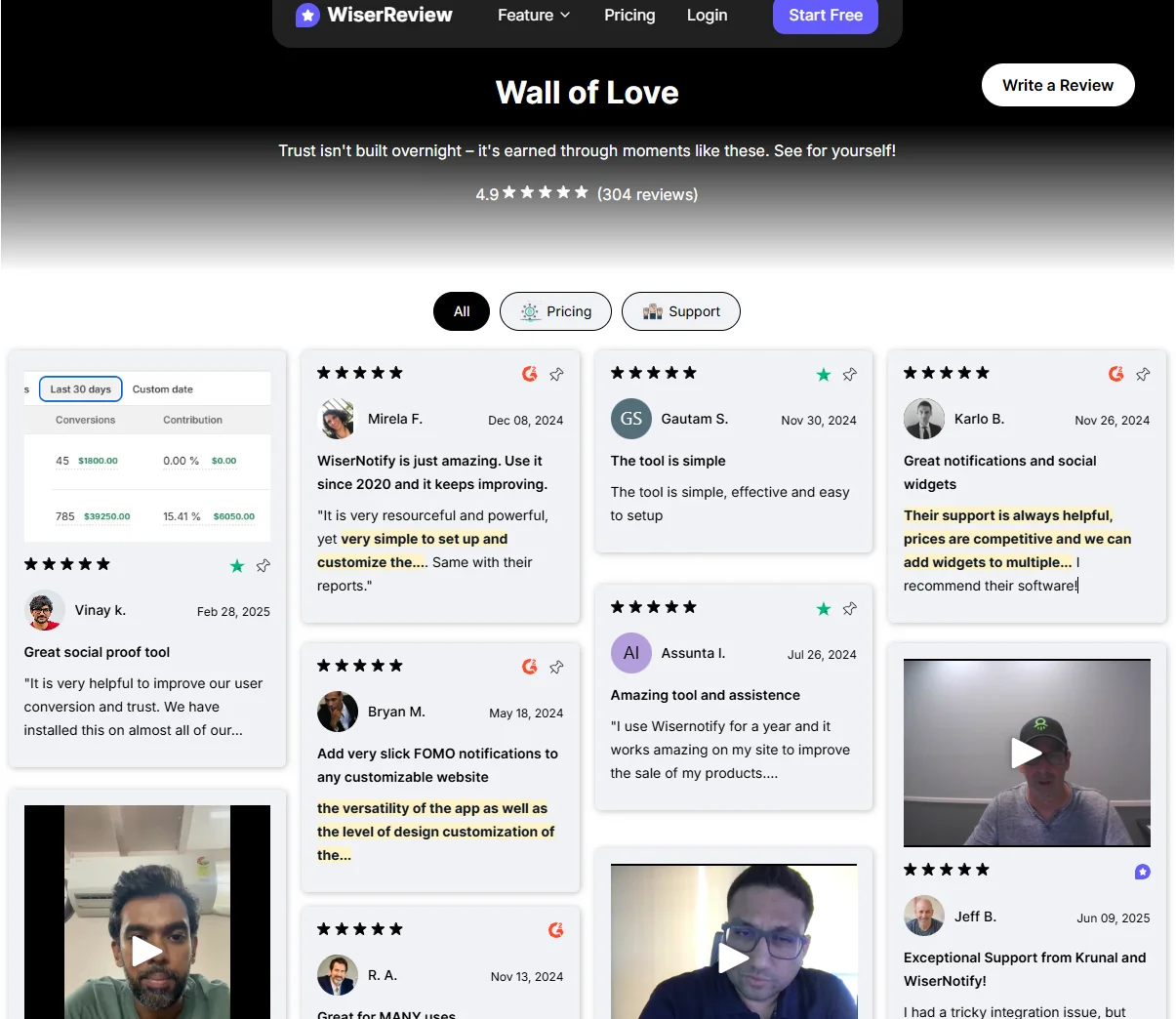
WiserReview’s Wall of Love showcases a modern, interactive widget. It combines star ratings, written feedback, and even video reviews from users.
Tabs and filters (like Pricing or Support) help visitors explore reviews by category.
This setup not only builds credibility but also makes it easy to highlight different aspects of customer experience.
2. Hotel Tashidelek
This example shows how Hotel Tashi Delek uses a clean Google review widget to display guest feedback.
The section highlights an overall rating of 4.4 stars from 1,458 reviews and showcases individual guest stories.
The design blends well with the hotel’s branding while making it easy for visitors to read reviews or write their own.
3. Perfect Gift
PerfectGift.com uses a Google Verified Reviews widget to build trust.
The layout features a bold headline, overall star rating, and multiple customer reviews displayed in a grid format.
It also includes a call-to-action button that encourages new customers to leave reviews, helping the brand continue to generate fresh feedback.
5 Google review best practices for Landing Pages
Follow these strategies to maximize the impact of Google reviews on landing pages:
Place reviews near conversion elements: Position reviews beside sign-up forms, checkout buttons, or pricing tables.
Use short, impactful reviews: Since landing pages are concise, highlight reviews that quickly build trust.
Showcase recent reviews: Fresh reviews carry more weight and increase credibility.
Match widget styling with landing page design: Keep reviews consistent with fonts, colors, and layout.
Highlight diverse feedback: Include reviews mentioning different benefits (e.g., fast service, great support, product quality) to appeal to multiple visitor types.
Build trust with every visitor
In just minutes, display your Google reviews on your Landing Pages.
3 Google review mistakes to avoid on Landing Pages
Avoid these common mistakes when adding reviews to landing pages:
Cluttering the page with too many reviews: Landing pages thrive on simplicity, stick to 3–5 strong reviews.
Using static images of reviews: Screenshots look unprofessional and don’t update. Always use live widgets.
Ignoring mobile users: Many landing page visitors come from ads on mobile. If your reviews aren’t responsive, you risk losing conversions.
Wrap-Up
Adding Google reviews to landing pages is one of the fastest ways to build trust and increase conversions.
While manual methods exist, they fall short in responsiveness and reliability. WiserReview offers a streamlined, customizable, and performance-friendly solution for embedding reviews.
Ready to make your landing pages more persuasive? Try WiserReview today and turn real customer feedback into higher conversions.
Frequently asked questions
Yes. WiserReview provides an embed code that works with tools like Unbounce, Instapage, ClickFunnels, WordPress, and more.
Yes. WiserReview pulls reviews directly from your Google Business Profile in real time.
Yes. WiserReview allows you to filter by star rating, keywords, or recency.
No. WiserReview widgets are lightweight and optimized for fast-loading pages.
Yes. All widgets are mobile-friendly and adapt perfectly to modern landing page designs.
Article by
Krunal
Krunal Vaghasia is the founder of WiserReview and an eCommerce expert in review management and social proof. He helps brands build trust through fair, flexible, and customer-driven review systems. Read more.

 5 min
5 min