The #1 Judge.me alternative for Squarespace

Migrate from Judge.me

Move to WiserReview in minutes — your reliable, Squarespace-ready review platform.
Fast migration · All reviews preserved · Trusted by 1,000+ brands.

Real words, real results

Judge.me end Squarespace support?

Close

Your reviews still deserve a home.

Close

With support ended, it’s time to migrate safely.

Close

Keep collecting and displaying reviews without interruption.

Move seamlessly to WiserReview

Check

Import all your Judge.me reviews, including photos & videos.

Check

Auto review requests after every order.

Check

Widgets that fit any Squarespace theme.

Check

Easy tagging, filtering, and moderation.

Check

Built for Squarespace. Backed by full support.

WiserReview in action for Squarespace

See how stores like yours collect, manage, and display high-converting reviews, all without extra tools or coding.

01 /

Collect reviews

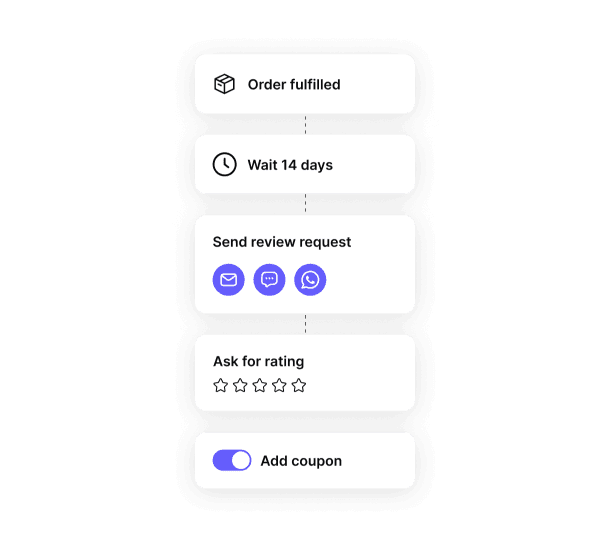
Send review requests after delivery, automatically. Ask for photo, video, or text feedback.

Get more Squarespace reviews
02 /

Review automation

Send timed reminders via email, SMS, or WhatsApp. Boost response rates by reaching buyers on time.

Automate and relax
03 /

AI review control

Filter reviews by star rating, tags, or words. Approve only what fits your product and tone. No spam, no fluff.

Control what goes live
04 /

Display by intent

Show reviews where they matter most. Build trust and boost sales on every page.

Match reviews to buyer intent

Powerful review features

Collect what matters, show it where needed.
Build trust that drives Squarespace sales.

Best Squarespace review widgets

Product review section

Boost product trust with a section dedicated to customer reviews.

Star rating

Show average star ratings to quickly share product quality and customer satisfaction.

Nudges

Highlight your best reviews right where shoppers decide, creating immediate trust.

Wall of love

Show both shop and product reviews to prove your brand’s trust and quality.

Floating review badge

Highlight star ratings and reviews with a sleek, scrollable badge to build trust instantly.

Carousel example

Curate and display reviews in a dynamic carousel at key locations on your site.

Auto Slider

Curate and display reviews in a dynamic carousel at key locations on your site.

Inline Trust Badge

Show total reviews count with trust badge at any pages

Review wall

Show both shop and product reviews to highlight your brand’s quality and trust.

Sidebar Snippet

Showcase reviews in a sidebar to boost trust and engagement as users browse your site.

Avatar

Curate and display reviews in a dynamic carousel at key locations on your site.

Floating Popup

Boost conversions and trust with sleek, real-time popups that highlight your top reviews.

Squarespace ratings on Google

Turn Squarespace reviews into traffic.
Show them across Google to increase visibility, clicks, & conversions.

Google seller ratings

Add verified seller ratings to Google Ads.

Boost ad trust and reduce cost per click by showing real customer proof.

Google shopping feed

Push review ratings into your Squarespace product feed.

Help shoppers choose faster with visible social proof inside Shopping ads.

Rich Snippets in Search

Turn product reviews into clickable results.

Use rich snippets to show ratings in organic listings and bring more buyers to your store.

Built for Squarespace

Quick to install

Set up in minutes. No coding needed.

Hands-free collection

Automate review requests after orders or delivery.

Seamless display

Show reviews on any page, fully theme-compatible.

Real words, real results

Works with your existing tools

WiserReview fits right into your Squarespace workflow.
It connects smoothly with your favorite tools.

whatsapp

WhatsApp

Send review requests directly in chat.

Mailchimp

Mailchimp

Trigger review requests.

google review

Google Reviews

Import and display your public reviews seamlessly.

zapier

Zapier & Webhooks

Connect with 5,000+ apps or your custom tools.

Coming Soon

Support for popular builders and marketing tools.

30+ integration

View all

Review tips for Squarespace

Use timing, relevance, and placement to turn reviews into conversions.

1.

Ask for reviews right after the emotional peak

Buyers are most excited right after receiving a product. Delaying your request reduces emotional recall, which lowers quality and engagement.

How:

→ Use WiserReview to trigger review requests based on delivery confirmation.

→ Set the flow to email or SMS 24–48 hours after fulfillment.

→ Customize the message to thank the customer and invite feedback while the product is fresh in mind.

2.

Personalize reviews by product or service type

Generic reviews feel disconnected. Buyers trust reviews that match what they’re considering, size, color, or even package tier.

How:

→ Use WiserReview’s tagging to auto-categorize reviews by SKU, variation, or page slug.

→ Embed specific reviews on matching Squarespace product pages using filters.

→ Maintain tag consistency across review forms and display blocks.

3.

Highlight visual UGC on high-intent pages

Social proof with photos or videos dramatically improves trust, especially for new visitors and high-ticket items.

How:

→ Let users upload images or video via WiserReview’s review form.

→ Enable media filters to surface visual content on landing or product pages.

→ Use floating widgets or trust carousels to make visual reviews visible without scrolling.

4.

Reuse top reviews in post-purchase flows

Customers who just bought are still evaluating their decision. Showing social proof here reinforces confidence and reduces refunds.

How:

→ Tag top reviews with trust-building phrases like “loved it” or “exactly what I needed.”

→ Add those reviews into Squarespace email campaigns using Mailchimp or Klaviyo integration.

→ Match content to the purchased product or service for relevance.

5.

Turn reviews into SEO content

Reviews are keyword-rich and trusted by search engines. Properly structured, they can help you rank for long-tail phrases.

How:

→ Enable rich snippets in WiserReview settings for schema markup.

→ Publish reviews on dedicated pages or product sections with crawlable content.

→ Link these pages internally from blogs, FAQs, or product menus.

Build trust on Squarespace

Just reviews that boost confidence & drive sales.

Frequently
asked questions

Judge.me will fully shut down for Squarespace on October 31, 2025. After that date, you won’t be able to access your Judge.me dashboard, reviews, or widgets. All data and features will be removed.

Yes. You can export all your reviews in a CSV file directly from your Judge.me dashboard. This is the safest way to keep your review data and move it to another platform like WiserReview.

You’ll lose access to all reviews, ratings, and customer feedback stored in your Judge.me account. The data will be permanently deleted after October 31, 2025, so exporting early is important.

Yes. WiserReview has a direct Squarespace integration that lets you collect, manage, and display product reviews automatically. You can also import your Judge.me reviews in one click using the import tool.

You can upload your Judge.me CSV file into WiserReview from the Manage Reviews → Import → Judge.me section. All ratings, names, and dates stay intact, and your Squarespace products will sync automatically.

No. Judge.me widgets will stop displaying reviews after the sunset date. Once you connect WiserReview, you can add its review widgets to your Squarespace pages using simple embed codes — with more layout and style options.

WiserReview is built for businesses that need a simple review system for Squarespace. It offers: One-click Judge.me migration Automatic review request emails Product-specific review widgets Google review sync and schema support Real human chat support for setup