Google Review Calculator

You can calculate how many Google reviews you need to reach your target rating and plan your next steps with clarity.

Built by WiserReview to help businesses grow with better Google reviews.

Calculate your Google rating goal

Enter your current rating

Add your average star rating and total Google reviews.

Set your target rating

Choose the rating you want to reach, like 4.8★.

See how many reviews you need

View how many new 5-star reviews will reach your goal.

Why your Google Rating matters

  • Higher ratings improve visibility on Google Search.
  • 90% of shoppers trust reviews more than ads.
  • 4.5★+ ratings drive 35% more clicks.
  • Frequent reviews boost Local Pack ranking.
  • A one-star rise increases sales by up to 9%.

What’s a good Google Rating to aim for?

Each rating level shows how customers feel about your business. Aim higher to earn more trust and visibility.

No rating yet

Start collecting reviews to appear in Google results, profiles with reviews get 5x more clicks.

1.0–1.9★

Fix major issues to rebuild trust and attract new customers, 82% of users avoid businesses rated below 2 stars.

2.0–2.9★

Improve your service to reduce negative feedback, ratings under 3★ cut visibility by up to 60%.

3.0–3.9★

Focus on quality and support to move closer to positive reviews, 70% of customers consider 3★ ratings average or risky.

4.0–4.6★

Maintain consistency and collect new reviews to stay reliable, businesses above 4★ appear in the Local Pack more often.

4.7–5.0★

Keep delighting customers to hold a top-rated reputation, 4.8★+ ratings drive 35% more clicks and 20% higher conversions.

How to get more Google Reviews quickly

Take these steps to collect more reviews and improve your Google rating within weeks.

1.

Ask customers right after purchase

Send review requests when the experience is fresh to get faster replies.

How:

Use WiserReview to trigger instant email or SMS requests, and businesses see up to 3x higher response rates.

2.

Use a direct Google review link

Make leaving a review simple and quick for every customer.

How:

Share your Google review link through messages or receipts; it can increase review volume by 40%.

3.

Add a QR code at your store or receipts

Let walk-in customers post reviews in seconds.

How:

Generate a Google review QR code in WiserReview, stores using this see 25% more local reviews.

4.

Display reviews on your website

Show genuine customer reviews to inspire new feedback.

How:

Using WiserReview’s carousel and Google review widgets, displaying reviews can raise conversions by 18%.

5.

Respond to every review

Build credibility and keep engagement active.

How:

Manage and reply to reviews inside WiserReview; active responses improve trust by up to 50%.

Common review mistakes to avoid

Small mistakes can cost visibility. Fix them to keep your Google reviews safe.

Filter out unhappy customers

Don’t ask only satisfied buyers to leave feedback. Google calls this “review gating” and can penalize your profile.

Use one review link for all locations

Always share the correct Google Business Profile link. Wrong links send reviews to the wrong branch and confuse search results.

Copy reviews from other platforms

Never repost feedback from Facebook or Yelp. Google removes duplicates and can suspend your listing.

Ignore negative feedback

Reply politely and solve the issue fast. Ignoring complaints lowers trust and hurts local ranking.

Ask too many customers at once

Spread requests over time. Sudden review spikes look suspicious and may trigger Google’s spam filters.

Post fake or self-written reviews

Never write reviews for your own business or use fake accounts. Google detects fake patterns and can suspend or permanently remove your profile.

Your Google reviews. Fully automated.

WiserReview helps you collect, manage, and showcase authentic Google reviews, all in one place.

01 /

Collect Google Reviews

Send requests automatically after every interaction. Gather photo, video, or written feedback.

Boost Google Reviews. Boost Revenue
02 /

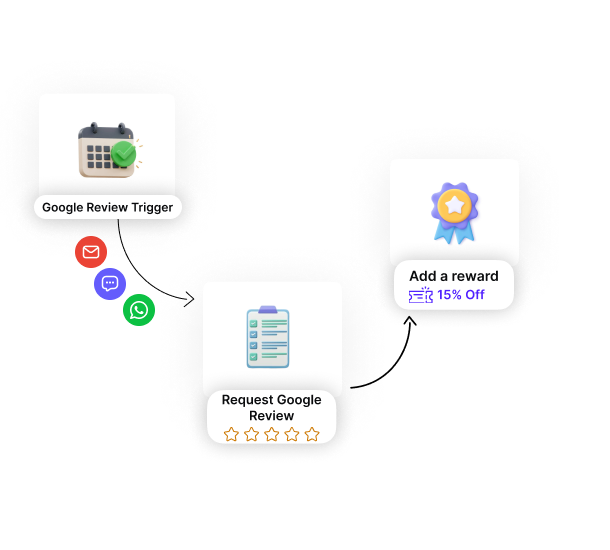
Automate Google Review

Create smart workflows with zero manual effort. Send review requests after any custom trigger.

Set it once. Reviews roll in
03 /

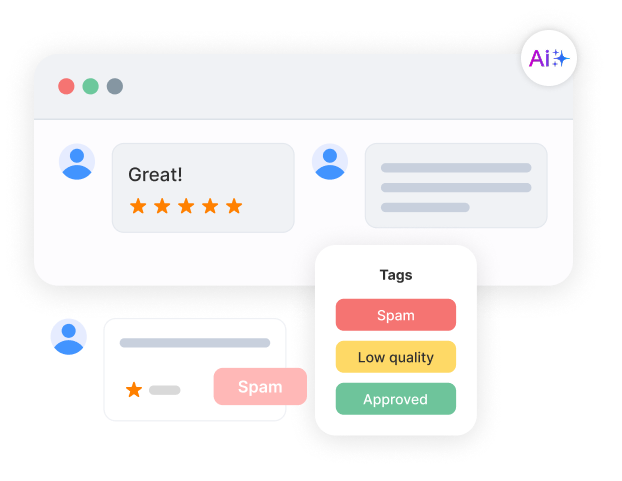
Google Review Moderation

Tag reviews by product, campaign, or sentiment. Auto-flag spam and low-quality responses.

Control what goes live
04 /

Display Google Reviews

Show real reviews at key decision points. Use carousels, popups, badges, or walls.

Display reviews that drive action

Real words, real results

Start collecting
Google reviews

Ask customers at the right moment. Collect Google reviews automatically and grow your credibility.

FAQs

Find quick answers about how the Google Review Calculator works and how it helps your business grow.

The calculator uses your current average rating, total reviews, and target rating to find how many new 5-star reviews you need.

No, you can use the calculator manually by entering your current rating and review count.

It shows the number of new positive reviews required to reach your target average rating.

The calculator assumes 5-star reviews for accuracy, but you can manually adjust the result if you often receive 4-star reviews.

Check your progress weekly to track new reviews and stay aware of how your average rating changes.

Yes, Google removes reviews that violate its policies, including paid or fake feedback.

Use WiserReview to send automated review requests and manage all your Google feedback in one dashboard.