3 min
3 min 
The Google Business Reviews API allows businesses to manage and display reviews from their Google Business Profile automatically.
With this API, you can collect reviews in real-time, display them on your website, and respond to customer feedback all from one place.
This tool helps businesses save time and stay updated without manually checking reviews.
By using the API, you can streamline review management, improve customer engagement, and build trust with your audience.
In this guide, we’ll explain how the API works and how you can use it to improve your business’s online reputation.
Let’s get started!
Google Business Profile background & Review context
A Google Business Profile (GBP) is a tool that lets businesses manage their information on Google Search and Google Maps.
It displays your business details like location, hours, and contact information.
Google reviews are customer feedback posted on your GBP. These reviews influence your visibility in search results.
Positive reviews help your business appear higher in local searches, attracting more customers.
The Google Business Reviews API allows businesses to manage reviews automatically.
It connects to your Google Business Profile and helps you collect, display, and respond to Google reviews in real-time, saving you time and improving customer engagement.
What the reviews API can (and can’t) do
Here are the main things the Google Reviews API can and can’t do.
Main capabilities & Endpoints
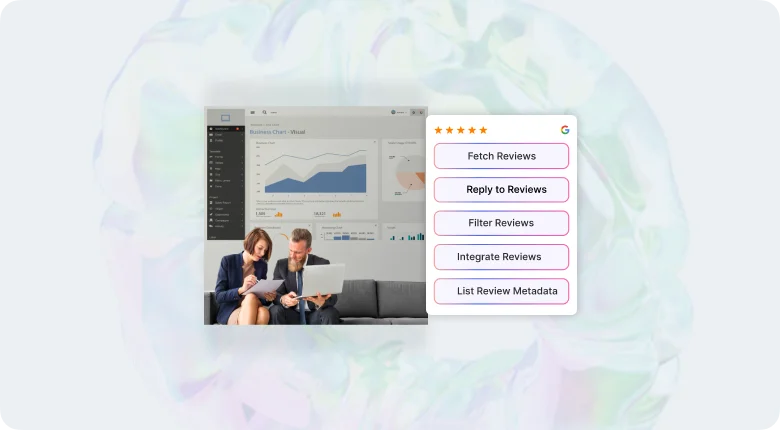
The Google Business Reviews API connects your system with your Google Business Profile and automates review handling.
Here’s what it can do:
- Fetch Reviews: Retrieve all customer reviews from your Google Business Profile in real time.
- Reply to Reviews: Post replies to reviews directly through the API without logging into Google.
- List Review Metadata: Pull review details like rating, language, and review time.
- Filter Reviews: Use endpoints to sort reviews by rating, keyword, or date for easy tracking.
- Integrate Reviews Anywhere: Display reviews on your website, dashboard, or any third-party app.

All your Google reviews in one place
Collect Google reviews, manage every response, and display them where they matter most.
Start Free →The data you receive
When using the API, you get structured review data that helps you manage and analyze customer feedback:
- Review text written by customers.
- Star rating (1 to 5).
- Reviewer name or username (only public information).
- Date and time the review was posted.
- Owner response, if you have replied to the review.
- Review language and ID, used for sorting or filtering.
This data helps businesses automate how they display and respond to reviews across platforms.
What you cannot do / Restrictions
The API has certain limits and rules:
- You cannot create or delete customer reviews.
- You cannot edit review content or change ratings.
- You cannot access personal reviewer data like emails or phone numbers.
- You cannot modify other Google Business Profile details (like business hours or location).
- There are usage limits, which restrict how many API calls can be made per day.
Getting access – Setup & permissions
Here are the steps and permissions you need to set up and access the Google Business Reviews API.
Prerequisites & Eligibility
To use the Google Business Reviews API, you need a verified Google Business Profile and a Google Cloud account.
- Your business must be verified on Google. Unverified profiles can’t access or manage reviews through the API.
- You need Owner or Manager access for the profile. Limited roles like “Site Manager” cannot use API permissions.
- A Google Cloud project must be created under your account to handle API connections and data.
Authentication & Authorization
Google uses OAuth 2.0 and API keys to secure access to the Reviews API.
- Use OAuth 2.0 if your system needs user-level access (for example, allowing staff to reply to reviews).
- Use an API key if you are only reading and displaying review data.
- Each request must be authenticated to ensure that Google verifies that you have permission to view or manage the reviews.
- Keep all credentials secure and never share your keys publicly.
Setting up APIs & Enabling services
Once your account and permissions are ready:
Log in to Google Cloud Console. A dashboard will appear.

Then, create or open your project.
Go to the API Library and search for Business Profile API.
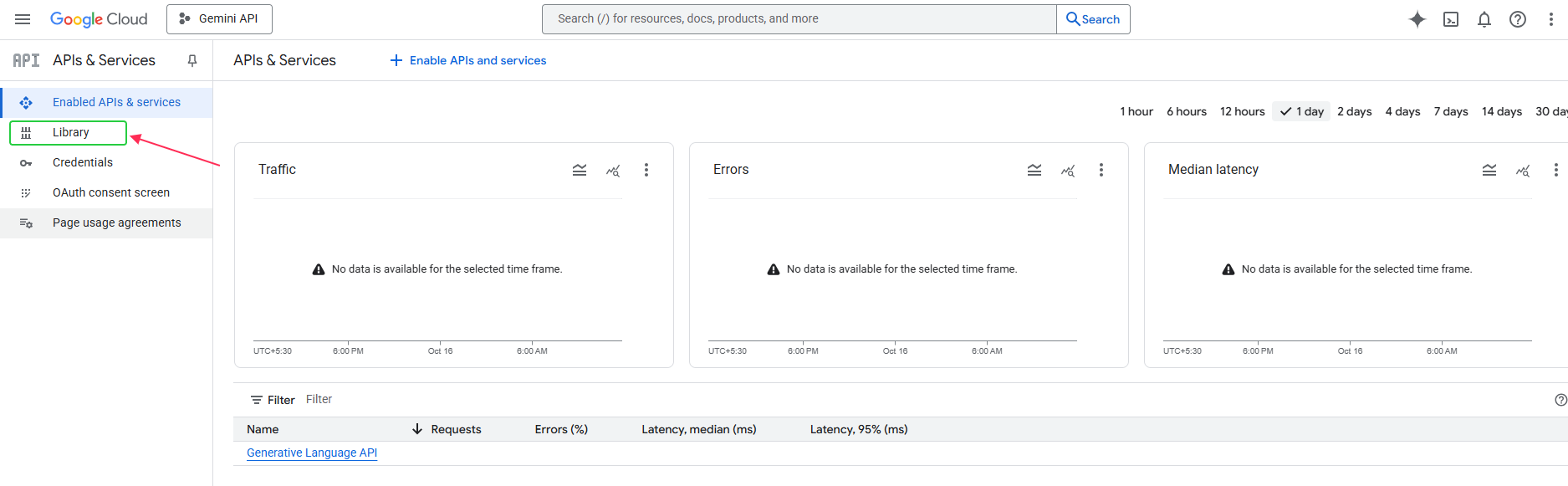
Click Enable to turn it on for your project.

Go to APIs & Services → Credentials to create an API key or OAuth Client ID.
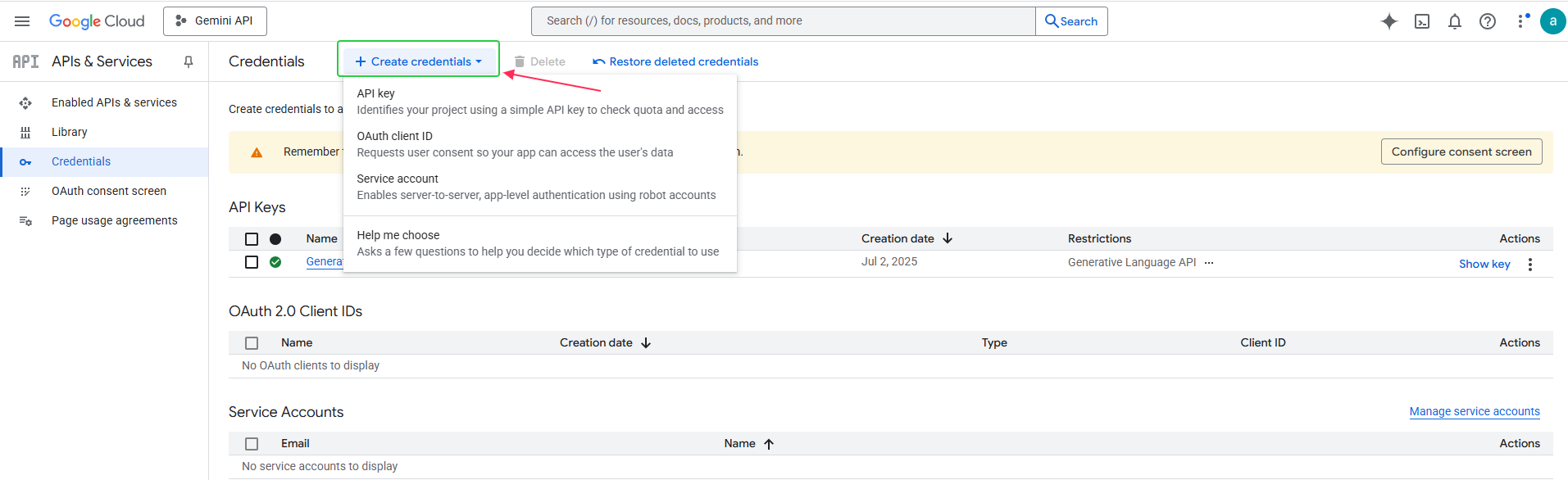
Link your Google Business Profile to your project through the authentication process.
After setup, you can make calls to the Reviews API to fetch, display, or reply to customer reviews automatically.
Integration & usage – How to consume the API
Here are the main steps to connect, use, and manage the Google Business Reviews API in your system.
Common workflow & sample calls
The API works through a simple flow. You first authenticate your app, call the right endpoint, and then process the response data.
- Authenticate your connection with an API key or OAuth 2.0 token.
- Fetch reviews for one or more business locations.
- Display or analyze the reviews in your app, website, or dashboard.
- Reply to reviews if your permissions allow it.
- Refresh data on a regular schedule to keep it up to date.
Best practices & design patterns
When working with the Reviews API, keep your system secure, efficient, and within Google’s limits.
Caching, error handling, and batch operations help reduce API load and prevent delays.
- Cache API responses to avoid exceeding rate limits.
- Use pagination for large review lists.
- Handle expired tokens or permission errors properly.
- Keep API keys and OAuth credentials private.
- Log all API calls for tracking and debugging.
- Use batch requests for multi-location review syncs.
Use Cases & Feature Ideas
The API can power more than just review display; it can automate and scale your customer feedback workflow.
Businesses use it to centralize data, automate replies, and monitor performance across multiple locations.
- Showing live Google reviews on your website or app.
- Sending instant replies to new customer reviews.
- Combining reviews from Google, Yelp, and Facebook in one dashboard.
- Running analytics to track review trends and customer sentiment.
- Getting alerts for new 1-star or 2-star reviews.
- Managing multi-location feedback from a single dashboard.
Limitations, pitfalls & alternatives
Here are the main limits of the Reviews API, common problems you may face, and safer alternatives to use.
Common challenges & Roadblocks
The Google Business Reviews API is helpful, but setup and use can bring some issues.
Most problems come from missing permissions, wrong setup, or using the wrong type of key.
Common problems include:
- Getting an “access denied” error because the account isn’t verified or lacks manager rights.
- Reaching Google’s daily request limit, which stops new calls until the next day.
- Use an API key when OAuth access is needed for posting replies.
- Reviews are not showing up right away because of Google’s refresh delay.
- Some features are not working in certain countries.
These issues are easy to avoid if you double-check your permissions, use OAuth for write actions, and monitor your API usage.
All your Google reviews in one place
Collect Google reviews, manage every response, and display them where they matter most.
Start Free →Third-party & Scraping alternatives
If the API doesn’t fit your needs, there are other tools to help you manage Google reviews.
Trusted third-party tools:
WiserReview: WiserReview is the best Google review management software. It lets you collect, manage, automate, and show Google reviews easily without coding.
Zapier or Make (Integromat): Helps move reviews into tools like Slack or Google Sheets.
Scraping or unofficial methods:
Some developers use scraping to pull reviews directly from Google Maps.
This can stop working anytime because Google changes its structure often. It can also break Google’s terms of service.
The safest option is to use official APIs or tools like WiserReview. They stay reliable, follow Google’s rules, and keep your review data accurate and up to date.
Wrap up
The Google Business Reviews API gives businesses a simple way to manage and respond to customer feedback without doing it all manually.
It connects directly to your Google Business Profile, helping you pull reviews in real time, reply faster, and keep your website updated with fresh feedback.
While the API has some limits, it’s still one of the most reliable ways to manage Google reviews safely.
For deeper features like automation, analytics, or multi-platform review tracking, tools like WiserReview can make the process even easier and more effective.
Frequently asked questions
Yes. Accessing the API through Google Cloud is free, but there may be costs if your usage exceeds Google’s daily quota or if you use paid Google Cloud features.
No. Your business must be verified before you can fetch or reply to reviews through the API.
The API updates in real time, but sometimes new reviews may take a few hours to appear depending on Google’s sync speed.
No. The API cannot delete or edit reviews. You can only respond to them or flag them manually through your Google Business Profile.
You can use tools like WiserReview to collect and manage reviews from Google, Facebook, and other sources all in one place.

Krunal