3 min
3 min 
Negative or fake reviews can pop up anytime, and they can seriously hurt your online reputation if left unchecked.
82% of customers won’t visit a business until they’ve read the online reviews.
64% of consumers prefer Google for reviews; one bad review on Google can influence your choice.
Whether it’s something you posted by mistake or feedback that doesn’t belong on your business page, knowing how to delete Google reviews safely can save you a lot of stress.
In this guide, we’ll break down when and how you can remove a review, what Google actually allows, and what to do if deletion isn’t possible.
Understand Google’s policies & limitations
Google lets users edit or delete their own Google reviews through their account control panel. Google will only remove other people’s reviews if they violate its policies, like being spam or hate speech.
Business owners cannot directly delete a Google review from others, but can report it for Google to review.
When deletion is allowed
You can always delete any Google review you personally wrote on Google Maps or Search, no special reason needed. Google will also remove reviews from others when the reviews violate its rules (spam, fake, explicit content, or illegal material).
Fake reviews or fraudulent reviews: The review is not based on a real experience (e.g., posted by a competitor or someone who never visited).
Spammy reviews: The same review is posted multiple times from the same account, or it is just a random group of characters.
Hate speech or offensive language: The review contains vulgar, harassing, or discriminatory language.
Off-topic or Irrelevant content: The review is a personal rant about something completely unrelated to the business’s products or services (e.g., political statements).
Illegal content: The review promotes illegal activity or contains personal, confidential information.
When deletion is not possible
Google won’t remove honest, negative feedback just because it hurts your feelings. Reviews that are true statements of experience, even if harsh, usually stay. Google Reviews that are personal opinions, critical stories, or negative ratings that do not break policy will remain unless the author deletes them.
Legitimate Negative Experiences: The review honestly shares a bad experience, even if you disagree with the details.
Disagreement Over Facts: You believe the customer’s experience is inaccurate or unfair. Unless the review is provably false and breaks a policy (like impersonation), Google will not get involved.
Unfair, but Policy-Compliant: The review uses harsh language but does not cross the line into hate speech or offensive language.
Risks & trade-offs
When you want to delete a Google review, especially one from someone else, you need to think about the risks. A customer deleting their own review only risks losing their review history. The main balance is between the time spent and the level of control they have.
Trying to Flag/Report
You might spend time on the review removal process only for Google to say “no.”
The trade-off is that using the flagging method is better for Google reviews that clearly violate policy (like spam or hate speech), while resolving the issue directly with the reviewer is better for getting a legitimate, yet negative, review removed.
Engaging the reviewer directly
If you respond to the negative review poorly or aggressively, you risk making the situation worse.
The trade-off is that a professional, kind response (offering to fix the issue) is better for demonstrating customer satisfaction to potential customers reading the thread, while avoiding a public response and trying to deal with the reviewer in private (email or phone) is better for cases where the negative review is full of personal rants or accusations you need to handle carefully.

All your reviews in one place
Collect reviews, manage every response, and display them where they matter most.
Start Free →5-Minute method: Step by step (for your own review)
Whether you want to edit or delete a review, you can do so in a few minutes on your phone or PC. Maybe you found the business was better than you initially thought, or you simply made a mistake.
Steps to delete
Step 1: Open Google Maps
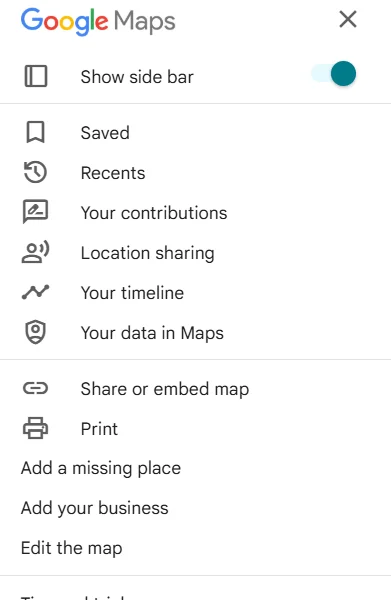
On your phone or computer, open Google Maps. Look for your profile picture in the top left corner or top right. Click on it to open the menu for your account.
Step 2: Go to Your Contributions
From the menu, select “Your contributions.” Here you can see everything you have posted, including photos, edits, and your online reviews.
Step 3: Find the Review to Delete
Click on the “Reviews” tab. Scroll through the list of individual reviews until you find the review you want to remove or change.
Step 4: Use the Three Dot Menu
Next to the review you want to delete, you will see a three-dot icon. Click this three-dot menu.
Step 5: Select Delete Review
A small menu will pop up with options like “Edit review” and “Delete a Google review.” Click on delete review. Google will ask you to confirm. Once you click “Delete,” the review will be removed immediately from the search results and the business profile.
Verification & double-check
After deleting, clear the cache or refresh Google Maps/Search to ensure the review no longer appears. If you used the mobile app, sign out and sign back in, or check on the desktop to confirm.
- Check the Business Profile: Return to the business profile and review the total number of Google reviews. The count should have dropped by one, and your own review should no longer be visible.
- Check Your Contributions: Go back to the “Your contributions” section of Google Maps. The review should be gone from the list of your past contributions.
How to remove bad reviews from Google Business Profile
Business owners cannot directly delete reviews left by others. The correct path is to flag reviews that break Google’s rules. Use the Google Business Profile (previously Google My Business) dashboard or Maps to report a review as inappropriate. Provide clear reasons and any proof (screenshots, policy violation details).
You can’t directly delete — you must flag/report
Google’s system aims to keep reviews authentic. Because of that, owners don’t have a delete button for others’ reviews. The reporting system exists to remove spam, hate speech, fake reviews, or content that violates Google’s policies.
Owners should gather evidence and choose the precise reason when reporting vague reports slows the process.
Step-by-step for flagging
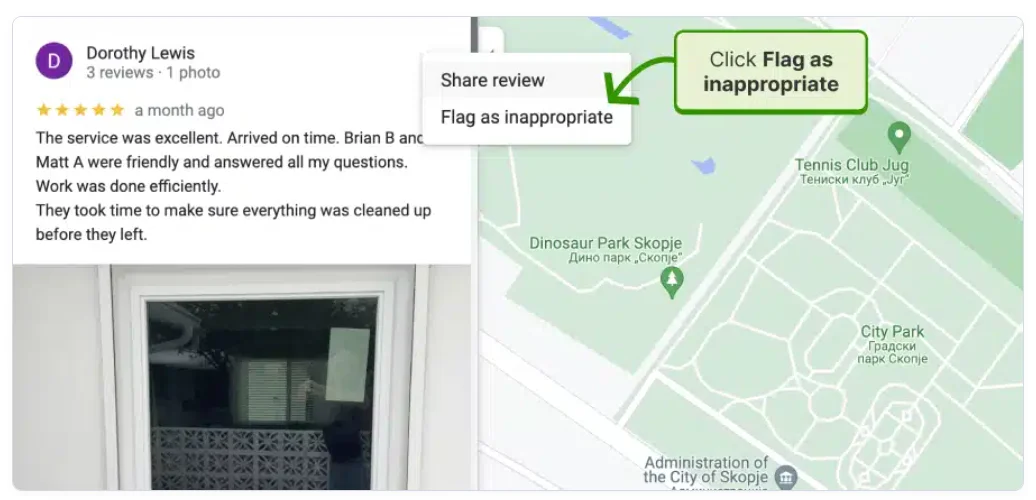
You can do this from the Google Search page where your business profile appears, or through your Google Business Profile (GBP) manager.
Step 1: Find Your Business Profile
Go to Google Search and search for your business name. You should see your business profile panel on the right side. Make sure you are logged into your business account.
Step 2: Access the Reviews
Click on the Google reviews to see all of them. Find the negative review you want to report.
Step 3: Click the Flag/Report Option
Look for the three dots or a small flag icon next to the review. Click on this menu.
Step 4: Select Flag as inappropriate
This option will start the reporting process. Google will take you to a new screen and ask you to select the reason for the violation.
Step 5: Choose the Policy Violation
Do not choose “Disagreement with the owner,” which will fail every time. Choose the most appropriate violation, such as “Off-topic,” “Hate speech,” or “Fake engagement.”
Step 6: Submit the Report
Fill out any requested details and submit. Google will now review the content; this typically takes several days to a week.
H3: After reporting — what to expect
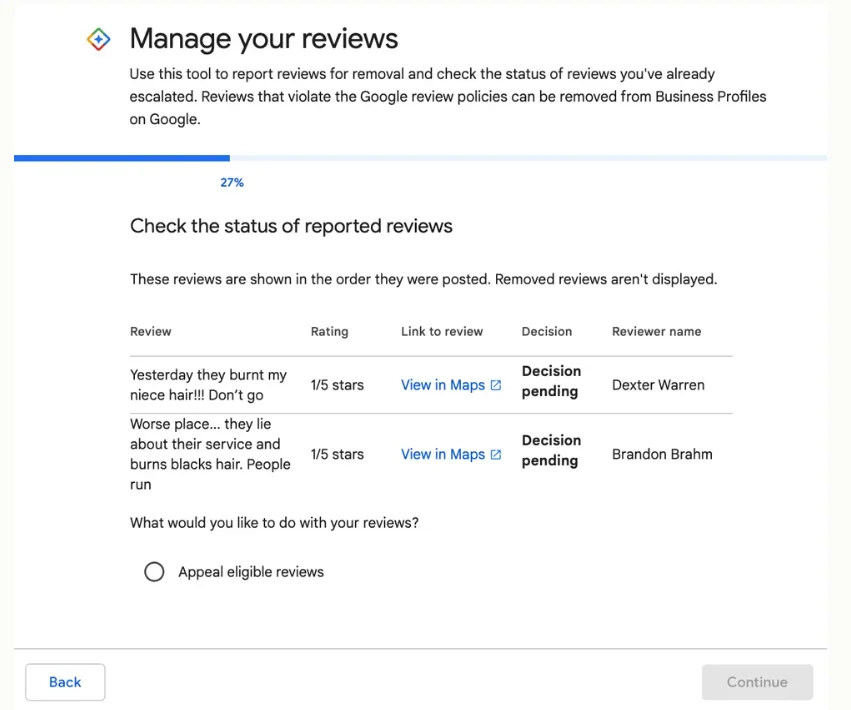
After you submit the report, you need to wait. You’ve done everything you can through the reporting system.
- Timeline: Google states that review evaluation “typically takes several days.” In the best-case scenario (a clear violation like spammy reviews), it can be removed in 24-48 hours. For less clear cases, it can take 1–3 weeks.
- Status Check: You can use Google’s Reviews management tool to check the status of a review you have reported. The statuses can be “Decision pending,” “Review removed,” or “Policy violated not removed” (Google disagreed with your report).
- Appeal: If the review is not removed, and you are sure it violates Google’s policies, you can sometimes submit a one-time appeal through the Reviews management tool. This is an additional step where a human reviewer will take another look.
WiserReview – Best Google review management software
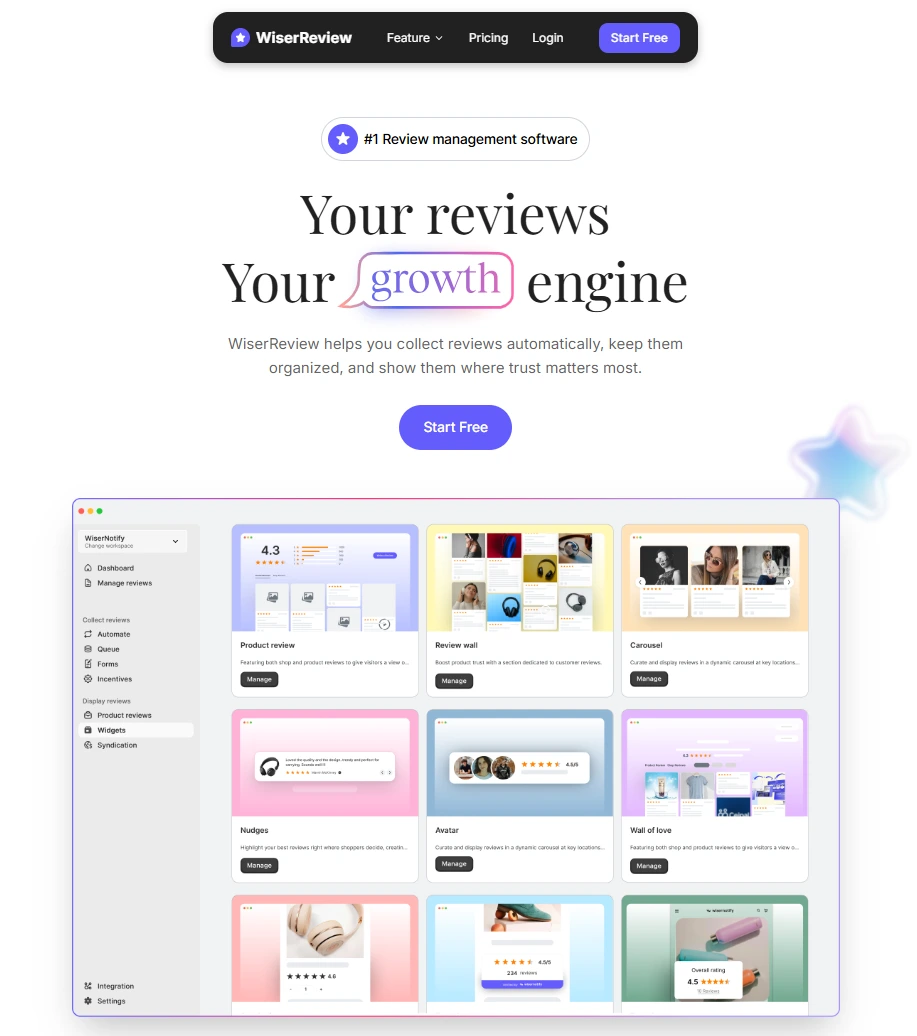
Tools like WiserReview help businesses monitor reviews across Google and other review sites, report suspicious activity, and gather fresh customer feedback.
They save time by centralizing alerts, automating review requests via Email, Sms, and WhatsApp, and letting you display positive feedback on your website.
1. Collect Reviews

Gather authentic feedback and testimonials from customers.
- Create branded Review forms with custom fields, logos, and colors.
- Collect text, photo, and video reviews.
- Sync existing reviews from Google, Facebook, and Shopify.
- Offer incentives (discounts and coupons) to increase participation.
2. Automate Review Collection
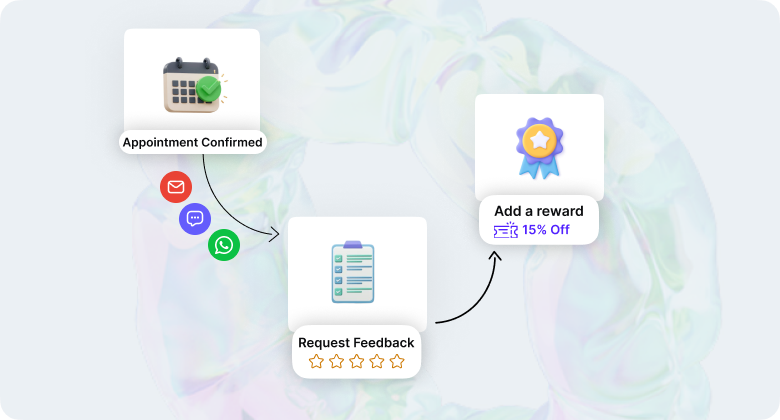
Save time and boost response rate with automation.
- Set automate triggers (e.g., after delivery, X days after purchase, after appointment booked).
- Send personalized email or WhatsApp review requests.
- Integrate with Shopify, WooCommerce, or custom webhooks.
- Add reward automation for submitted forms.
3. Moderate and Manage Reviews
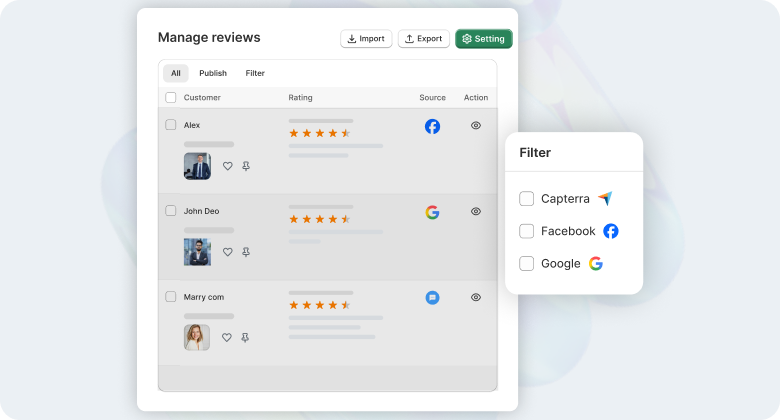
Use smart filters to manage and tag reviews by product or sentiment, ensuring quality control.
- Use moderation filters to block profanity or spam.
- Tag reviews by product, location, sentiment, or type.
- Approve, reply, or hide reviews directly from the dashboard.
- Use AI-powered sentiment detection (if enabled).
- Allows you to reply to all reviews directly from the dashboard using customizable templates.
4. Display and Showcase Reviews

Provides SEO-friendly(Search engine optimization) widgets(carousels, badges) to display your best reviews on your website.
- Choose from multiple Google review widgets (Carousel Slider, Floating Popup, Trust Badge, Review Wall).
- Customize fonts, colors, layout, and animation.
- Embed easily via HTML, Shopify, or script snippet.
All your reviews in one place
Collect reviews, manage every response, and display them where they matter most.
Start Free →What to do if deletion isn’t possible
If Google won’t remove a review and legal action is impractical, use smart reputation tactics: reply professionally, invite the reviewer to resolve the issue offline, and encourage satisfied customers to post fresh reviews.
1. Respond professionally to the review
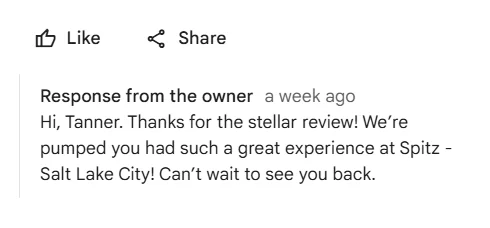
A good response can actually turn a negative review into a positive reflection of your company’s commitment to happy customers.
- Acknowledge and Apologize: Always thank the customer for their feedback, apologize that they had a bad experience, and keep your tone polite.
- Take it Offline: Do not argue in public; end your reply by offering a direct way to fix the issue: “We would like to make this right. Please call us at (Local phone number) and ask for (Manager number). This shows potential customers you care and that you took responsibility even for an anonymous review.
2. Encourage new positive reviews
The more happy customers you have posting new reviews, the faster the bad reviews will drop down the page and become less noticeable.
- Use tools like WiserReview: Utilize a system to automatically request reviews from satisfied customers immediately after a purchase or service. This process is highly effective and completely within Google’s policies as long as you ask all customers, not just the happy ones.
- Be Proactive: Train your team to ask for review in person: “We’re so glad you loved the service! If you have a few minutes, we’d appreciate it if you shared your feedback on Google.”
3. Legal route (only in extreme cases)
You would only consider this if the negative review is clearly false, harmful, or involves serious illegal claims.
- Trade-off: Contact a lawyer for serious issues like slander or fraud if you want to have a review removed permanently. For most other policy violations, reporting through your Business Profile Account is the best choice; it’s free and much quicker. A lawyer’s letter may catch Google’s attention faster, but only for illegal content.
Wrap up
Deleting your own Google review is quick and safe, usually a few clicks; removing others’ negative reviews takes reporting, patience, and sometimes extra evidence.
For most business owners, a mix of reporting, calm, public responses, and steady customer outreach is the fastest way to protect their online reputation.
Use tools to monitor Google reviews and be prepared to respond, but don’t rush to remove them.
Frequently asked questions
Yes, you can delete a Google review. If it breaks Google's policies, you can report it for potential removal.
You only need one valid report to get Google to review a flagged review; there's no set number of reports needed.
You can remove your Google reviews by opening the Google Maps app or website. Go to your contributions, find the review you want to delete, click the three-dot menu, and choose "Delete Reviews."
Business owners cannot hide or turn off Google reviews on their profiles. You can report reviews that violate rules, and Google might remove them if it finds a violation.

Krunal