4 min
4 min 
Responding to Google reviews builds trust and improves your online reputation. Every review response shows that your business listens, values feedback, and cares about customer satisfaction.
Replying to positive reviews helps you thank happy customers. Handling negative reviews in a calm and professional tone shows excellent customer service.
Even fake reviews deserve a short, polite reply that protects your brand reputation.
In this guide, you’ll learn how to reply to positive, negative, and fake reviews on your Google Business Profile on time and with a respectful tone.
Let’s get started!
Why is it essential to respond to Google reviews?

Replying to Google reviews shows that you care about customer satisfaction and helps build trust with potential customers.
Studies show that businesses that respond to reviews see up to a 16% higher conversion rate than those that don’t.
A single review response can turn negative feedback into loyalty and improve your online reputation across Google Search and Maps.

All your reviews in one place
Collect reviews, manage every response, and display them where they matter most.
Start Free →Responding to positive (Good) Google reviews
Here are the best ways to reply to positive Google reviews and show real appreciation to your customers.
Best practices for responding to positive (Good) Google reviews
Here are a few simple and effective ways to reply to positive Google reviews.
➔ Thank the customer right away
Begin by expressing thanks. Respect and customer pleasure can be demonstrated with a simple “Thank you for your kind words” or “We appreciate your feedback.”
➔ Use the customer’s name
Personalize your reply. Addressing them by name makes your review response feel real and written by a real person, not a template.
➔ Acknowledge specific details
Mention what they liked, such as your excellent customer service, product quality, or quick delivery. It shows you read the review carefully.
➔ Keep a professional and courteous tone
Even when reviews are glowing, maintain a professional tone. Stay polite, warm, and avoid exaggerated phrases.
➔ Reinforce your company values
Use this chance to remind readers what your business stands for, like honesty, care, or community focus. It strengthens brand reputation.
➔ Invite them to return
Encourage repeat visits or purchases. A friendly “We’d love to see you again soon” builds stronger customer relationships and loyal customers.
➔ Respond in a timely manner
Reply within a few days. A quick review response shows that your business is active, attentive, and values every positive feedback.
5 Positive Review Reply Templates (3–5 Star Reviews)
Here are a few ready-to-use templates to help you reply to positive Google reviews clearly and naturally.
1. For a 5-star review
“Hi [Name], thank you for the 5-star review and your kind words about our [product/service]. We’re glad you had such a great experience. Your feedback inspires us to keep delivering excellent customer service every day.”
2. For a 4-star review
“Thanks [Name] for sharing your positive feedback. We’re happy you enjoyed [specific aspect mentioned]. If there’s anything we can improve to make your next visit even better, please let us know. We appreciate your support!”
3. For a 3-star review
“Hi [Name], thank you for taking the time to leave a review. We’re glad you had a positive experience overall, and we’ll keep working to improve the areas you mentioned. Your honest feedback helps us serve you better.”
4. For repeat or loyal customers
“Hey [Name], we really appreciate your continued trust and support. It’s always a pleasure serving loyal customers like you. Thanks for your glowing review and for being part of our journey!”
5. For any general positive review
“Thank you [Name] for your kind review. We’re thrilled to hear about your positive experience with our team. Your feedback means a lot and motivates us to keep providing the best customer service possible.”
Example of Responding to positive (Good) Google reviews
Here are real examples that show how to reply to positive reviews in a simple and genuine way.
1. Raina Morgan – Roofing Service
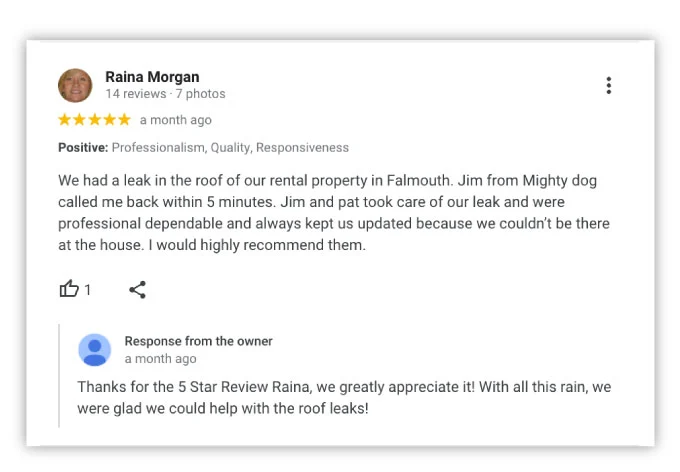
This response shows how a business can reply to a 5-star review with warmth and gratitude.
The owner thanked the customer by name and mentioned the exact service they helped with. It feels personal, genuine, and reflects great customer satisfaction.
2. Amanda Stanley – Home Inspection
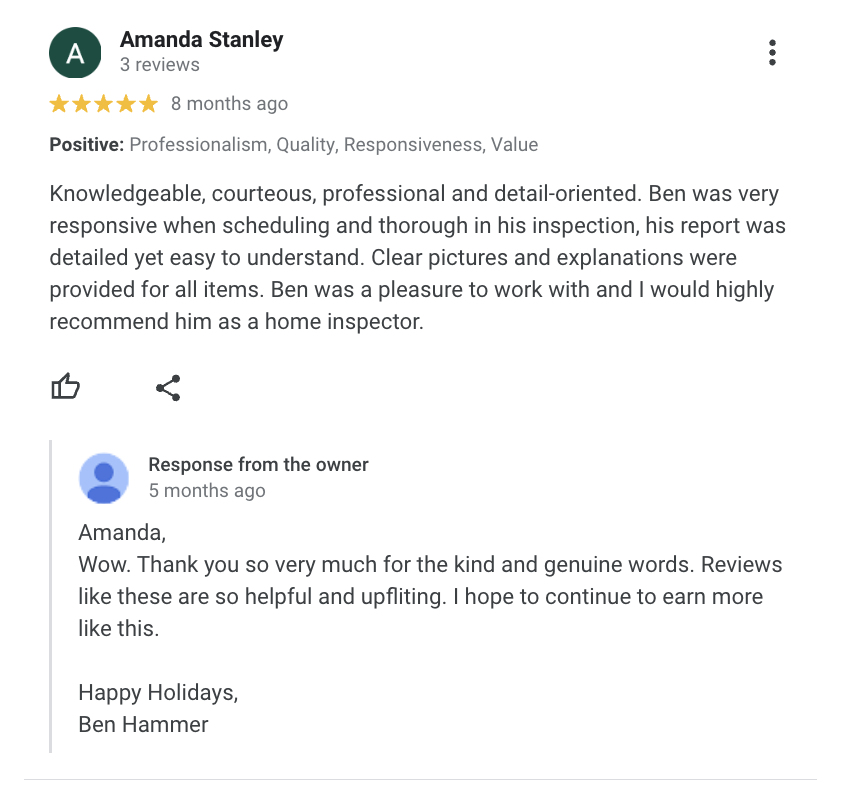
The owner replied with a kind and thoughtful message that feels sincere.
They showed real appreciation for the positive feedback and took time to wish the customer well. It’s a strong example of how a professional and courteous tone builds trust.
3. Sharon Larson – Dental Clinic
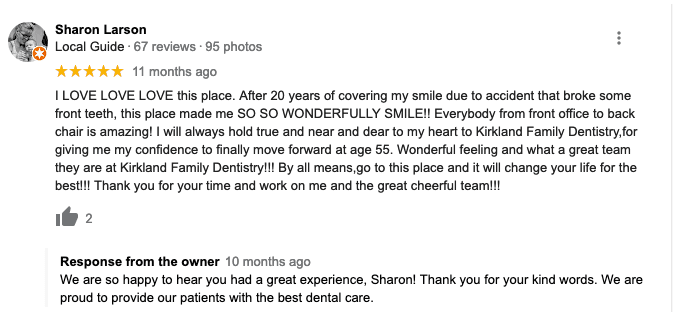
This reply is short but full of warmth. The owner thanked the reviewer by name and highlighted the positive experience.
It’s a great model of how a business can respond to emotional glowing reviews with care and authenticity.
4. Judy Weigand – Community Visit
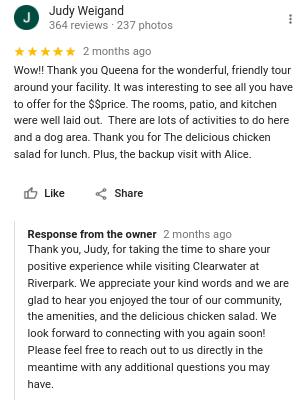
The owner’s response feels professional and detailed. They thanked the reviewer for visiting and referred to specific moments from her review.
This approach makes the reply feel genuine and shows true attention to customer experience.
5. Amanda K – Hotel Stay
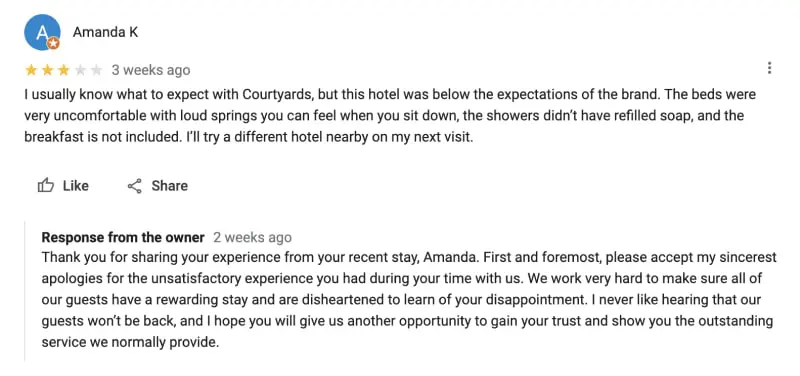
The business handled this negative review with empathy and honesty. The owner apologized clearly and expressed a wish to make things right.
It’s a perfect example of a calm, professional tone when addressing negative feedback.
All your reviews in one place
Collect reviews, manage every response, and display them where they matter most.
Start Free →Responding to negative (Bad) reviews
Here are simple ways to reply to negative reviews with calm, respect, and care to protect your business reputation.
Best practices for responding to negative (Bad) reviews
Here are 4 best practices to follow when replying to negative reviews on your Google Business Profile.
➔ Stay calm and polite
Never reply in anger. Keep your review response professional and courteous. A calm reply shows that your business takes customer concerns seriously and values every customer’s experience.
➔ Thank the reviewer for their feedback
Even unhappy customers help your business improve. Start by thanking them for their honest feedback. Example: “Thank you for sharing your experience with us. We’re sorry it didn’t meet your expectations.”
➔ Apologize sincerely and address the issue
Offer a short, genuine apology without making excuses. Example: “We’re sorry for the negative experience you had. We always aim for excellent service, and we regret we missed the mark this time.” Then briefly explain any fix or improvement plan.
➔ Move the conversation offline
If needed, invite the customer to continue privately. Example: “Please contact us at [email/contact info] so we can make things right.” This keeps the online reviews space clean and shows you care about resolution, not public arguments.
5 Negative Review Reply Templates (1–2 Star Reviews)
Below are five short and effective templates you can use for 1–2 star reviews.
1. General apology reply
“Hi [Name], thank you for your honest feedback. We’re sorry for your negative experience and appreciate you sharing it. We take all customer concerns seriously and would like to make it right. Please reach us at [email/contact info].”
2. Poor service experience
“Hi [Name], we apologize that our service didn’t meet your expectations. We always aim for excellent customer service and will use your valuable feedback to improve. Thank you for helping us do better.”
3. Product or delivery issue
“Hi [Name], we’re sorry you weren’t fully satisfied with [product/service]. We understand how frustrating this can be and are reviewing what went wrong. Please contact us so we can resolve this quickly.”
4. Communication or misunderstanding issue
“Hello [Name], thank you for your review. We’re sorry for any confusion and appreciate your patience. We value your customers’ experience and want to ensure clear and helpful communication next time.”
5. Turning frustration into trust
“Hi [Name], we’re sorry your experience wasn’t what you expected. We’ve shared your negative feedback with our team to improve. We’d love a chance to offer you a positive experience in the coming weeks.”
Example of Responding to negative (Bad) reviews
Here are real examples that show how to handle negative reviews with patience and respect.
1. Jaime Lynn – Plumbing Issue
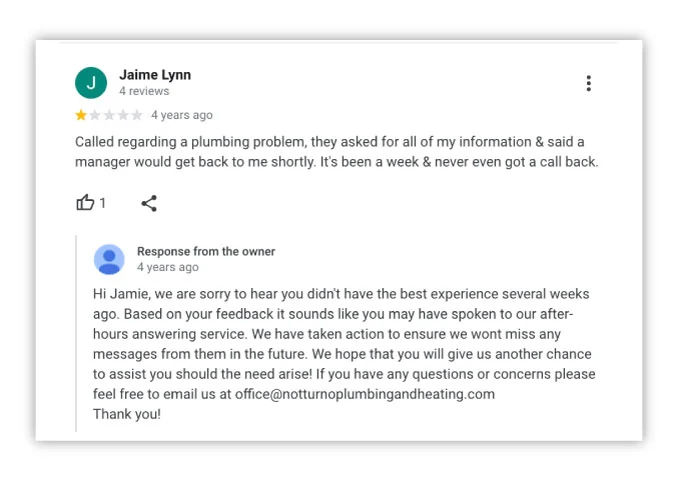
The owner gave a respectful and solution-focused reply. They apologized, explained what went wrong, and shared the steps taken to fix it.
This shows how a polite review response can turn a negative experience into a chance to rebuild trust.
2. Brittany Caceres – Retail Experience
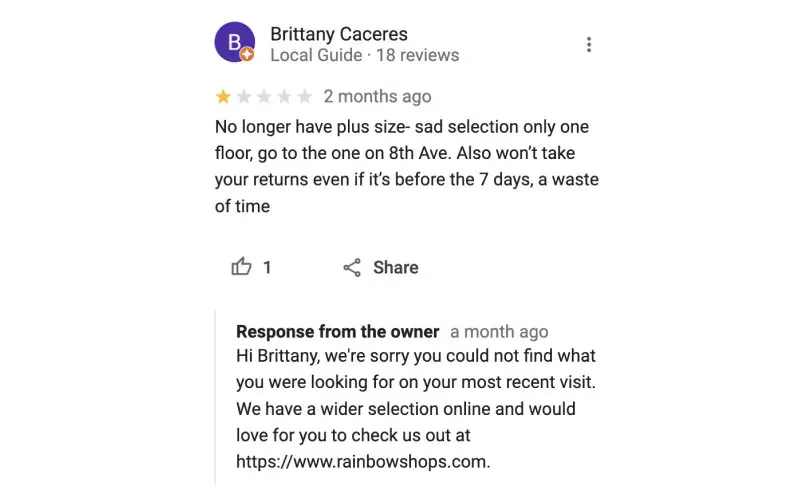
This reply is polite, simple, and focused on helping. The owner didn’t argue or defend; they offered a clear alternative for the customer.
It’s a smart way to protect brand reputation while keeping a friendly and professional tone.
3. Steven Stavropoulos – Pricing Concern
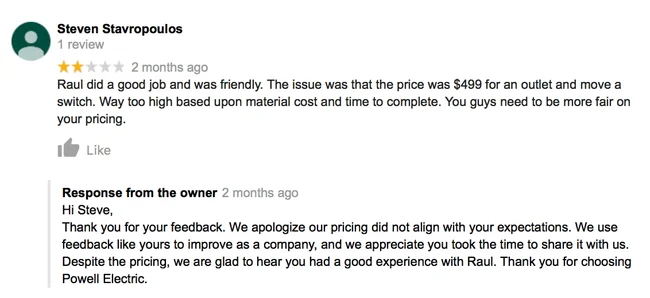
The owner handled this 2-star review with balance and respect. They apologized for the pricing issue while appreciating the customer’s input.
The tone remains calm and helpful, showing how honest feedback can improve service.
4. Jack Pitts – Tax Service
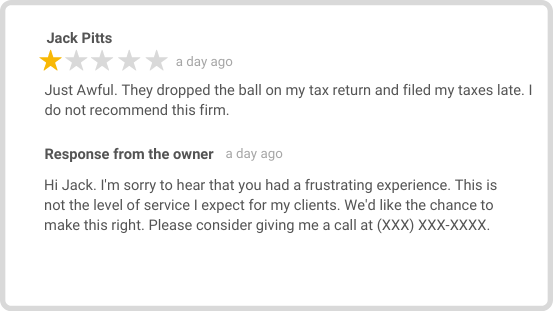
The business responded quickly and kept the message sincere. The owner admitted the issue, apologized, and offered direct contact to fix it.
It’s a great example of being transparent and showing excellent customer service.
5. A H – Restaurant Delay
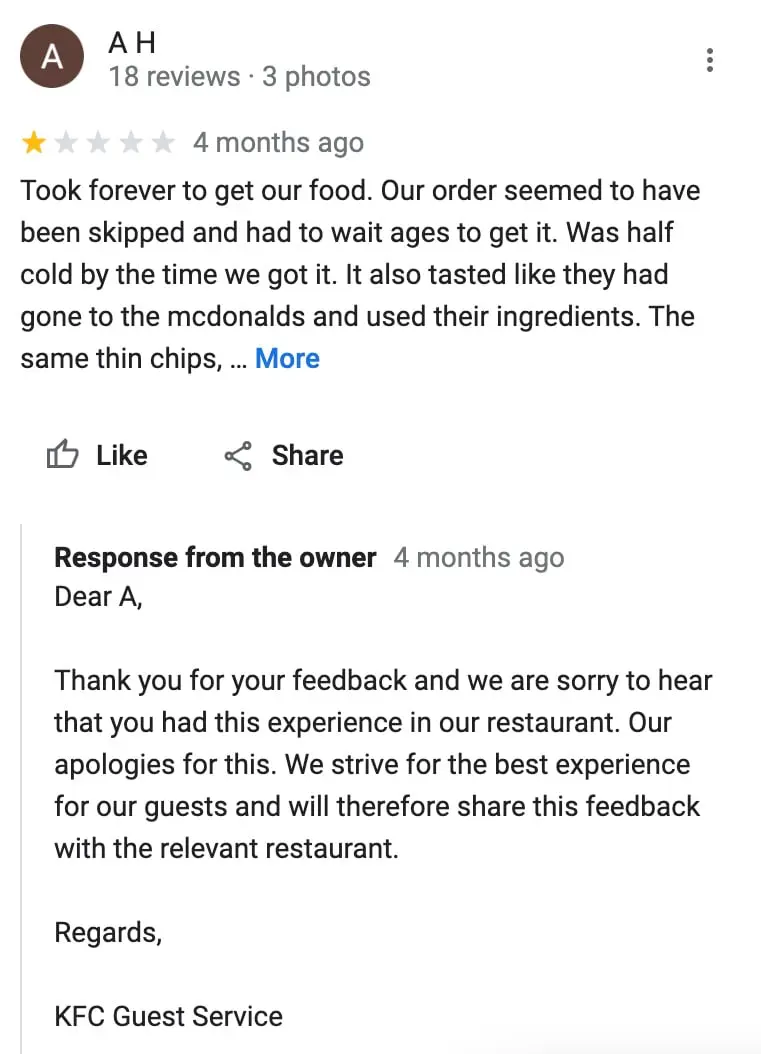
This reply is polite and professional throughout. The owner apologized, shared that the feedback would be passed along, and kept the message short.
It shows responsibility and care for dissatisfied customers while keeping a positive tone.
Responding to fake or suspicious reviews
Here are quick, polite ways to handle fake reviews and protect your brand reputation.
Best practices for responding to fake or suspicious reviews
Here are a few simple and effective ways to reply to fake or suspicious reviews.
➔ Stay polite and respectful
Even if a review feels fake, don’t argue or accuse. Keep your response short and friendly. Show that your business stands for fairness and excellent customer service.
➔ State the facts simply
If you can’t find the reviewer’s name or order, say so in a polite way. Example: “We couldn’t find your details in our records. Please reach out to us directly so we can help.”
➔ Report it through Google
Use your Google Business Profile dashboard to flag the review. Google can remove reviews that break its policy.
➔ Reassure real customers
End your reply by reminding people that you value honest feedback and care about every customer’s experience. It helps build trust with potential customers who read reviews.
3 Fake review reply templates
Here are a few reply templates you can use when responding to fake or suspicious Google reviews.
1. Couldn’t verify the review
“Hi [Name], we couldn’t find your details in our records. Please contact us at [email/contact info] so we can look into this. We care about every customer concern and want to understand what happened.”
2. Possible mistake or spam
“Hello, thank you for sharing your feedback. We couldn’t match your name or visit in our system, so we’ve asked Google to review it. Our team always values real customer feedback and honest reviews.”
3. Clear and calm reply
“Hi, we try to respond to every review fairly. We couldn’t verify your visit, but if you believe this is an error, please reach out. We’re happy to talk and keep our business profile accurate for everyone.”
Example of Responding to fake or suspicious reviews
Here are simple examples that show how to reply to fake reviews politely while keeping your business professional and trusted.
1. T.S T – Fake or Suspicious Review
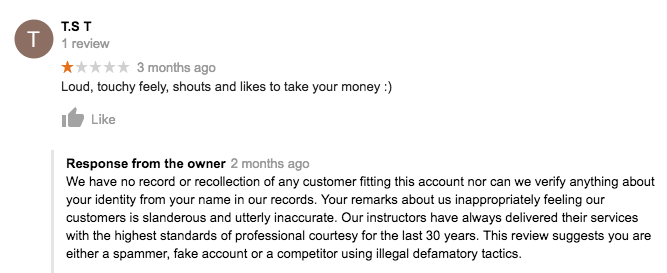
This looks like a fake review where the business couldn’t find any record of the reviewer.
The owner explained the situation calmly and defended the company’s professional reputation. However, a shorter and softer response would sound more polite and less defensive.
2. Johnny Wordsworth – Possible False Claim
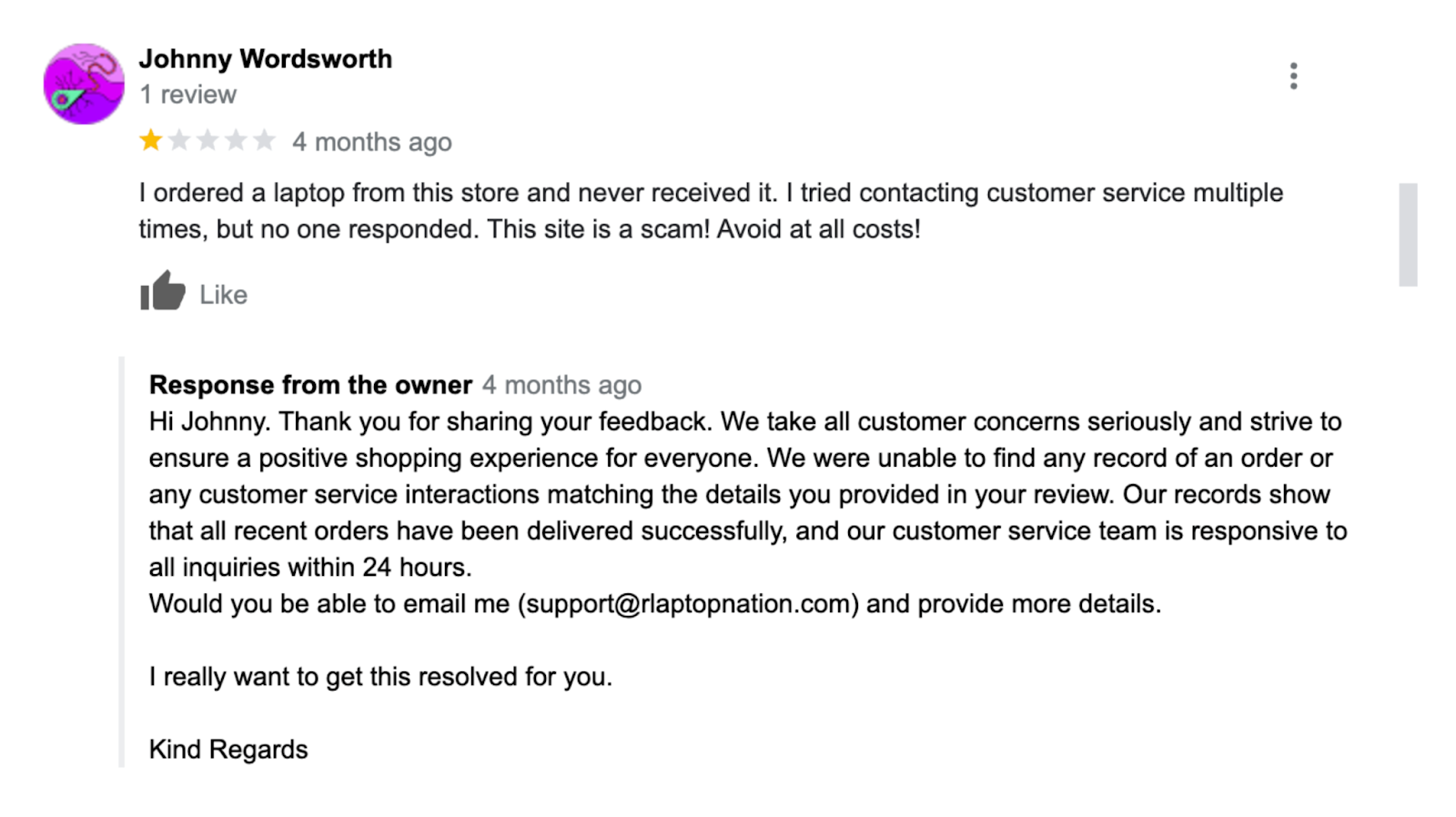
The reviewer claimed a missing order, but the owner’s records didn’t match the details. The reply stayed polite and factual, showing how to handle false or mistaken feedback clearly.
The owner also invited the reviewer to email for resolution, which helps maintain customer trust and transparency.
Respond to Google reviews automatically and professionally with WiserReview
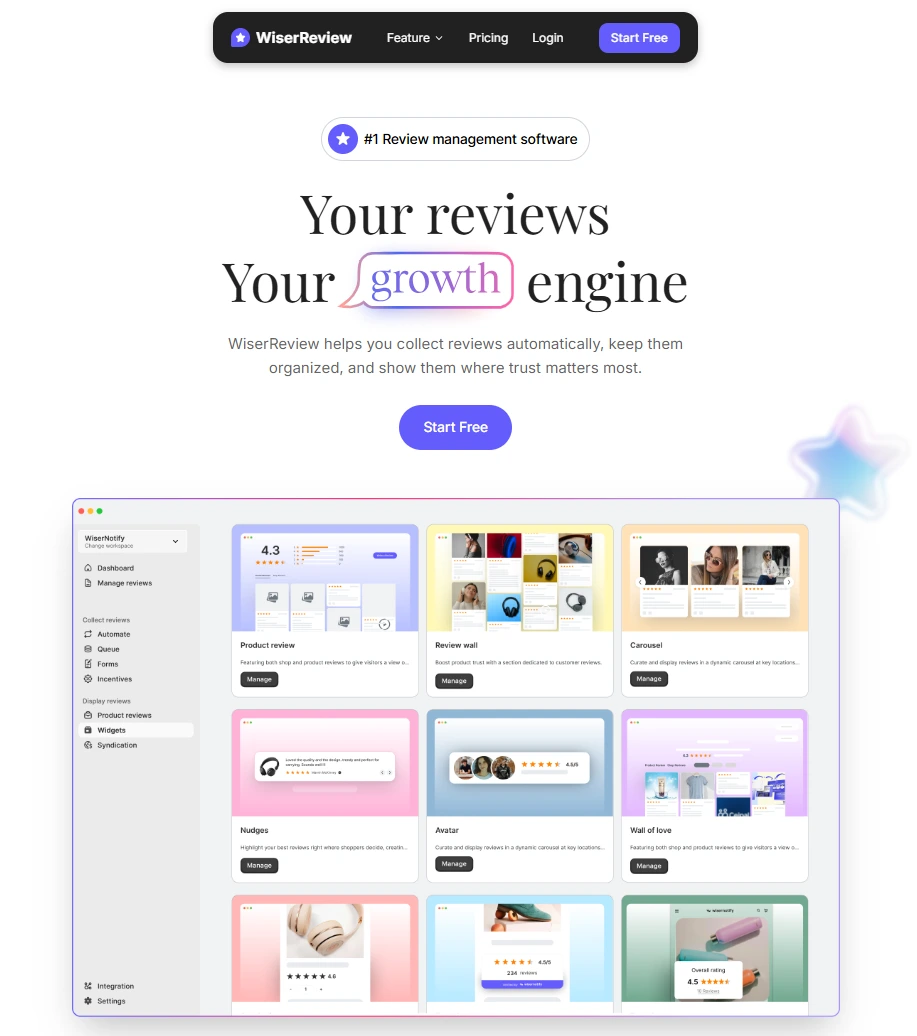
Managing Google reviews manually can take time, especially when your business receives new online reviews every day.
WiserReview makes it simple by helping you reply automatically with a professional and courteous tone while keeping every message personal.
With WiserReview, you can:
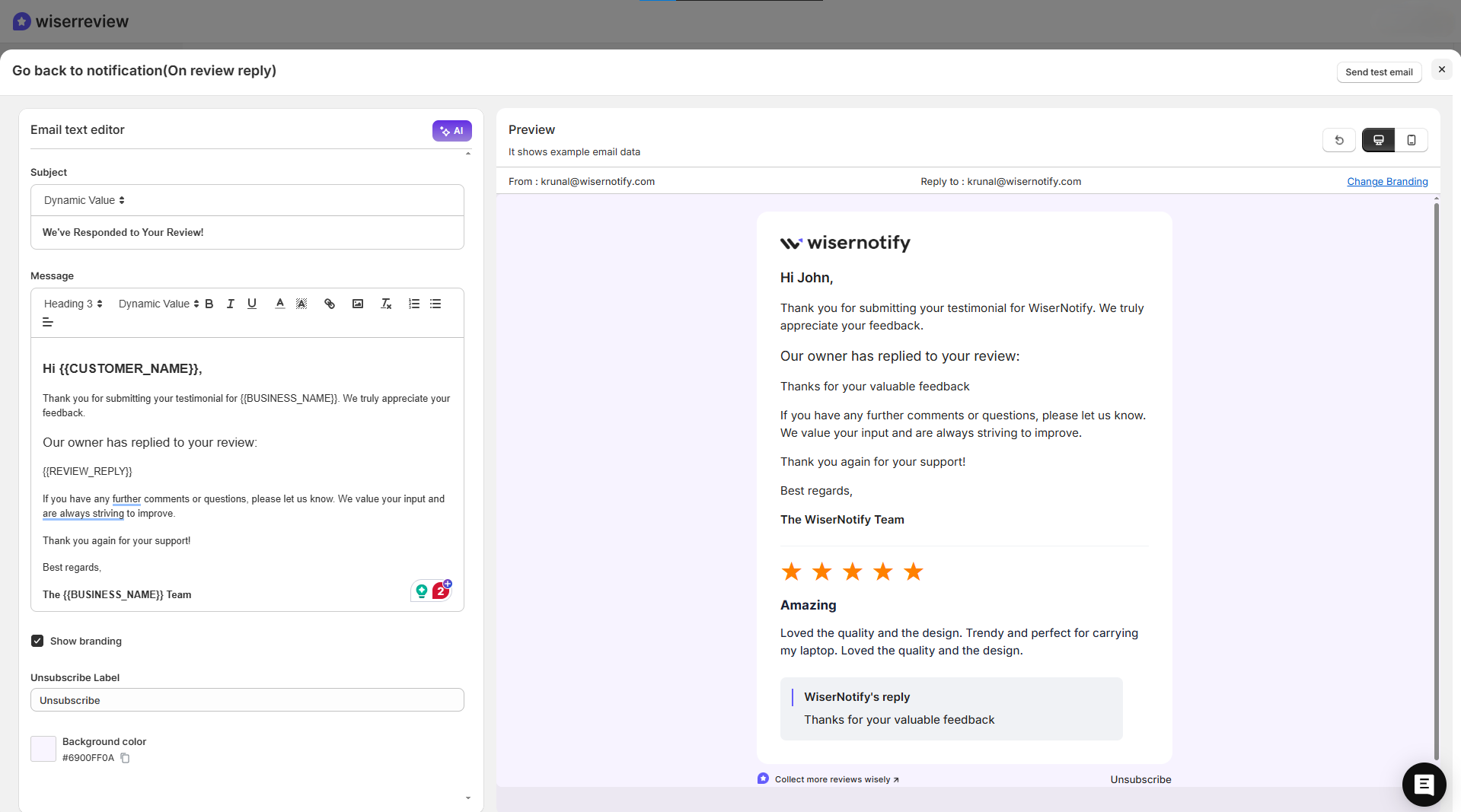
- Set auto-reply templates for both positive and negative reviews.
- Customize your tone using smart filters that match your brand reputation and customer satisfaction goals.
- Use AI-assisted suggestions to create polite and natural replies in a timely manner.
You can also collect reviews faster using email, SMS, or WhatsApp review requests.
Each request is timed perfectly after a purchase or visit, helping more customers leave reviews and share their positive feedback.
Once reviews start coming in, WiserReview lets you:
- See all reviews in one review management dashboard.
- Reply instantly without switching tabs.
- Display your best reviews on your website or product pages with a Google review widget like the Review Wall, Carousel, or Star Ratings.
These tools help build stronger customer relationships, improve online reputation, and attract more potential customers who trust real experiences.
All your reviews in one place
Collect reviews, manage every response, and display them where they matter most.
Start Free →Fundamentals & best practices for all responses
Here are the key points to keep every Google review response clear, polite, and consistent, no matter if it’s good, bad, or fake.
Tone, Style & Approach
Keep your tone calm, polite, and real. Don’t sound robotic or defensive. Start by thanking the customer, talk about their point briefly, and end with a friendly note.
- Write like you’re speaking to a person, not writing a script.
- Use clear, everyday language.
- Stay kind even if the review feels unfair.
Timeliness & Consistency
Try to respond within a few days. Quick and steady replies show you care about your customers and their feedback.
- Check your Google Business Profile dashboard often for new reviews.
- Keep your replies consistent in tone, same level of care.
- Thank happy customers and handle negative reviews right away.
Privacy & Offline Escalation
Never share private details in public. If a problem needs more discussion, move it offline politely.
- Example: “Please email us at [email] so we can look into this for you.”
- Respecting customer privacy builds trust.
- It also keeps your business profile clean and professional.
When Not to Respond (or Keep It Short)
Not every review needs a long reply. If it looks fake or unrelated, keep your response short or skip it.
- Example: “We couldn’t find your record. Please reach out to us directly.”
- Flag fake reviews through your Google dashboard instead of arguing.
- Focus your time on real customer feedback that helps your business grow.
How to turn review responses into marketing assets
Your Google reviews don’t just build trust; they can become powerful marketing tools.
With WiserReview, you can turn your best customer feedback and review responses into ready-to-share visuals for social media, helping your business grow through real customer experiences.
Step-by-Step: Share Reviews on Social Media with WiserReview
1. Connect your social accounts
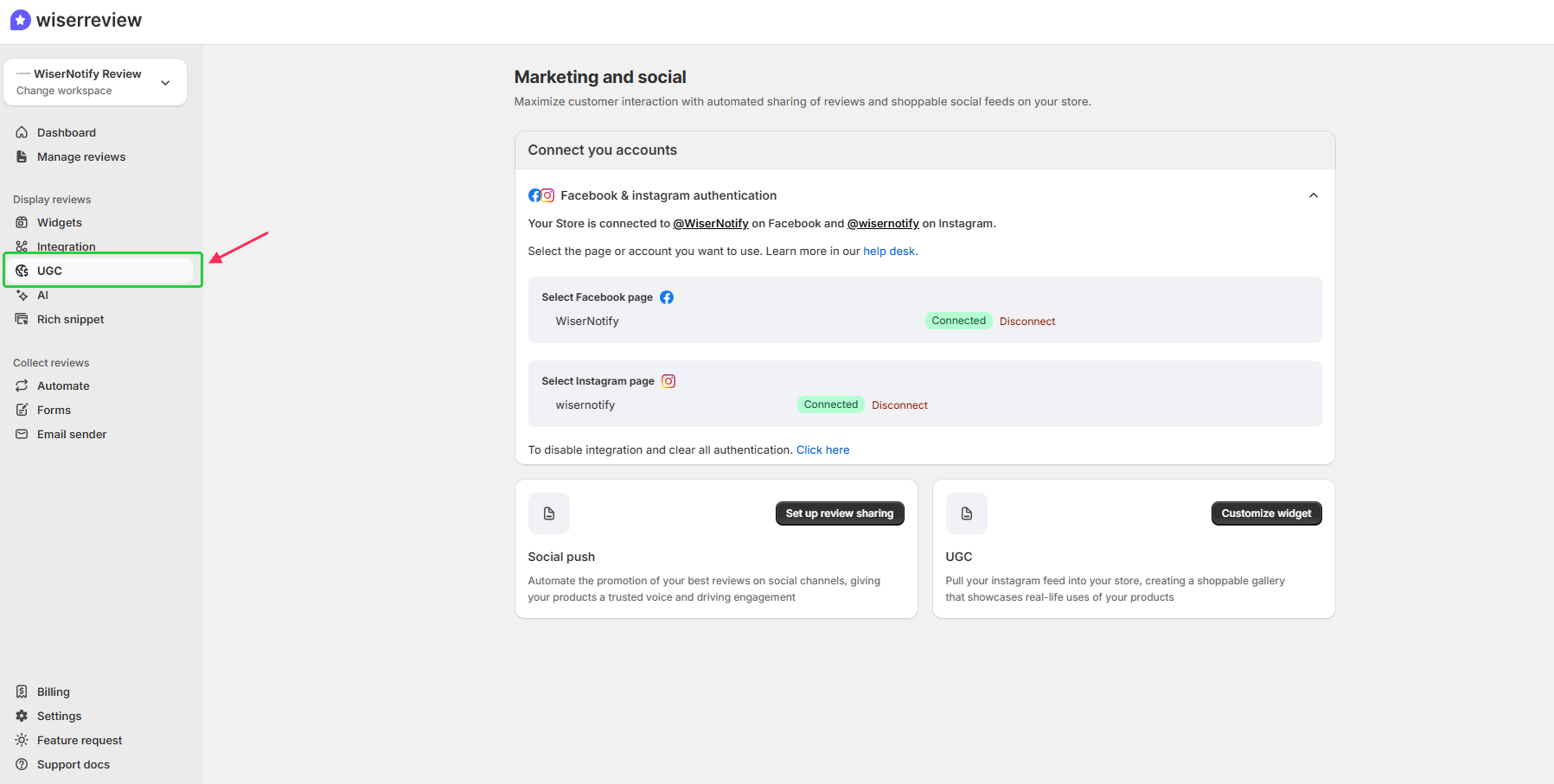
First, sign up for WiserReview and go to your dashboard → UGC (User-Generated Content) section.
Securely connect your Facebook and Instagram pages. Once connected, you can post your top Google reviews or review replies automatically.
2. Set up social sharing
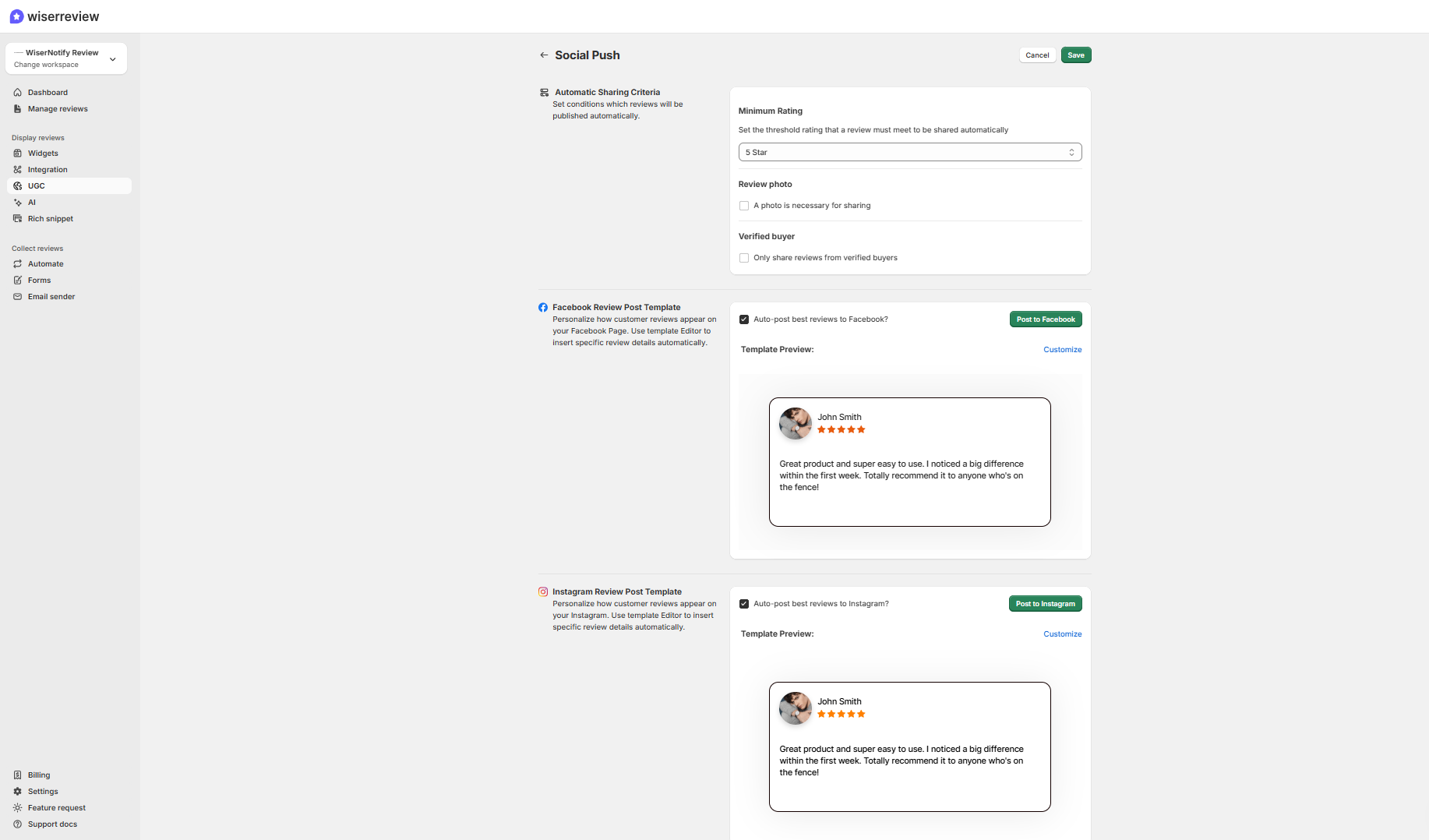
Click on “Set up review sharing” under the Social Push section. Choose which types of online reviews you want to share, like 5-star positive feedback or replies that show excellent customer service.
3. Customize the post style
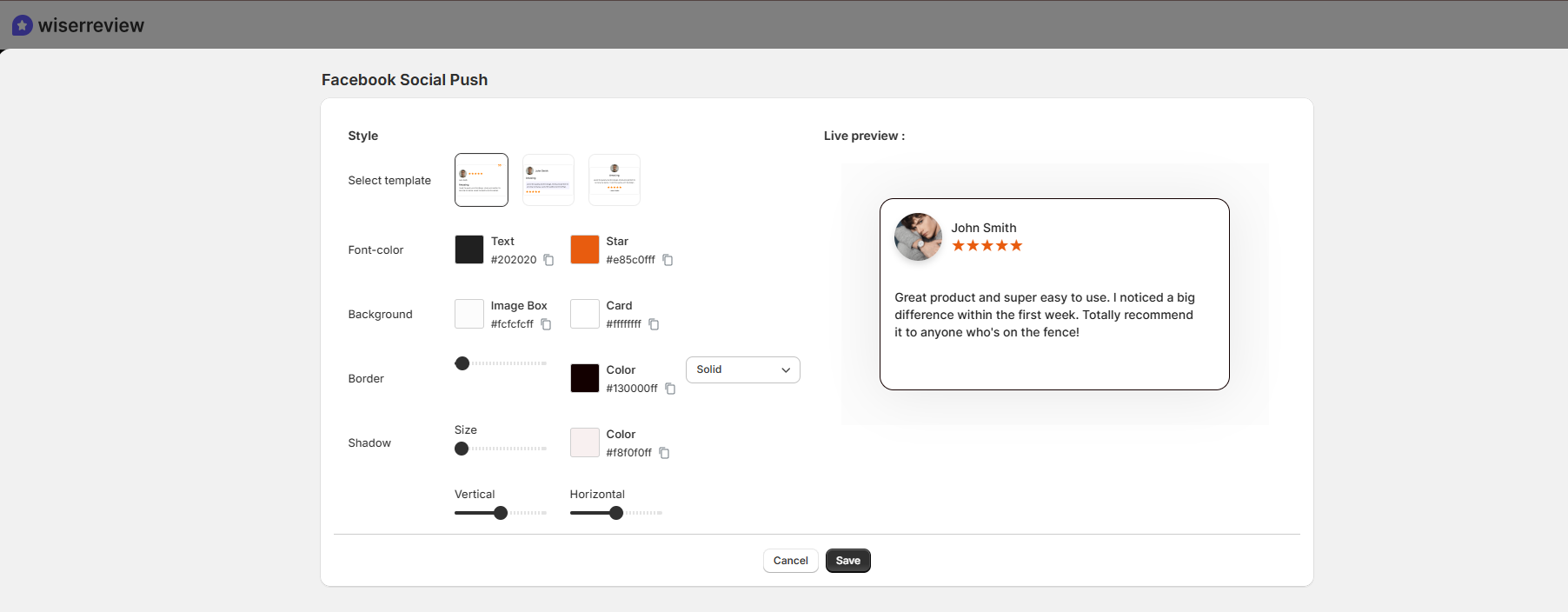
Add your logo, pick brand colors, and use clean layouts to match your business style. WiserReview templates keep posts simple and professional so your positive reviews stand out naturally.
4. Auto post instantly
You can auto-post to share new reviews instantly after a customer’s experience. This helps keep your business profile active and your followers engaged.
5. Create a UGC gallery for your store
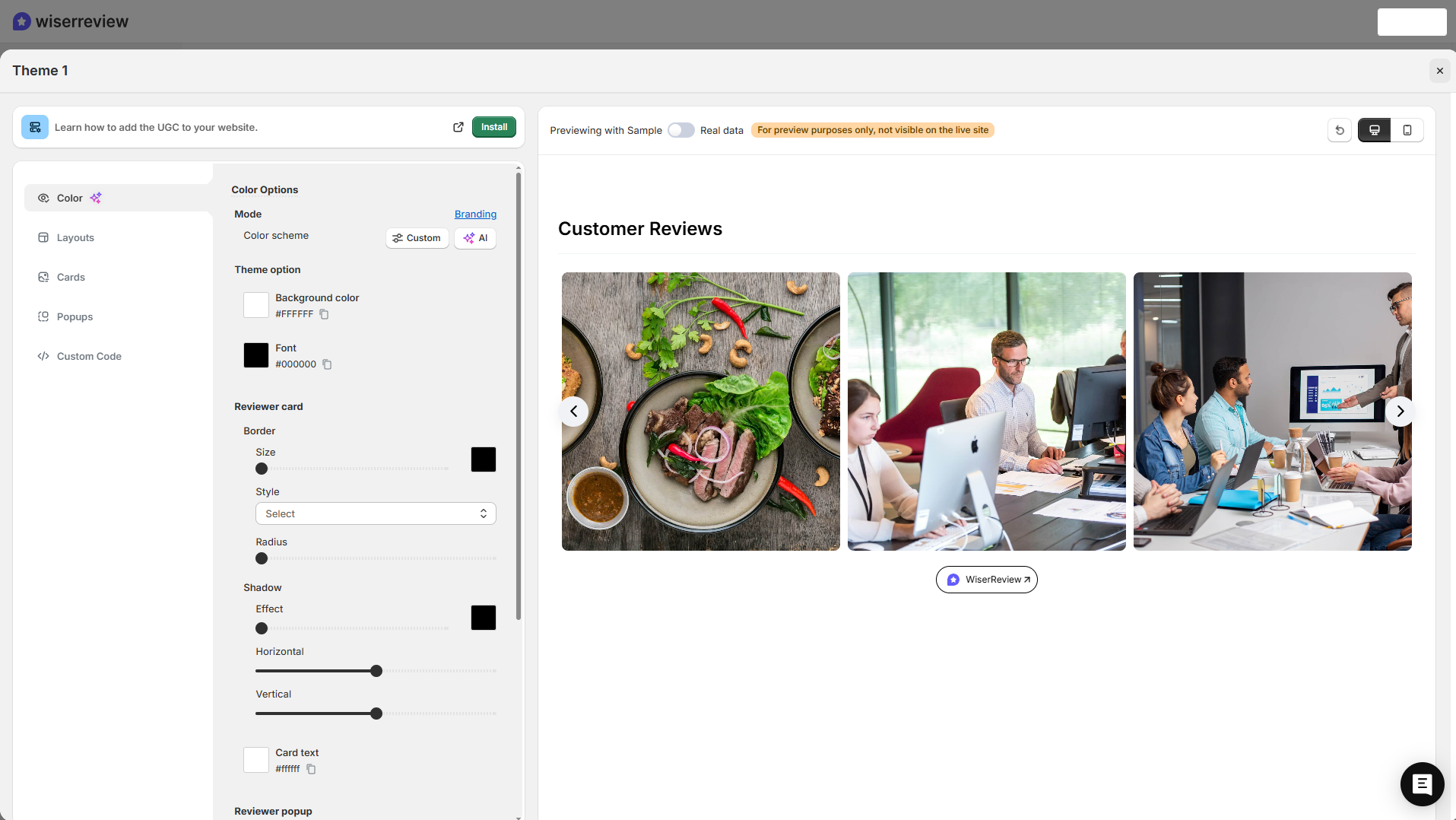
Use the UGC widget to pull your Instagram feed into your site. It builds a live gallery of real customer posts and positive reviews, helping potential customers trust your products faster.
Best Practices for Review-Based Marketing
- Share reviews that highlight your brand reputation and customer satisfaction.
- Keep posts short and genuine, let your real customers speak for you.
- Add your review responses to show you value feedback and stay connected.
- Rotate between loyal customers, new buyers, and first-time reviewers.
- Always get consent before using photos or names from customers.
All your reviews in one place
Collect reviews, manage every response, and display them where they matter most.
Start Free →Wrap up
Responding to Google reviews builds credibility and trust. A simple, polite reply shows that your business listens and values every customer.
Thank people for good feedback, stay calm with complaints, and keep replies short and respectful.
Consistent, thoughtful responses help improve your online reputation, strengthen customer relationships, and make your business stand out to new customers.
Frequently asked questions
Try to respond within two to three days. Quick replies show that your business is active and values customer feedback.
Keep your response short and polite. Say you couldn’t verify the reviewer, then flag the review in your Google Business Profile dashboard for review.
Yes. Replying to all positive and negative reviews shows you care about your customers’ experience and helps build trust.
Stay calm, thank the customer for their feedback, and offer to resolve the issue privately. A polite reply helps protect your brand reputation.
Yes. WiserReview lets you set auto-reply templates for positive and negative reviews, saving time while keeping your tone professional and consistent.

Krunal