4 min
4 min 
A review request email helps businesses collect more online reviews from real customers. It turns simple messages into feedback that builds trust and improves the customer experience.
When you send a clear, friendly email after a recent purchase, customers feel valued and are more likely to leave honest reviews. These reviews become strong social proof that helps new buyers make informed decisions.
Good review request templates save time and get better results. They use personal tone, short messages, and direct review links so customers can share positive feedback in minutes.
This guide shows seven proven email examples that you can copy, edit, and use right away to collect more reviews and improve your brand’s reputation.
Why review request emails matter

A review request email directly impacts how customers see your business. It helps collect valuable feedback from every recent purchase, which shows what your team is doing right and what needs work.
Online reviews act as proof of trust. According to 85% of consumers, they trust online reviews as much as personal recommendations.
Sending regular review emails helps businesses turn happy customers into promoters and allows unhappy customers to share problems before posting negative reviews publicly.

Manage all your reviews in one place
Collect reviews, automate requests, and display them beautifully with WiserReview.
Start Free →7 Proven review request email examples
Here are 7 proven review request email examples that show how real brands ask for customer feedback in simple, genuine ways.
1. Camera Ready Cosmetics
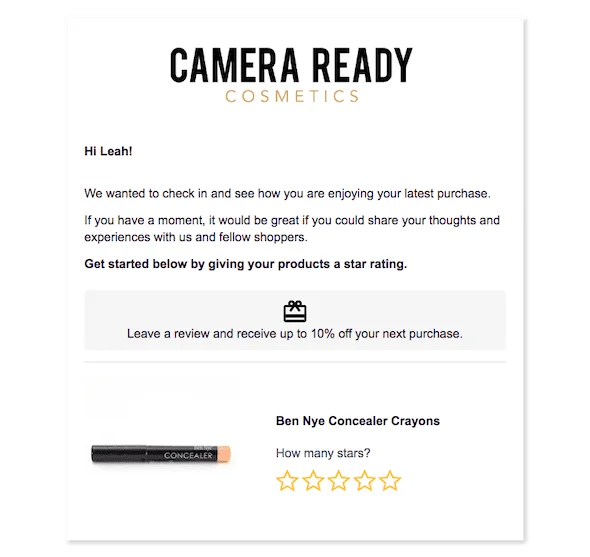
Camera Ready Cosmetics sends a kind follow-up asking how customers liked their recent purchase.
It keeps the tone friendly and adds a small reward, 10% off the next order, to encourage more reviews. The simple design and clear star rating make it easy for people to share quick feedback.
2. Amazon

Amazon’s email goes straight to the point. It asks customers to rate both the item and the seller in one step.
This helps collect honest reviews fast and gives new shoppers useful insights. The message feels short, clear, and easy to act on.
3. TradeGecko
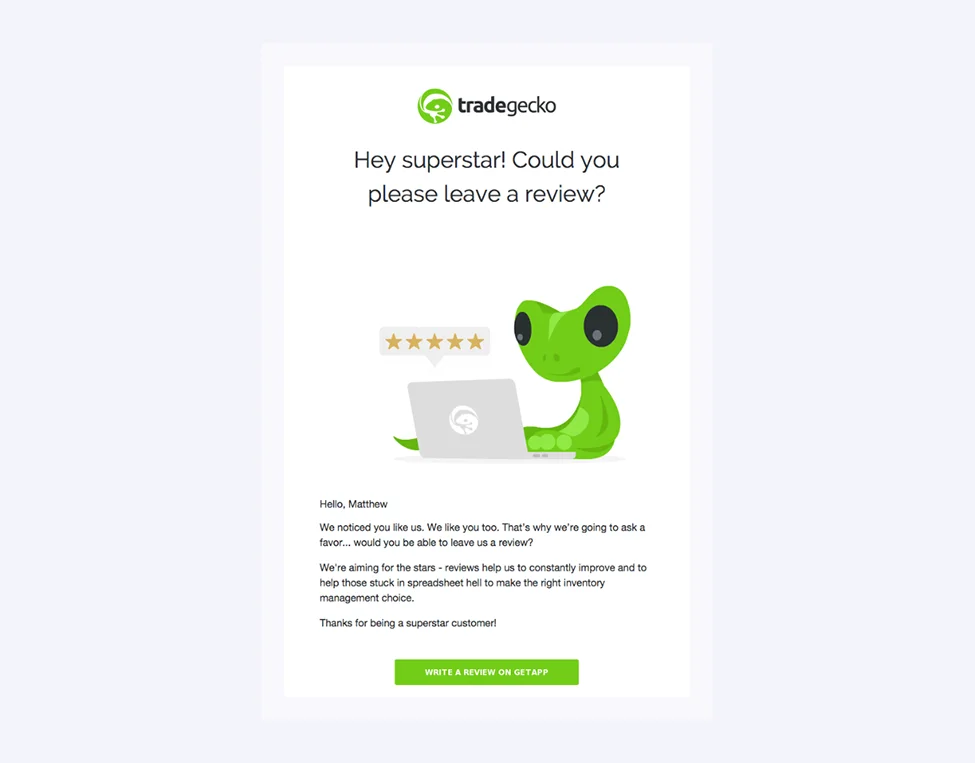
TradeGecko uses a fun, positive tone that feels personal. The message thanks the buyer and invites them to share a quick review.
It also reminds them that their feedback helps others make better choices. The friendly wording and bright visuals keep it engaging.
4. Outdoorsy
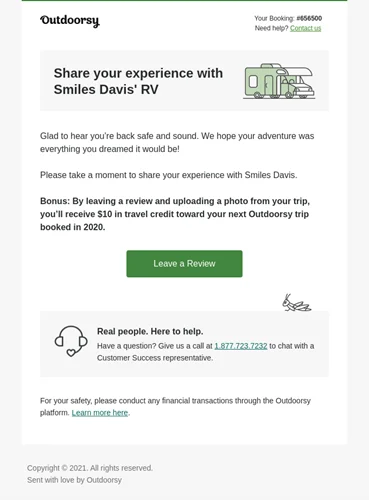
Outdoorsy sends a warm, travel-inspired review request email that feels personal.
It mentions the customer’s trip and offers a $10 credit for sharing a review and photo. The message builds a connection while gently motivating the customer to respond.
5. Chapelle Jewellery
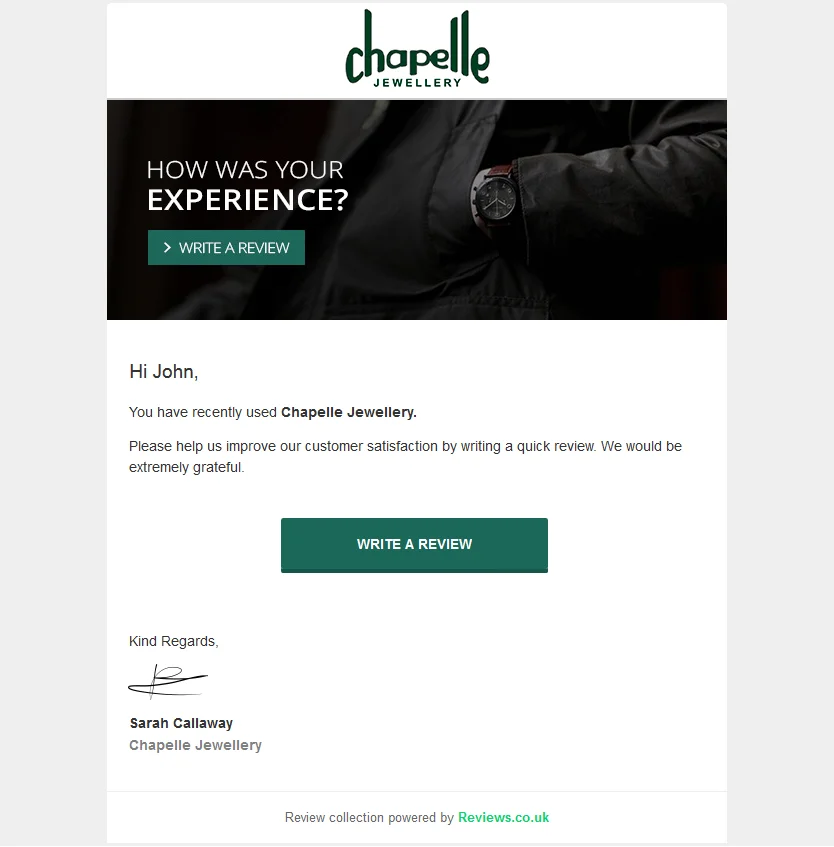
Chapelle Jewellery’s message is simple and polite. It thanks the buyer and asks for a quick review to help improve service.
A single, clear button makes it easy to reply. The friendly tone helps strengthen trust and keeps the process smooth.
6. Papier
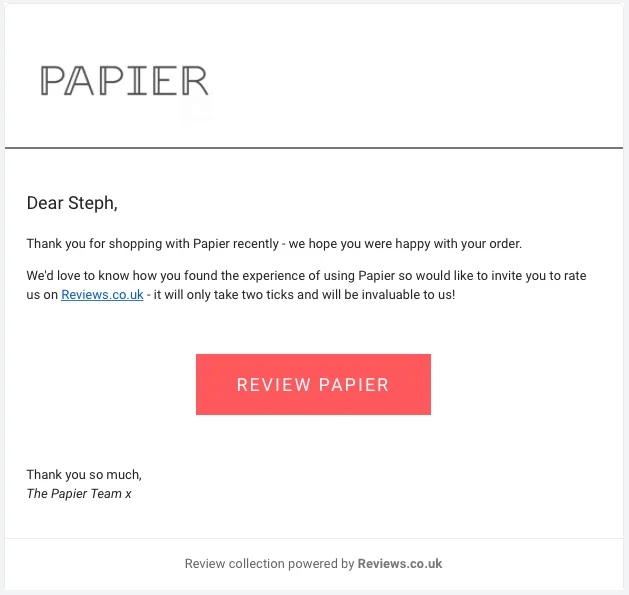
Papier keeps things clean and friendly. The message thanks the customer and invites them to rate their order with one click.
The short copy and bold “Review” button make it easy to finish in seconds. It’s a great example of a quick and thoughtful review email.
7. Sunsoil
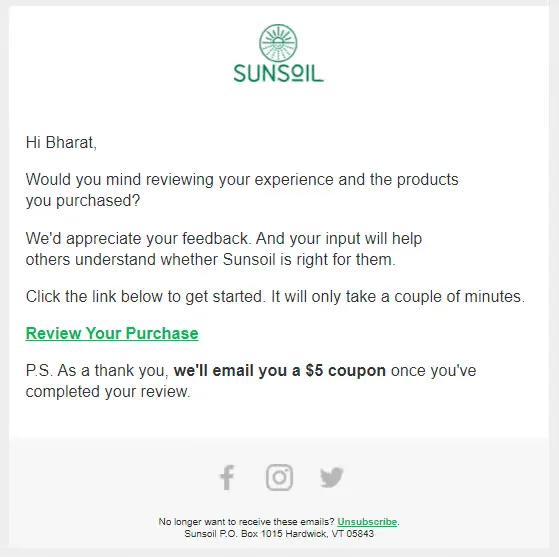
Sunsoil’s email is warm and appreciative. It thanks the buyer for their order and asks for a short review. It also offers a small $5 coupon as a thank-you.
The tone feels natural and genuine, which encourages more people to share their experiences.
Manage all your reviews in one place
Collect reviews, automate requests, and display them beautifully with WiserReview.
Start Free →4 Best practices before you write your email
Here are the 4 best practices to follow before you write your review request email.
➔ Know your audience
Start by understanding who will read your email. A first-time buyer may still decide if they trust your brand.
They need context and clear instructions. A repeat customer already knows your product and expects a quick request. When you write one message for everyone, it feels generic.
➔ Timing matters
Send the email when the customer finishes the experience. For ecommerce, wait until the product arrives and gets used. For digital products, wait until the user completes a key action. For services, wait until the work ends. If you send the email too early, the customer has nothing to say.
➔ Choosing the right platform kink
Always send customers to a platform they already trust. Avoid asking them to create new accounts or fill out long forms.
Use one clear link and place it where users can see it fast. Each extra step reduces the chance of a completed review. Simple paths collect more reviews with less effort.
➔ Staying compliant & respectful
Follow email and privacy laws in every region you operate. Make it clear why you are contacting the customer.
Always include an easy opt-out option. Never pressure or force a review. Respect builds trust and protects your brand reputation. Customers respond better when they feel in control.
Anatomy of an effective review request Email
Here are the key parts of an effective review request email.
Subject line tips
The subject line creates the first impression. It should explain the purpose clearly and sound friendly. Short lines work best because they are easy to read on any device. Avoid sales or urgent language, as it can reduce trust.
Best practices for subject lines:
- Keep it short and clear
- Use a friendly tone
- Add context when possible
- Avoid promotional words
- Focus only on the request
Email body structure
The email body should guide the reader step by step. Each section should serve one goal. A clean layout helps readers act faster. Long or crowded messages reduce responses.
A clear email body includes:
- A polite greeting
- A short reminder of the purchase or service
- A simple request for feedback
- One visible review link
- A brief thank-you at the end
Manage all your reviews in one place
Collect reviews, automate requests, and display them beautifully with WiserReview.
Start Free →WiserReview: Automate review request emails
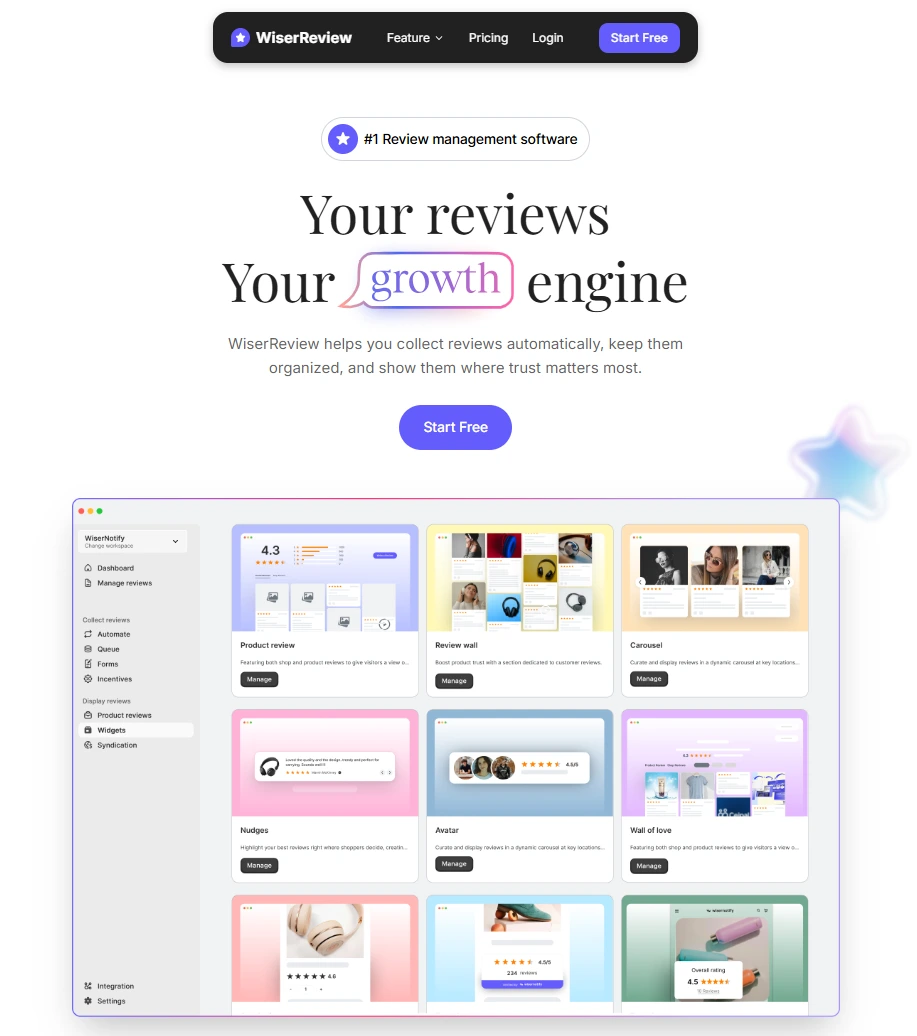
WiserReview makes it easy to send review request emails automatically from your dashboard. You don’t need to send each message manually or worry about timing; the system handles everything for you.
Once you connect your store, WiserReview detects each recent purchase and triggers a friendly, branded email template asking for customer feedback. You can customize the subject line, message, and timing to match your brand voice.
Here’s a clear step-by-step guide to set it up:
1. Sign up for WiserReview. After that, a dashboard will appear.
2. Go to the Automate module
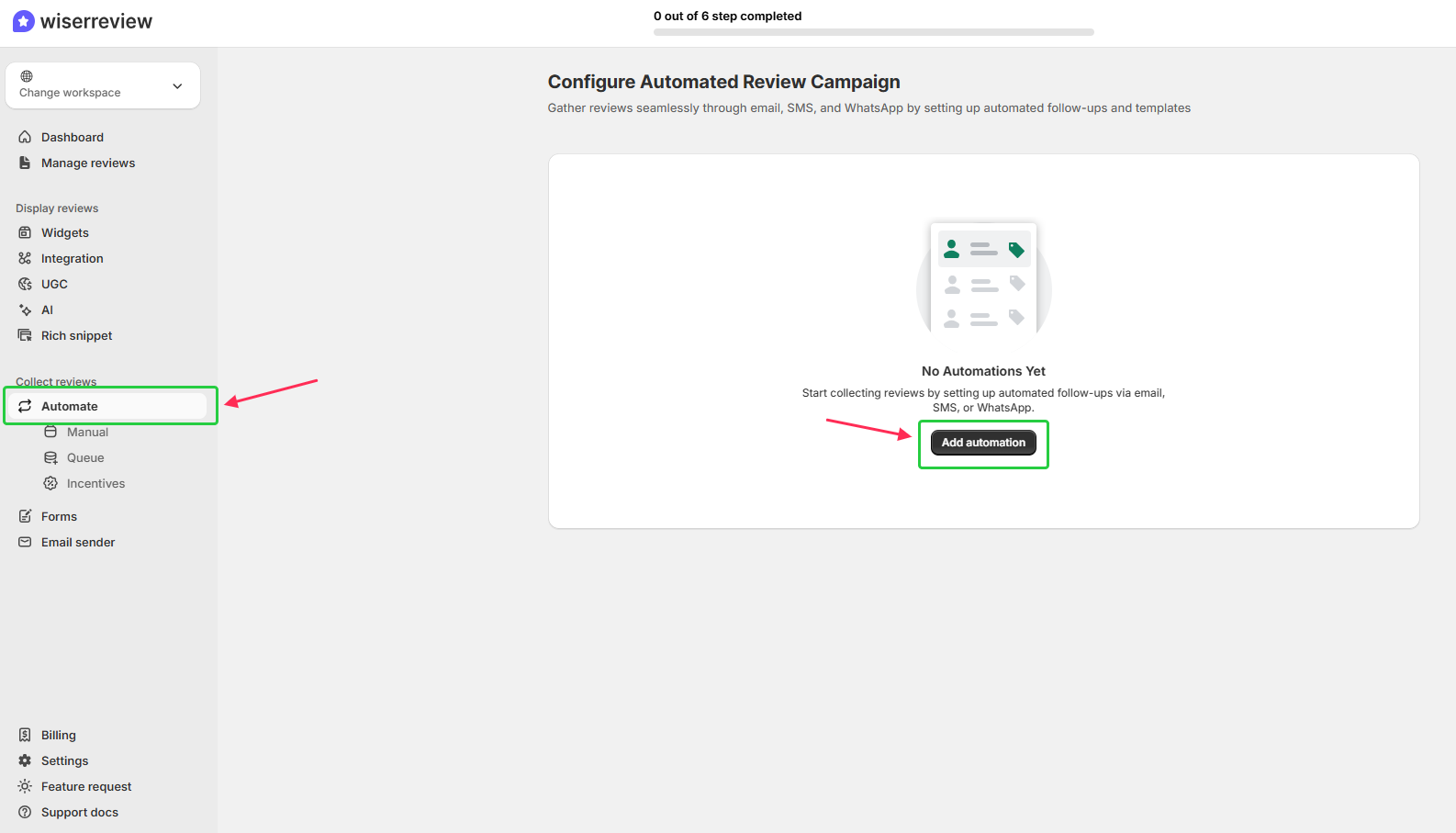
- Navigate to Collect reviews > Automate from the left-hand menu in the dashboard.
- Start a new campaign by clicking the black Create automation button on the top right.
3. Choose your platform
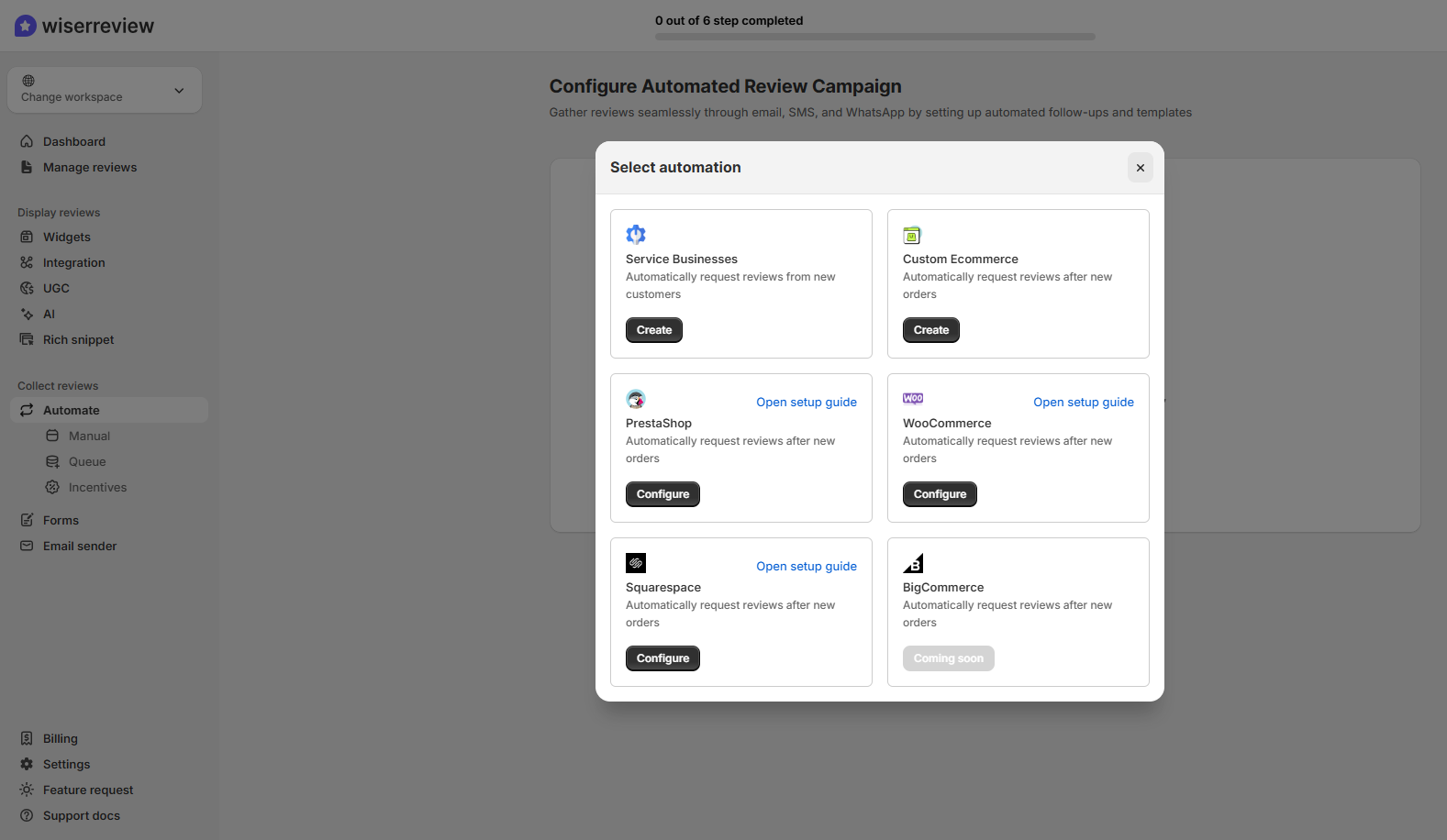
- Select your platform (e.g., Custom Website, WooCommerce, PrestaShop, Squarespace, etc.) and click Create or Configure.
- Once you submit the API key, the review collection automation will be created automatically.
4. Connect a data source to trigger requests
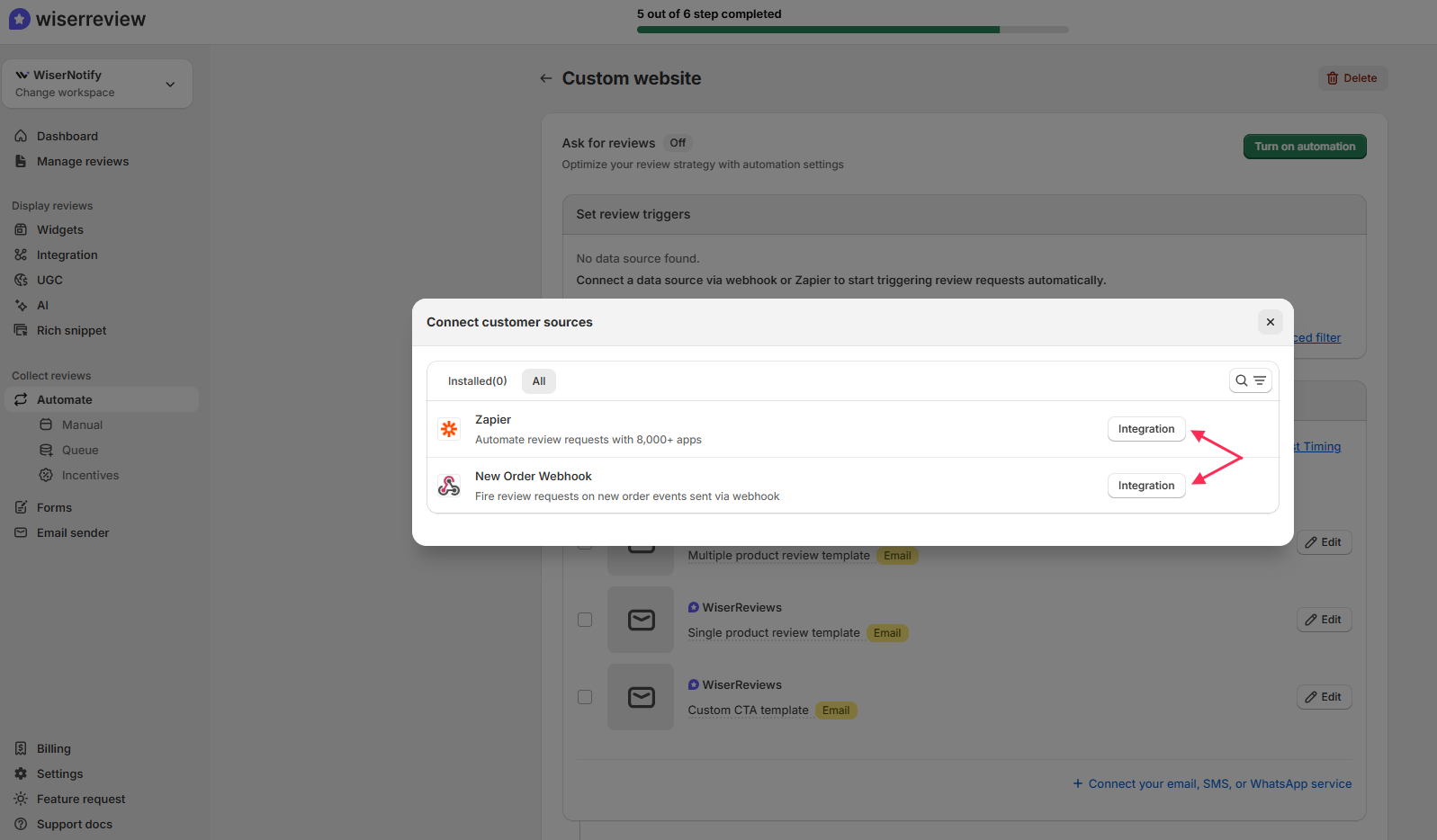
Use Webhooks, Zapier, or platform-native triggers (such as “new order”) to start the review request workflow automatically.
5. Set templates and schedule for email/SMS/WhatsApp
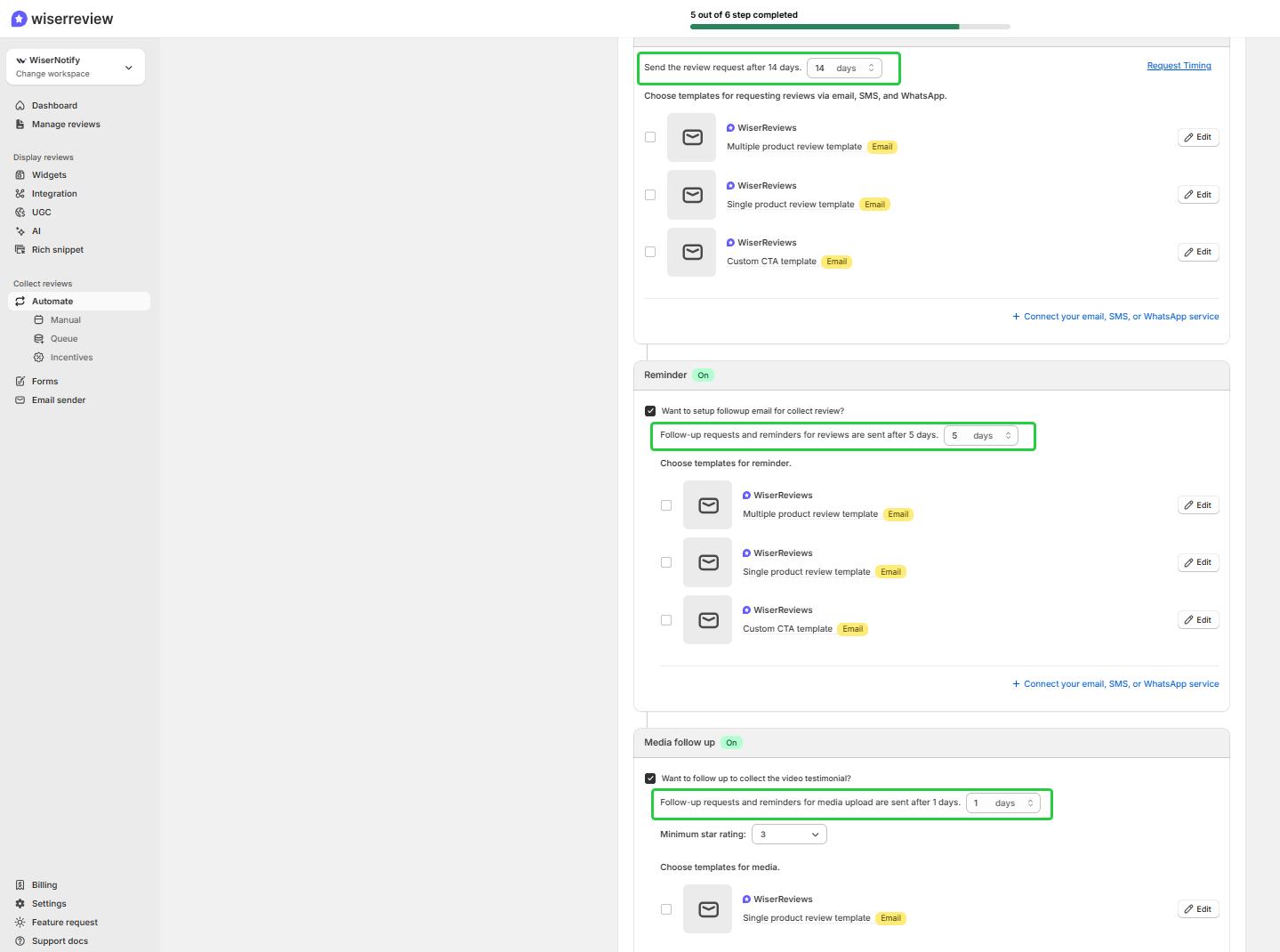
Choose when to send the first request (e.g., 14 days after).
Add follow-up reminders (e.g., after 5 days).
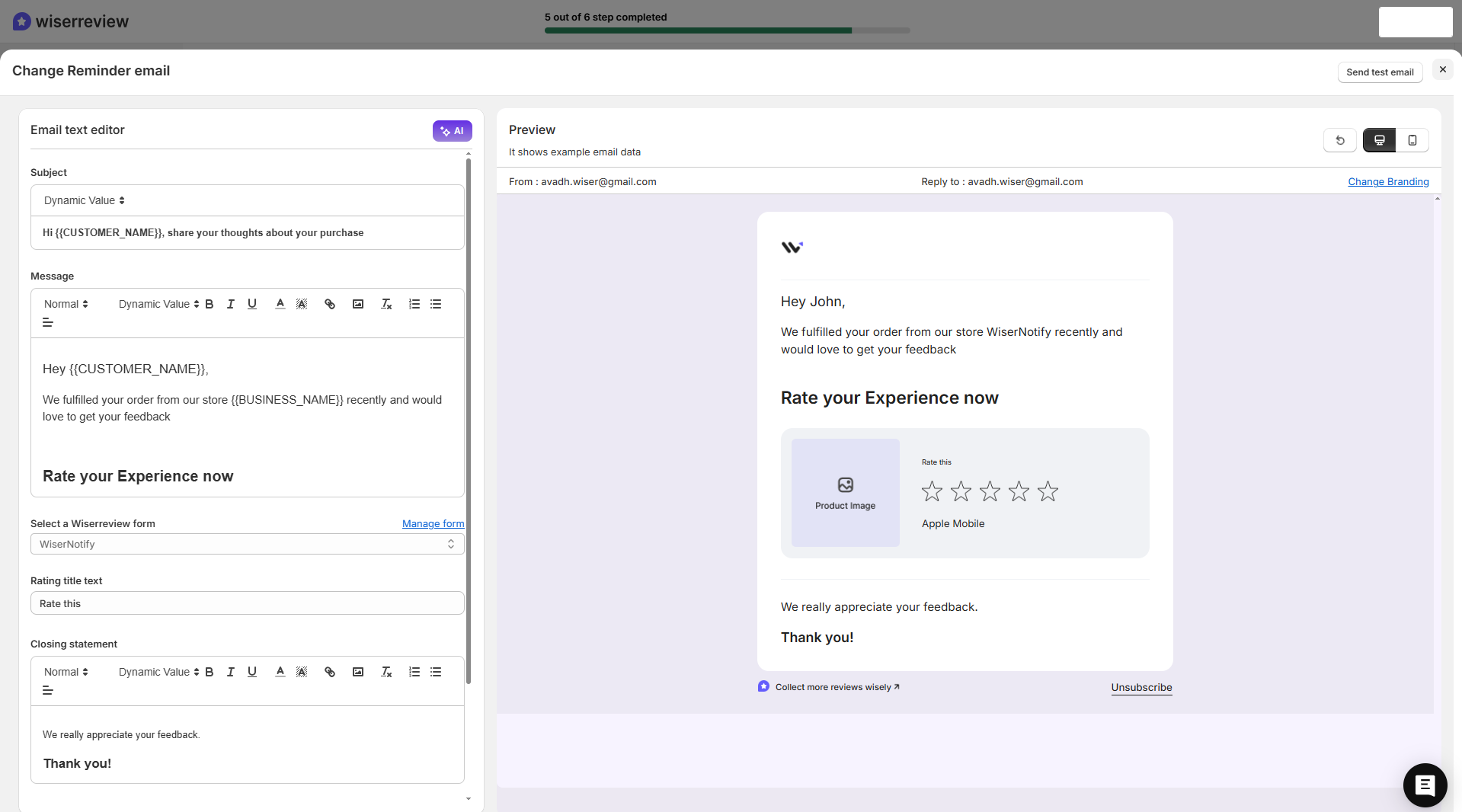
Customize templates for Email, SMS, or WhatsApp.
6. Click “Turn on automation”
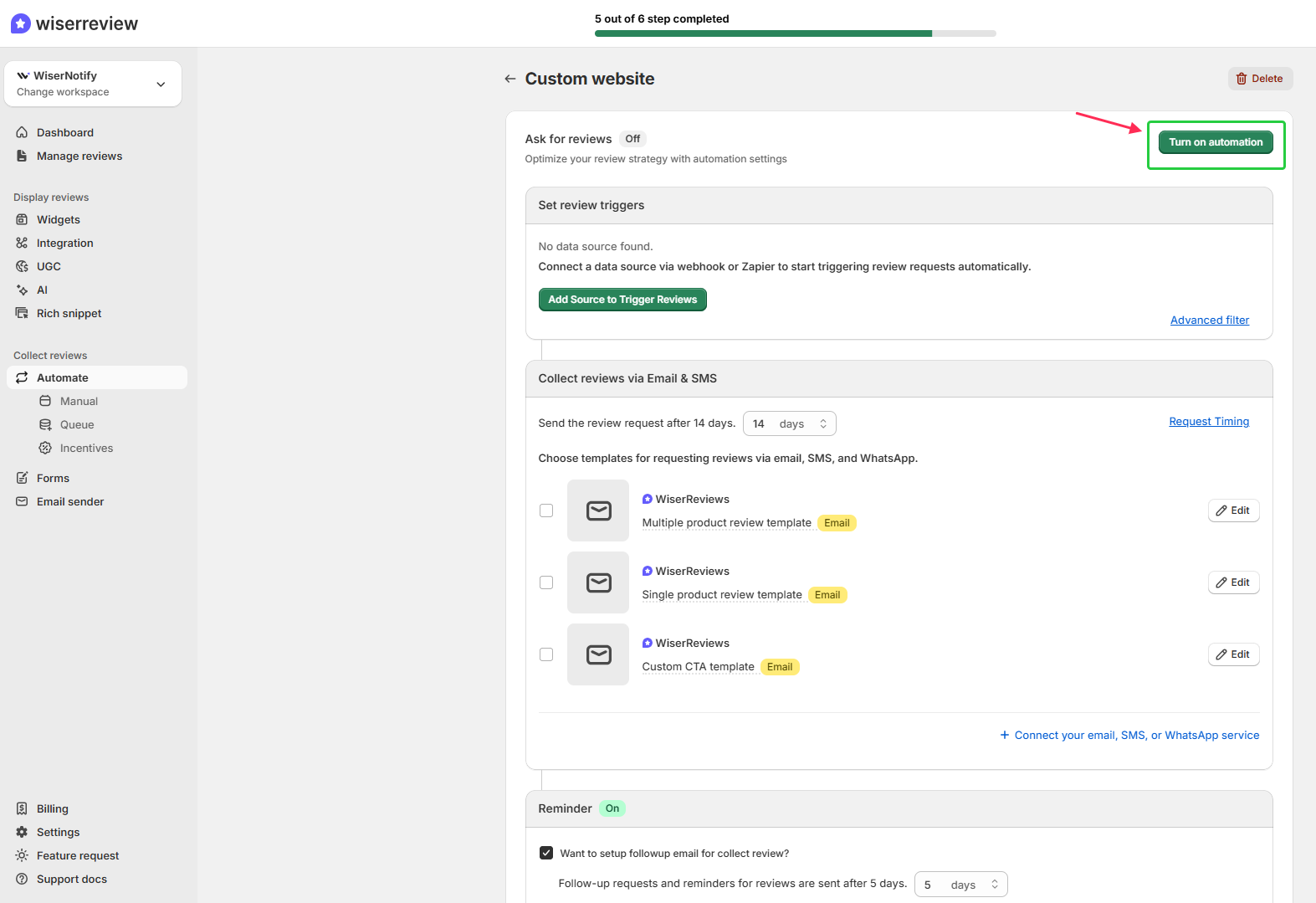
Finalize your setup and enable the automation to start collecting reviews.
Manage all your reviews in one place
Collect reviews, automate requests, and display them beautifully with WiserReview.
Start Free →7 Proven review request email templates
Here are seven proven review request email templates you can copy and customize.
1. Post-purchase review request
Send this email right after a recent purchase while the experience is still fresh. A quick thank-you and a direct review link help customers share honest reviews easily.
Template:
Subject: How was your recent order with [Business Name]?
Body:
Hi [First Name],
Thanks for shopping with us! We’d love to hear how everything went.
Your feedback helps us improve and guide other shoppers.
Can you take a minute to leave a quick review?[Leave a Review]
Thank you,
The [Business Name] Team
2. Service feedback Email
This works best for service-based businesses that want to understand their customer experience. It’s simple, friendly, and helps avoid negative reviews by fixing problems early.
Template:
Subject: How did we do?
Body:
Hi [First Name],
We hope you enjoyed our service. Your feedback helps us improve every day.
Could you share a quick review of your experience?[Share Feedback]
Thanks for helping us grow,
The [Business Name] Team
3. Loyal customer appreciation request
Loyal customers are the most reliable source of positive reviews. A warm thank-you and a clear request make them happy to share their experience.
Template:
Subject: Thank you for being a loyal customer 💜
Body:
Hi [First Name],
We truly appreciate your continued support.
Would you mind sharing your experience to help other potential customers find us?[Write a Review]
Your review means a lot to us,
[Business Name]
4. Follow-Up reminder Email
Sometimes customers forget to review. A short reminder can bring in more reviews without feeling pushy.
Template:
Subject: Just a quick reminder 😊
Body:
Hi [First Name],
We noticed you haven’t shared your thoughts yet on your recent order.
It only takes a minute, and your feedback really helps us out.[Leave a Quick Review]
Thanks again,
[Business Name]
5. Happy customer trigger Email
Send this after receiving positive feedback from a chat, message, or survey. It turns private praise into public social proof.
Template:
Subject: Thank you for your kind words!
Body:
Hi [First Name],
We’re so glad you had a great experience!
Would you mind sharing your thoughts on our review page to help others?[Share Your Review]
We really appreciate your time,
The [Business Name] Team
6. Resolve-before-review Email
If a customer isn’t happy, this email helps your customer service team resolve the issue before asking for a review.
Template:
Subject: We’d like to make things right
Body:
Hi [First Name],
We’re sorry to hear you weren’t fully satisfied.
Please reply to this email and let us know what went wrong. We’ll fix it right away.
Your feedback helps us serve you better.Thank you,
[Business Name] Support
7. Incentivized review request
A small offer motivates customers to share honest reviews while feeling valued.
Template:
Subject: Share your review and get [Reward]% off your next order!
Body:
Hi [First Name],
We’d love to hear what you think about your recent purchase.
As a thank-you, enjoy [Reward]% off your next order after leaving a review.[Leave a Review]
We appreciate your support,
The [Business Name] Team
All your reviews in one place
Collect reviews, manage every response, and display them where they matter most.
Start Free →Wrap up
A review request email helps businesses collect customer feedback that builds trust and brings in more reviews. It turns a simple message into proof that real customers value your brand.
The best emails are short, personal, and clear. They thank the buyer, include one direct review link, and use a friendly tone that feels genuine. This simple approach improves the customer experience and strengthens your brand reputation.
Using WiserReview, you can automate these emails, send them right after a recent purchase, and track all responses in one place. It saves time and keeps your review process consistent and effective.
Frequently asked questions
Send your review request email within 1–3 days after a recent purchase or service. The experience is still fresh, and customers are more likely to share honest feedback.
Send one main review email and one gentle follow-up reminder if the customer hasn’t responded. Avoid sending more to keep the message friendly, not repetitive.
Yes, but keep it small and genuine, like a discount or coupon. Make it clear that you value honest reviews, not just positive feedback.
Always include a thank-you line, a short message, and one clear review link. You can also mention how the customer’s feedback helps improve products or services.
WiserReview automates review request emails, sends them at the right time, and tracks results. It helps you collect more online reviews and manage responses easily from one dashboard.

Krunal