5 min
5 min 
When you report a Google review, it is a step often taken by a business owner to protect their reputation. Google’s system takes your report, often called “flagging”, and puts it into a queue. A mix of automated tools and actual Google employees will then review the content.
If the review violates one of Google’s official rules (like containing hate speech or being a fake review), it will be removed. If the review is just a negative review based on a customer’s genuine experience, it will stay up, even if you disagree.
In this article, we’ll explore what really happens when you report a Google review and how it affects your online business reputation.
What is the Google Reviews policy?
The Google reviews policy is a set of guidelines designed to ensure feedback is honest, relevant, and helpful to customers. It focuses on ensuring every online review reflects a real experience and is respectful.
The rules strictly forbid spam, false information, sexually explicit content, illegal material, or inappropriate reviews that include harassment or hate speech.
They also ban reviews from individuals with a conflict of interest, such as employees or competitors attempting to post negative Google reviews.
What happens behind the scenes (Process)
When you flag a review on your Google Business Profile, you start an internal check by Google.
It is a mix of computers and people making decisions; understanding this process helps set the right expectations for a business owner dealing with negative reviews.
Google’s intake/review of your report
Once you submit a report (flag) for review on your profile:
- Google immediately records your report for the Google review report and assigns a status such as “Decision Pending”.
- Google screens the review using automated systems & human moderation; they check whether the review violates policy (such as spam, fake content / inappropriate content).
For example, if a review contains numerous curse words or is a copy-paste of a review from elsewhere (spam), the system can flag it immediately.
Human moderation vs algorithmic screening
- Google’s automated systems first scan the reported review. These algorithms look for apparent violations such as spam behavior, fake user profiles, copied text, or mass review posting.
- If the system detects a clear policy break, the review may be flagged or removed automatically.
- When the case is not apparent, such as a review that seems real but contains conflict or unclear intent, the review is sent to human reviewers.
- Human moderators verify whether the review accurately reflects a genuine customer experience or contains policy-violating content, such as hate speech, personal attacks, or inappropriate language.
- If moderators find no violation, the review stays live, even if it is negative.
This process ensures that not every negative review gets removed, only those that clearly violate Google policies.
Decision paths
After the review, Google’s team follows a few paths for the flagged review:
- Remove the Review: If the review is found to clearly violate Google policies (for example, if it’s a competitor’s fake reviews or includes restricted content). It is immediately removed from Google Maps and Google search.
- Leave it Live (No Violation): If the review is simply a negative rating or a bad review that accurately reflects a customer’s genuine experience and does not violate any rules (e.g., no hate speech, no spam), it will remain visible. You must remember that not all reviews or not every negative review can be taken down.
- Request Edits or Modifications: In rare cases, Google may contact the reviewer and request modifications to parts of the review that violate the rules.
Notification and status updates to the reporter
- Reporters do not get a notification that the reviewer has been informed or removed.
- Your status may change to “Escalated: check your email for updates”, “Report reviewed: no policy violation”.
- The review may remain visible while under review, and removal is not guaranteed.

All your reviews in one place
Collect reviews, manage every response, and display them where they matter most.
Start Free →How to report a Google Review (Methods)
There are several ways to report a review depending on the review platform:
1. Google Search / Profile panel
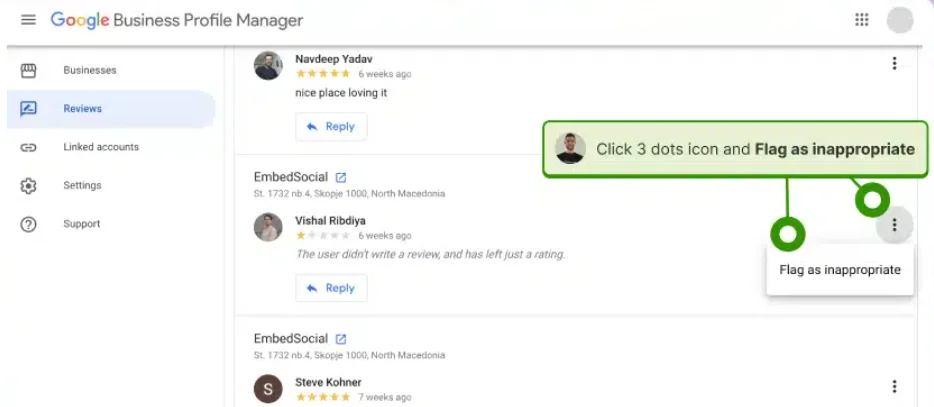
This is the fastest way for an owner to flag a review.
- Search your business on Google and open the review section.
- Find the review you need to report.
- Click the three vertical dots next to the review’s star rating.
- Select “Report review” or “Flag as inappropriate.”
- Choose the best reason that matches the review that violates policy and submit.
2. Google Maps
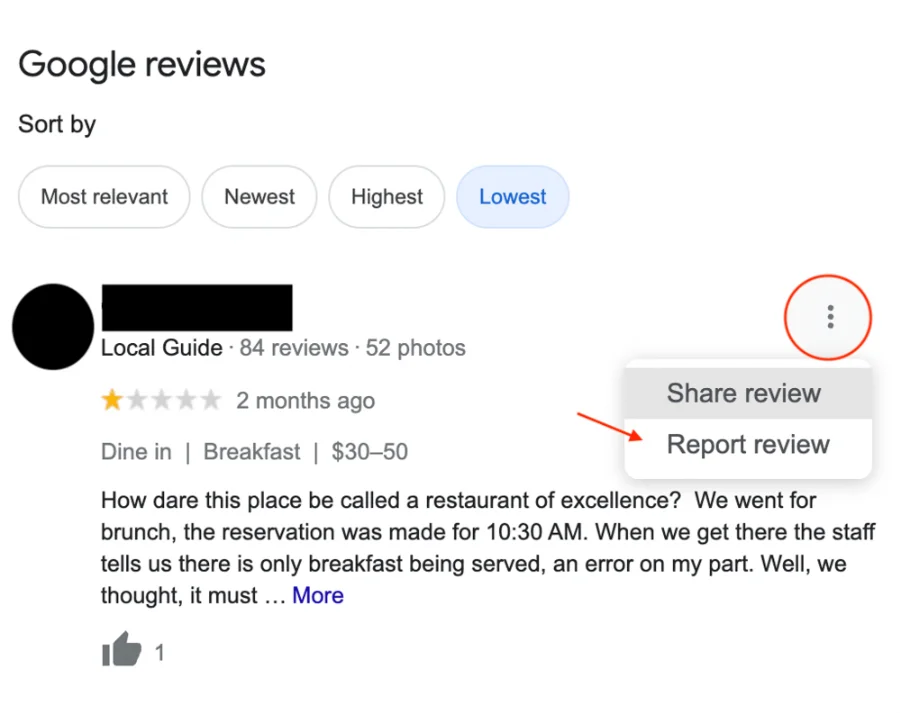
You can also use the Google Maps App on your phone or computer.
- Open Google Maps and locate your business.
- Please tap on the business to open its profile.
- Scroll down to the reviews section.
- Find the review, click the vertical dots next to it, and select “Report review.”
- Follow the prompts to select the type of violation (e.g., fake content).
3. Google Business Profile dashboard (“Flag as inappropriate”)
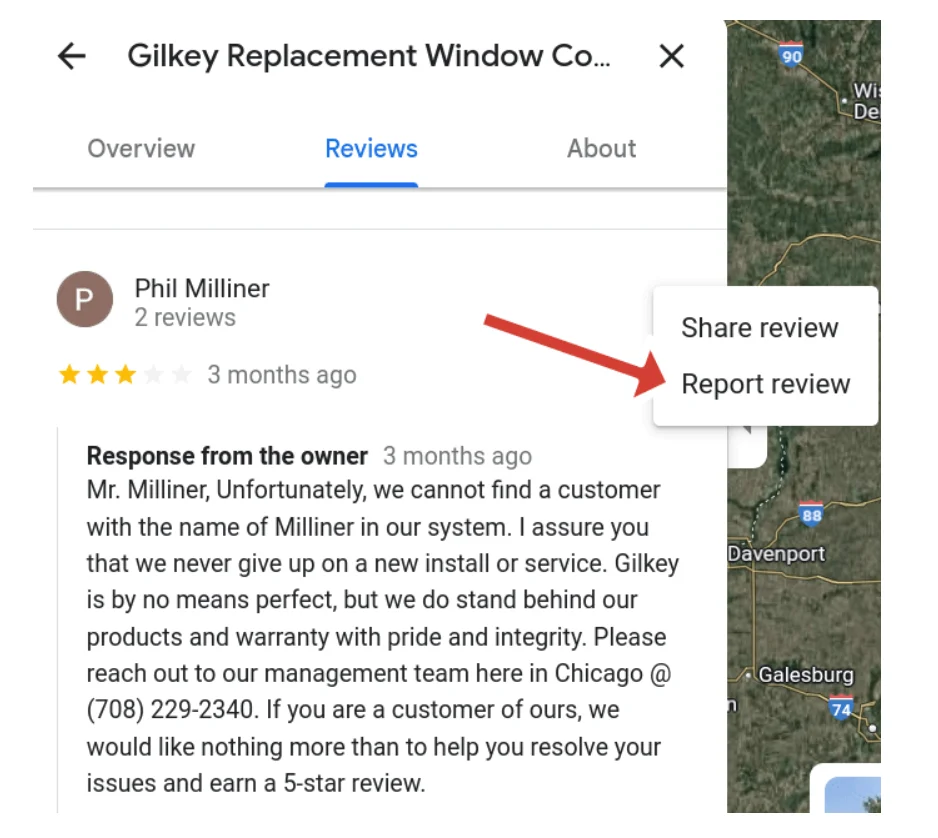
For managing online reviews from one place, the Google Business Profile dashboard is the most effective method.
- Log in to your Google Business Profile (GBP).
- Go to the “Reviews” tab.
- Find the review and look for the three-dot menu.
- Select “Flag as inappropriate” or “Report review.” This is the official method for initiating the report review process.
4. Using the reviews management tool / Google’s internal tools
To check the status of a previously reviewed report or submit an appeal, use the dedicated review management tool.
- Go to the Google Reviews Management software link (you can search for it).
- Confirm your account is linked to the correct business profile.
- You can select to “Report a new review for removal” or “Check the status of a review I reported previously and appeal options.” This is also where you would appeal a “Report reviewed – no policy violation” decision.
5. In extreme cases: Legal removals/defamation takedown requests
If a review contains serious, provably false statements that are defamatory, or if it exposes private information, standard reporting may not be sufficient. This occurs when you submit a formal legal request to Google through their dedicated legal removal troubleshooter.
This process is more complex and typically requires evidence that would be used in a court, making it the best course for the most extreme situations.
Is it a good idea to report or flag a Google review?
It is a good idea to report a review, but only if you believe the new review truly breaks Google’s review policy. The goal of reporting is to remove harmful, non-compliant content and protect your online reputation, not just to delete negative reviews you dislike.
When to Report (The Good)
- Fake Reviews/Spam: If a competitor leaves false reviews, or if a user posts the same thing 20 times.
- Inappropriate Content: If the review has hate speech, offensive language, or private information.
- Conflict of Interest: If the reviewer is a former employee or a company trying to manipulate their own or a competitor’s ratings.
When to Respond (The Better)
If a review is just a negative review based on a legitimate review experience, don’t report it. Instead, respond professionally and quickly (promptly). A polite, empathetic response that offers a solution demonstrates to all customers that you provide excellent customer service and genuinely care about their satisfaction. It turns a bad situation into a win for your online reputation.
How to prevent bad ratings and get positive reviews with WiserReview
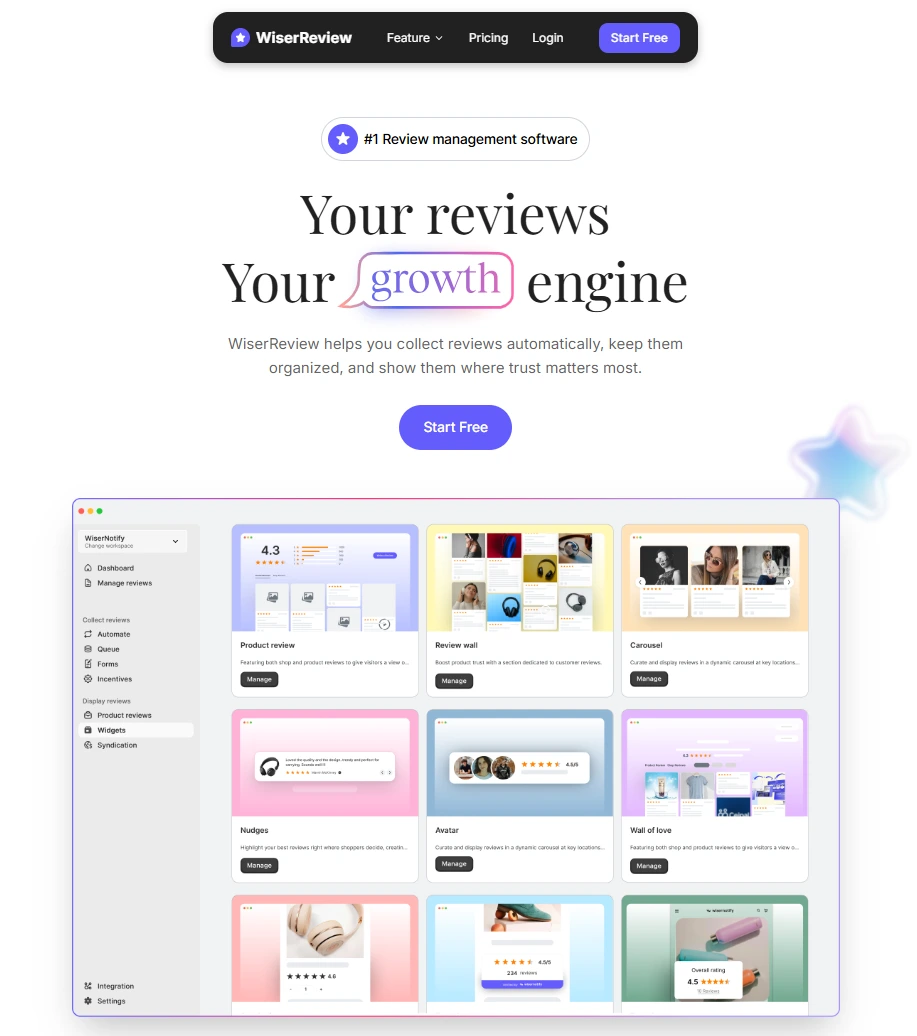
Here’s a simple step-by-step guide on how to use the review-management tool WiserReview to boost positive feedback and manage negative reviews.
1. Connect your business account

- Sign in to WiserReview and link your business profile (for example: your Google Business Profile) so the system can collect reviews in one place.
- Once connected, you’ll see all the reviews for your business locations in a single dashboard, no more checking multiple review sites.
- This setup allows you to monitor “new review” alerts, enabling you to catch negative feedback early and celebrate positive feedback promptly.
2. Automate review request
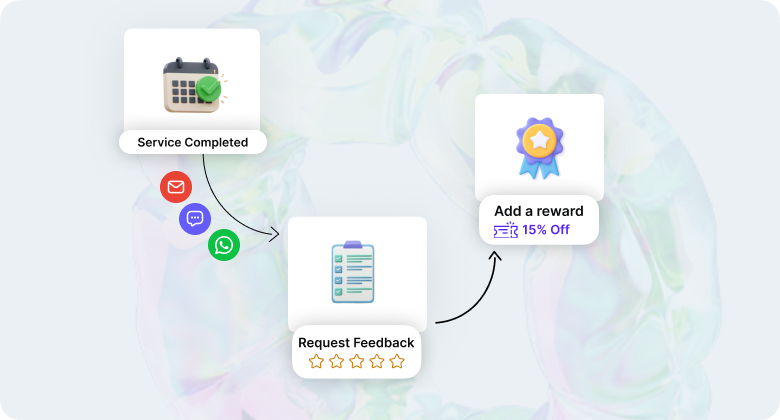
- Set up WiserReview to send review-request emails or messages (SMS, WhatsApp) automatically after a customer completes a purchase or uses your service.
- Include a direct link to the review page so it’s easy for the customer, it removes friction and boosts the chance they’ll leave a review.
- Use timing carefully: when the customer’s experience is still fresh, they’re more likely to leave a positive review.
3. Filter, Moderate, and Tag reviews
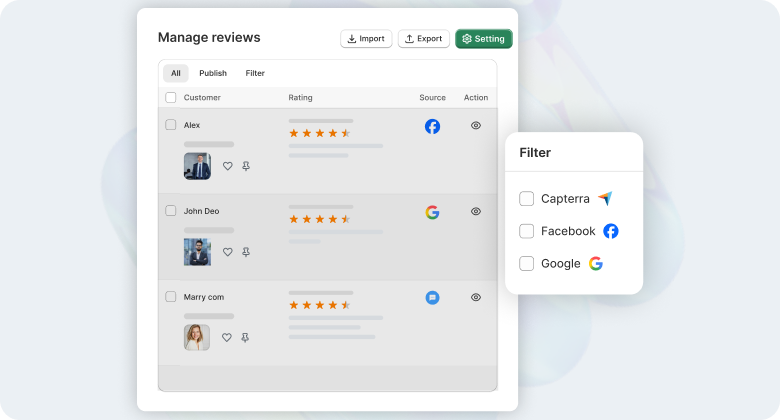
- Use WiserReview’s moderation filters to spot reviews that might include profanity, hate speech, or spam, so you keep your review section clean and trustworthy.
- Tag reviews by topics (for example: “staff behaviour”, “delivery time”, “product quality”) so you can see what’s going well and what’s not.
- Manage feedback promptly, flag it internally, determine if it’s legitimate or requires a response, and track recurring issues to identify and resolve the root cause.
4. Display positive reviews visibly
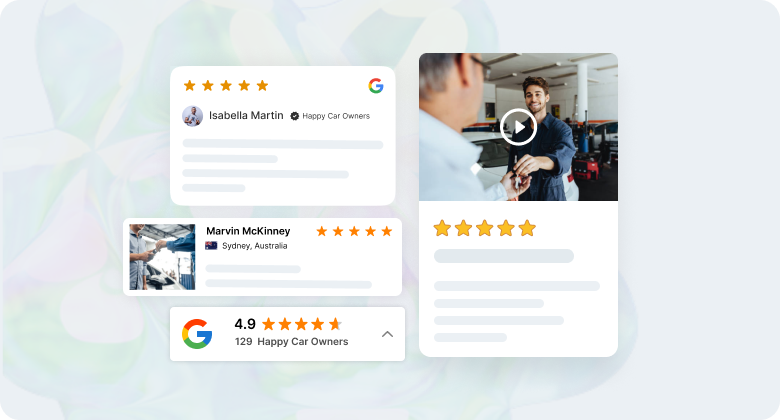
- Once you have good reviews, use WiserReview Google review widgets (carousel slider, review wall, pop-up) on your website so visitors see them right away.
- Filter the reviews you display to show the most relevant positive ones (5-star ratings or comments about “excellent service”), which builds trust with potential customers.
- By showing honest, recent customer feedback, you influence other people’s decisions in your favour.
5. Use feedback to improve service
- Use the tagged data and insights from reviews to identify common problems (for example: “many reviews mention slow response”, “some mention broken packaging”).
- Fix those issues proactively, as it helps avoid more bad reviews and improves your overall customer satisfaction.
- Encourage happy customers to leave reviews, because genuine positive Google reviews matter more than trying to hide or remove bad ones.
6. Keep the process consistent
- Make review management a regular part of your operations by checking new reviews daily or several times a week.
- Respond to both positive and negative feedback (for bad reviews: acknowledge the issue, offer a fix, for good reviews: thank the customer).
- Over time, building a steady flow of genuine, positive feedback helps you counterbalance occasional negative ratings and supports your business profile’s trust and online visibility.
All your reviews in one place
Collect reviews, manage every response, and display them where they matter most.
Start Free →How to handle negative customer feedback
When you receive a negative review (even if it doesn’t violate Google’s policy), how you respond matters:
- First, acknowledge the customer: “Thank you for your feedback. We’re sorry you had a less-than-ideal experience.”
- Ask for more details offline: “Please contact us at [contact] so we can understand what happened and make things right.”
- Public response indicates that other customers value your service.
- If the review is clearly fake or violates policy (e.g., spam, hate speech, or fake user), then use the flag/report process described above.
- For genuine negative reviews, don’t focus on asking Google to remove; instead, focus on resolving the issue, showing your service improves, and encourage satisfied customers to leave positive reviews too.
Wrap up
Reporting a Google review is a tool to protect your business, but it should be used wisely.
Only reviews that violate Google policies, like fake content or inappropriate feedback, are eligible for removal. The process involves both automated and human checks, and you’ll receive updates about the review’s status.
Tools like WiserReview make managing reviews easier, helping you gather positive reviews, address negative Google reviews, and maintain your business’s online reputation. Remember, responding professionally to all reviews builds trust and strengthens your brand in front of other customers.
Frequently asked questions
You only need to flag a review once for Google to start its review process. This doesn't promise that the review will be deleted; flagging a review multiple times does not change how Google reviews it.
No, Google does not disclose the identity of users who report reviews, ensuring privacy.
Google will review the reported content and determine if it violates its policies, but the reporting user remains anonymous.
You can report reviews that are inappropriate, fake, or violate Google's review policy, such as spam or hate speech.

Krunal