Google review plugin for Framer
Credibility, your way.
Add real Google reviews to your Framer site in seconds.
No code needed, just clean, visual integration.
Review widget that convert
Adding your Google reviews Carousel takes just a few clicks — no coding or plugins required.
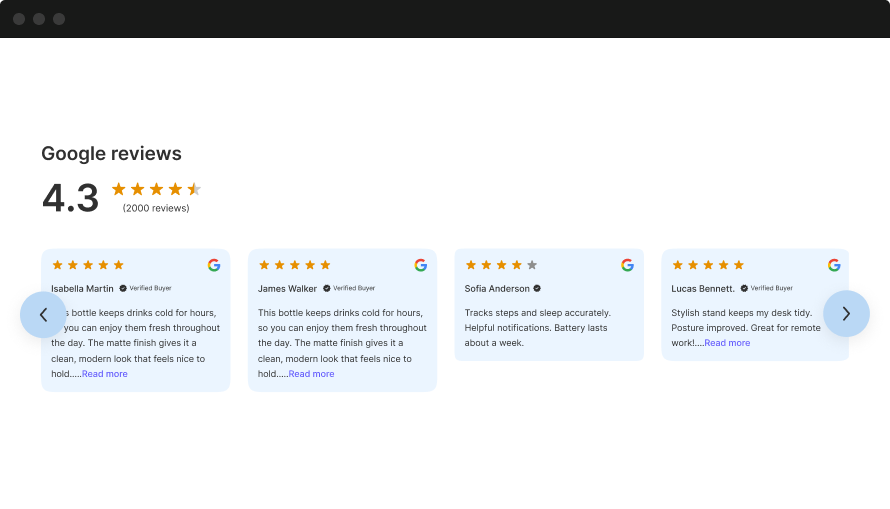
Framer-ready Google reviews

Google reviews, made for Framer
WiserReview helps you collect, manage, and showcase Google reviews. Perfectly built for Framer users who want to boost trust, traffic, and sales with ease.

Collect Google reviews easily
Send review requests through email, WhatsApp, or direct links. Customers can reply with text, photos, or videos.
More responses, less chasing
Automate review invites
Set rules once and let the system handle follow-ups. No manual reminders needed.
Zero manual follow-ups
Filter and manage reviews
Choose which reviews to show based on rating, keywords, or tone. You stay in full control of what goes live.
Only high-quality reviews go live
Display reviews your way
Use flexible widgets like sliders, badges, or walls. Just copy the embed code into any Framer page or block.
Build trust and convert more visitorsBuilt for Framer
WiserReview brings powerful review features, without tech hassle.

Quick setup
Works seamlessly with all Framer websites.

Automatic sync
No updates or maintenance needed, just set it & forget it.

Custom-fit display
Add carousels or badges that match your brand.

SEO-ready
Show review stars in Google search to boost visibility.
Best Google review widget

Google Carousel
Curate and display reviews in a dynamic carousel at key locations on your site.

Auto Slider
Curate and display reviews in a dynamic carousel at key locations on your site.

Trust Badge
Show total reviews count with trust badge at any pages
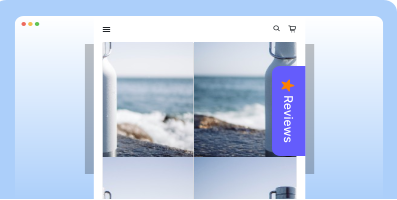
Sidebar Snippet
Showcase reviews in a sidebar to boost trust and engagement as users browse your site.

Google Review badge
Display top Google or Facebook reviews on your site with Floating badge.

Floating review badge
Highlight star ratings and reviews with a sleek, scrollable badge to build trust instantly.

Avatar
Curate and display reviews in a dynamic carousel at key locations on your site.

Review wall
Show both shop and product reviews to highlight your brand’s quality and trust.
Fuel search with Google reviews
Show stars in ads, shopping, and search to boost clicks and traffic.
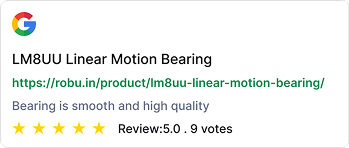
Google Ads ratings
Show star ratings on your ads to grab attention fast. Boost CTR and reduce cost per click with trusted proof.

Shopping feed integration
Push reviews into Google Shopping listings automatically. Build trust and win clicks before the product page even opens.
SEO snippets
Add review stars to your organic search results. Get better visibility, more clicks, and stronger credibility.
Who needs a Google review widget?
Perfect for businesses that grow through trust and proof. If your customers check reviews before buying, this is for you.
Local service businesses
Add review widgets to service pages and footers.
Help visitors see real proof before calling or booking.
Works well for plumbers, electricians, cleaners, and repair pros.
Healthcare & wellness providers
Show trusted ratings on booking pages.
Build confidence with reviews from real patients.
Ideal for dentists, therapists, clinics, and wellness studios.
Salons, spas & personal Care
Display reviews where clients decide, home, gallery, or service sections.
Boost walk-ins and repeat visits.
Let new clients see real feedback before visiting.
Hospitality & travel services
Place star ratings on landing pages or booking forms.
Reviews help guests choose faster and with more trust.
Great for hotels, rentals, and travel packages.
Multi-location & franchise businesses
Use different widgets for each branch.
Show location-specific reviews on the right WordPress pages.
Manage all locations from one dashboard with ease.
Freelancers, consultants & agencies
Embed Google reviews on your homepage or portfolio.
Build trust before the first message.
Perfect for creatives, marketers, and solo professionals.
Google reviews ready in minutes


Instant setup
Connect your Google profile and go live fast. No tech setup or plugin required.
Auto-collect reviews
Send review requests automatically after a purchase or visit. No follow-ups needed.
Flexible display options
Add carousels, popups, or badges anywhere on your site. Fits all Framer themes and layouts.
Other popular <br class="mobi-none"> review Widgets

Facebook review Widget
<p>Show real reviews from your Facebook page in a clean layout with star ratings and names. Auto-sync supported.</p>
Perfect for: local pros, service businesses, personal brands.

Google seller ratings
<p>Highlight your Google Seller Ratings in search or on-site using verified data. Supports stars and review count.</p>
Perfect for: ecommerce stores running Google Ads.

Wall of love Widget
<p>Showcase all your best reviews in a clean grid or collage. Filter by source or tag.</p>
Perfect for: testimonials page, about page, landing pages.

Video Testimonial Widget
<p>Display short customer videos with names and star ratings. Boosts trust with real faces and voices.</p>
Perfect for: coaching, SaaS, services, personal brands.

Google review badge
<p>A small sticky badge that shows real-time reviews as users browse your site. Works on all pages.</p>
Perfect for: product pages, landing pages, checkout flows.
Google product review feeds
<p>Send product-level reviews to Google Shopping using structured feed files. Boosts visibility and click-throughs.</p>
Perfect for: product pages, cart upsells, post-purchase flows.
Add reviews where your visitors are
It works with WordPress, Webflow, Shopify, Wix, and more, no extra setup needed.

WordPress
Add Google reviews to WordPress

Custom HTML sites
Embed Google reviews with HTML

Google business profile
Sync Google reviews in real-time

Wix
Auto-sync Google reviews on Wix

Squarespace
Show Google reviews on Squarespace
30+ integration
View allReal words, real results
Google review tactics for Framer
Strategically placed trust turns visitors into buyers. Here’s how to do it right:
Showcase reviews on first scroll
The first few seconds on your site are critical. Most visitors skim, scroll, and subconsciously ask themselves: “Can I trust this?” Placing real customer reviews just below your hero section answers that question instantly. It adds credibility right after your boldest brand claim, exactly where trust is most fragile. This isn’t about adding clutter; it’s about anchoring your pitch with proof the moment attention peaks.
How
Add a Reviews section directly under your hero block using Framer’s layout stack. Grab your filtered review embed from WiserReview and drop it into a native Embed block. Adjust spacing so it feels like part of the intro flow, and use motion (e.g., slide-up or fade-in on scroll) to keep it engaging without being overwhelming.
Reinforce pricing with proof
Pricing is one of the highest-friction areas on any site. It’s where visitors pause and weigh options, or leave. Well-placed reviews here don’t just defend your pricing, they justify it. They address doubts, back up value claims, and give potential buyers confidence from people just like them.
How
Use a horizontal layout (Grid/Flexbox) to split the screen: pricing on one side, reviews on the other. In WiserReview, filter testimonials that mention affordability, ROI, or satisfaction. Embed a slider, quote stack, or badge widget next to your pricing block. Keep it styled to match your design, no harsh boxes or clashing fonts.
Use sticky or fixed-position badges
Mobile users are fast scrollers and easy to lose. A floating badge keeps social proof visible without interrupting flow. It’s a subtle, persistent reminder that others have chosen (and trusted) you, even as users explore your content. This tactic is especially powerful on long-scroll pages, mobile layouts, or landing pages without lots of CTAs.
How
Enable the floating review badge in WiserReview. In Framer, drop the embed code inside a custom frame and apply position: fixed (bottom corner recommended). Use scroll triggers or set a delay so it appears only after 20–30% scroll depth. Add a close icon for clean UX. This ensures trust is ever-present, but never annoying.
End with social proof
The final CTA is where a decision is made, but it’s also where uncertainty creeps in. By closing your page with high-impact testimonials, you reinforce confidence and nudge the visitor one last time. This works like a real-time answer to the quiet doubts they haven’t even spoken yet.
How
Above your final CTA button or form, insert a stacked testimonial block using WiserReview’s grid layout. Filter for 5-star reviews that feel emotional, direct, and specific. Use Framer’s container tools to space them neatly. Add a soft divider or heading like “What others are saying” to naturally lead into them. This creates a reassuring final push before commitment.
Keep it visual and minimal
Your reviews should feel like an intentional part of your design, not a bolted-on widget. When reviews are integrated visually, they get noticed without being disruptive. Clean design reinforces trust, while clutter erodes it. Aesthetic alignment builds subconscious confidence and keeps your UX sharp.
How
In WiserReview, customize your widget’s font, size, spacing, and color palette to align with your Framer design system. Avoid heavy shadows or default styles that clash. Use Framer’s Embed block inside a container with soft padding and a neutral background. Consider adding a slight animation or scroll effect to keep attention without distracting from core content.

Add Google reviews
to Framer
Show real Google reviews on your Framer website. Turn trust into clicks and conversions.