Drupal websites are known for flexibility, scalability, and control, especially for content heavy, enterprise, and custom built sites.
But even the most powerful Drupal setup struggles to convert users if trust is missing. Visitors want proof before filling forms, requesting demos, or engaging with content.
Reviews solve this by showing real experiences from real users. With WiserReview, you can add reviews to Drupal websites without interfering with performance, theming, or custom modules.
Why add reviews on Drupal?
Drupal is often used for complex websites where credibility matters as much as functionality. Reviews strengthen that credibility.
1. Increase conversions on Drupal pages
Drupal sites often support lead generation, content hubs, and enterprise funnels. Reviews reduce hesitation at key moments.
Statistics and insight:
Pages with reviews convert up to 37% better.
92% of users trust reviews as much as personal recommendations.
Trust signals increase form completion rates.
Use case: Add a WiserReview widget near Drupal contact forms, demo request pages, or gated content sections to reinforce confidence.
2. Build trust for enterprise and content heavy sites
Drupal is widely used by governments, universities, and large organizations. Reviews add human proof to complex sites.
Statistics and insight:
Enterprise buyers rely heavily on peer validation.
Social proof shortens long decision cycles.
Authentic feedback increases credibility.
Use case: Display reviews from partners, customers, or users on solution pages or product overview sections.
3. Maintain Drupal performance and custom theming
Drupal performance and theme consistency are critical. WiserReview widgets load asynchronously and can be styled to match any Drupal theme.
Statistics and insight:
Lightweight embeds preserve page speed.
Consistent design improves trust by over 20%.
Clean layouts improve engagement.
Use case: Customize WiserReview widget styles to align with your Drupal theme variables and branding.
Next, follow the steps below to show clean, high-converting reviews on your site.
Start by importing your existing reviews via a direct integration or CSV import.
If you do not yet have reviews, you can start collecting them with WiserReview automations.
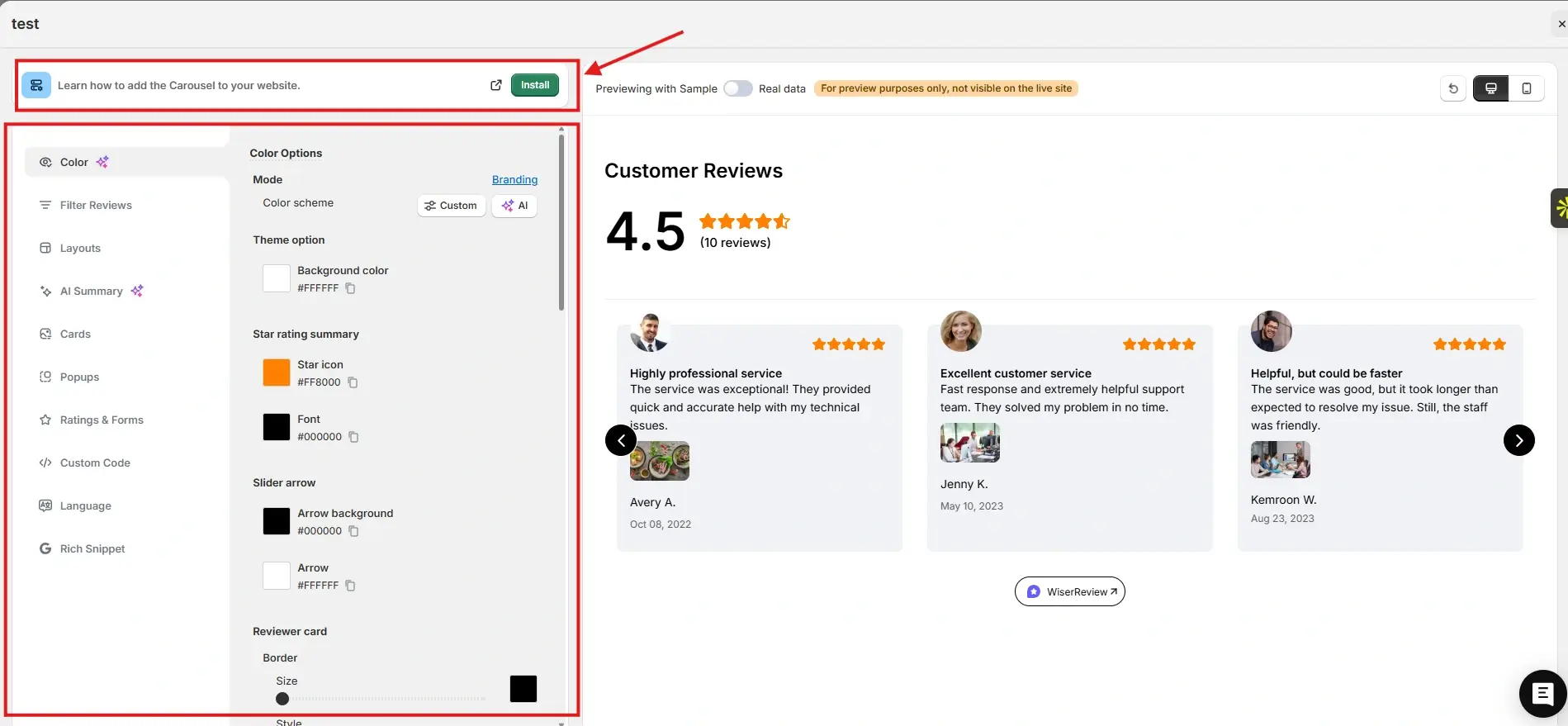
After that, go to the Widgets section. You will see multiple review widgets built to build trust and help visitors decide.
For this example, we chose the Carousel widget. You can customize it to match your brand colors and layout. Once everything looks right, click Install.
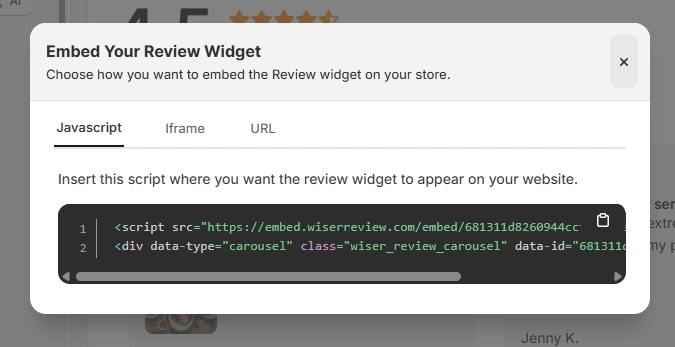
You will then see the JavaScript, iframe, and URL options for embedding the widget on your site.
Here is how the Wall of Love looks on the MyMunche website.
You can explore the platform further or book a demo to learn how to collect more reviews and show them where they matter most, based on our four years of experience working with over 1,100 brands.
How to embed reviews on Drupal
After generating your WiserReview widget code, follow these Drupal specific steps:
Log in to your Drupal admin panel.
Navigate to the page or content type where reviews should appear.
Edit the page or node.
Switch the text format to allow full HTML.
Paste the WiserReview embed code into the content area or a custom block.
Save the changes.
Clear Drupal cache if needed.
For site wide reviews:
Create a Custom Block and paste the embed code.
Place the block using Drupal Block Layout.
Best practices for showcasing reviews on Drupal
Drupal offers granular control, so use reviews strategically.
1. Place reviews near high intent content
Drupal pages often guide users through information.
Place reviews:
Near lead forms
On solution pages
Before call to action sections
2. Use content specific reviews
Generic testimonials feel out of place on structured Drupal sites.
Use WiserReview tags to:
Match reviews to content types
Show relevant feedback per page
3. Optimize reviews for mobile and performance
Drupal sites serve diverse devices.
Use:
Sliders instead of large grids
Short testimonials
Responsive layouts
3 Common mistakes to avoid when adding reviews to Drupal
Even flexible platforms can lose impact if reviews are misused.
1. Blocking scripts via Drupal filters
Drupal text formats may strip scripts.
Solution: Ensure the content format allows scripts or use custom blocks.
2. Using one review widget across all content types
This reduces relevance.
Solution: Create multiple widgets filtered by tags.
3. Ignoring cache and performance settings
Cached pages may delay updates.
Solution: Clear cache or use dynamic blocks when needed.
All your reviews in one place
Collect reviews, manage every response, and display them on your Drupal site.
Drupal websites succeed when strong architecture is paired with trust. Reviews provide the social proof users need to engage, convert, and commit.
With WiserReview, you can add fast, flexible, and fully styled reviews to Drupal sites without compromising performance or control.
Start using WiserReview to turn your Drupal website into a trust driven experience.
Frequently asked questions
Can I add reviews to any Drupal version?
No. You can embed reviews using HTML blocks or content areas.
No. Widgets load asynchronously and remain lightweight.
Yes. Tag, filter, and approve reviews inside WiserReview.
Yes. All updates are handled inside the WiserReview dashboard.
Article by
Krunal
Krunal Vaghasia is the founder of WiserReview and an eCommerce expert in review management and social proof. He helps brands build trust through fair, flexible, and customer-driven review systems. Read more.

 4 min
4 min