Typedream sites are fast, clean, and conversion-focused. But minimal design alone does not build trust.
Visitors still look for proof before signing up, booking, or buying. Without reviews, even high-quality offers feel risky.
Reviews remove doubt by showing real outcomes from real users. With WiserReview, you can embed reviews into Typedream pages without hurting speed, layout, or simplicity.
Why add reviews on Typedream?
Typedream is built for clarity and performance. Reviews are strengthened by adding credibility without clutter.
1. Increase signups on Typedream landing pages
Typedream is commonly used for SaaS waitlists, newsletters, and product launches. Reviews placed near signup blocks improve confidence at the moment of action.
Statistics and insight:
Pages with social proof increase signup rates by up to 32%.
95% of users read reviews before trusting a new brand.
Landing pages with testimonials reduce hesitation and form drop-offs.
Use case: Place a compact review carousel directly below your Typedream email signup block to reinforce value before users subscribe.
2. Maintain Typedream page speed and clean layouts
Typedream prioritizes fast load times and simple blocks. WiserReview widgets are lightweight and load asynchronously, keeping Typedream performance intact.
Statistics and insight:
53% of users leave if a page feels untrustworthy.
Fast pages with trust signals see higher engagement.
Next, follow the steps below to show clean, high-converting reviews on your site.
Start by importing your existing reviews via a direct integration or CSV import.
If you do not yet have reviews, you can start collecting them with WiserReview automations.
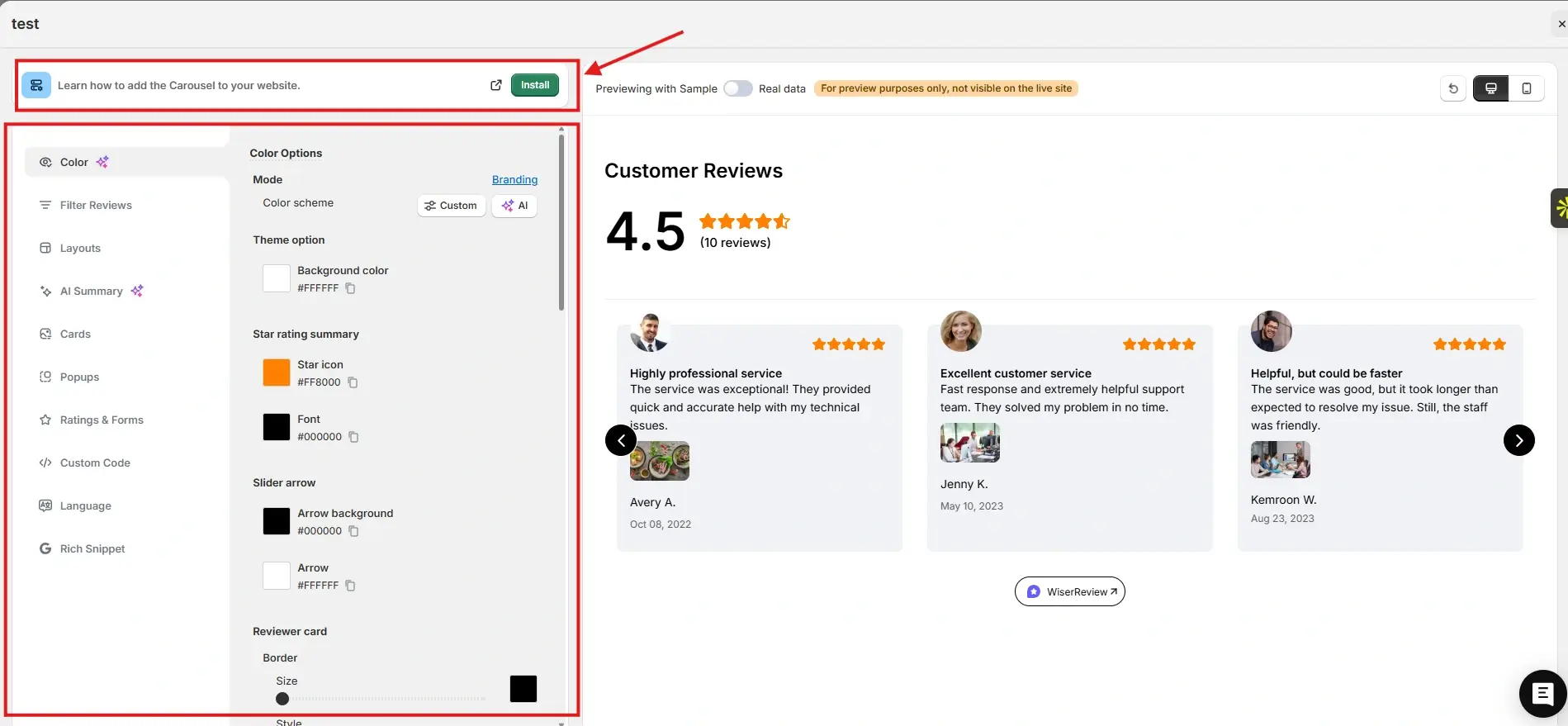
After that, go to the Widgets section. You will see multiple review widgets built to build trust and help visitors decide.
For this example, we chose the Carousel widget. You can customize it to match your brand colors and layout. Once everything looks right, click Install.
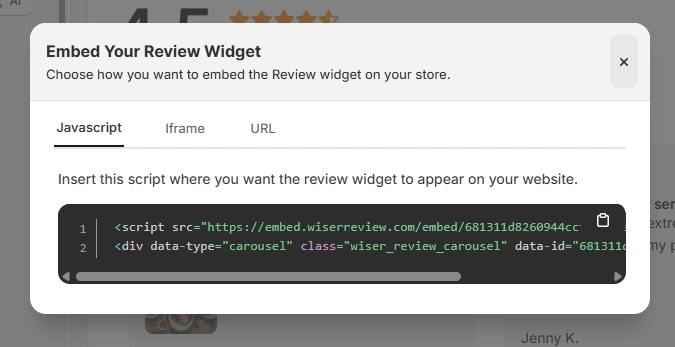
You will then see the JavaScript, iframe, and URL options for embedding the widget on your site.
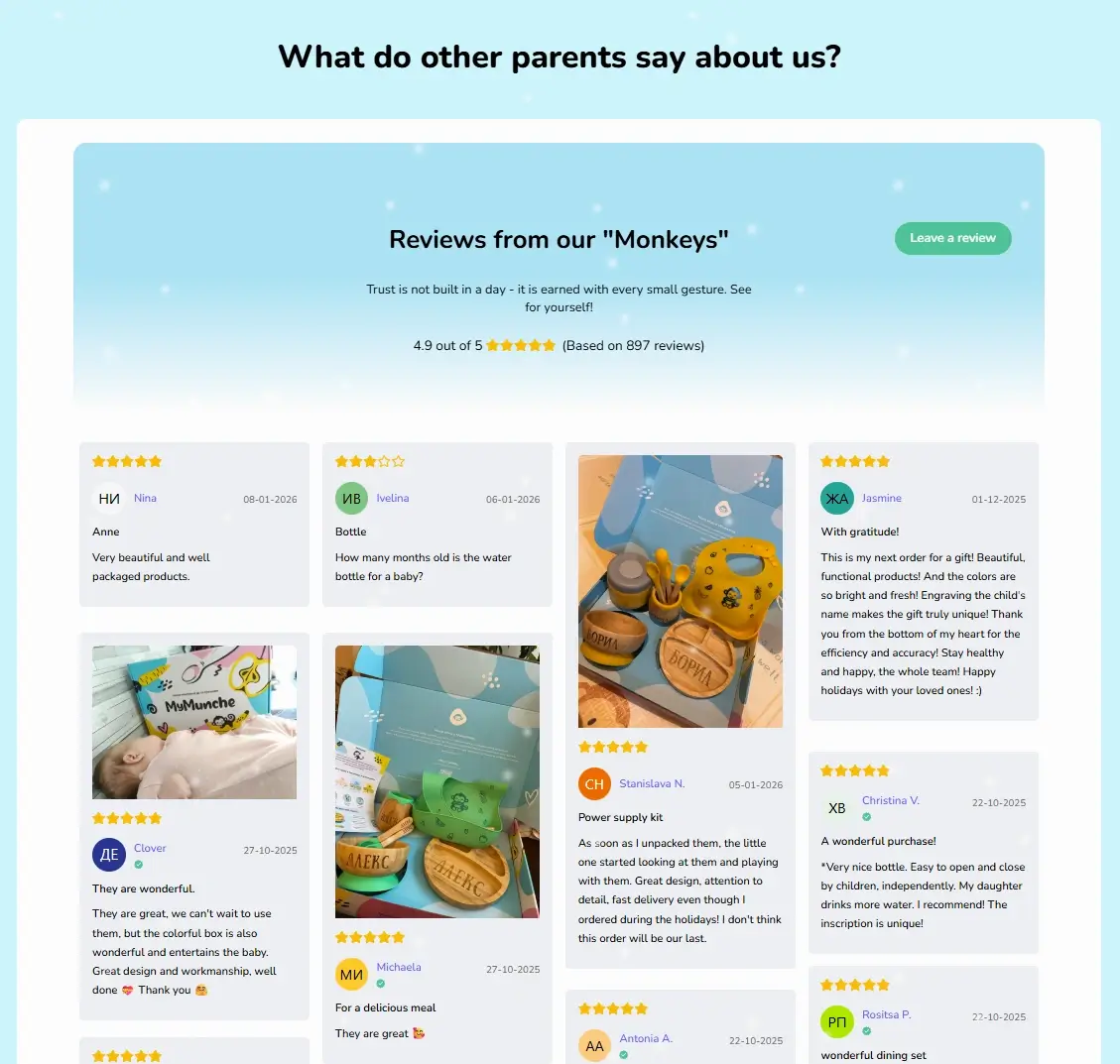
Here is how the Wall of Love looks on the MyMunche website.
You can explore the platform further or book a demo to learn how to collect more reviews and show them where they matter most, based on our four years of experience working with over 1,100 brands.
How to embed reviews on Typedream
After generating your WiserReview widget code, follow these Typedream-specific steps:
Log in to your Typedream dashboard.
Open the page where you want to show reviews.
Add a new block and select the Embed or Custom HTML block.
Paste the WiserReview embed code into the block.
Adjust spacing using Typedream block controls.
Preview the page to ensure proper alignment.
Publish your changes.
For floating or site-wide widgets:
Add the embed code to a global section or site settings.
Enable visibility across all pages or selected pages.
Best practices for showcasing reviews on Typedream
Typedream works best with focused content and clear flow.
1. Place reviews after value explanation blocks
Typedream pages often follow a top-down narrative. Place reviews right after:
Feature explanations
Use case sections
Before signing up or pricing blocks
This placement reinforces claims with proof.
2. Use short, high-impact reviews only
Typedream users prefer clarity over volume. Avoid long testimonials.
Use:
1 to 2 sentence reviews
Clear outcomes or results
Star ratings with short quotes
3. Use one widget per page goal
Typedream pages usually focus on one action. Match reviews to that goal:
Newsletter page shows subscriber feedback
SaaS page shows product results
Service page shows client outcomes
All your reviews in one place
Collect reviews, manage every response, and display them on your Typedream site.
3 Common mistakes to avoid when adding reviews to Typedream
Typedream simplicity can be lost if reviews are misused.
1. Adding too many review blocks
Multiple review sections distract users and break page flow.
Solution: Use one focused widget placed near the primary action.
2. Using over-designed review layouts
Heavy designs conflict with Typedream’s clean style.
Solution: Choose minimal layouts with neutral colors and simple fonts.
3. Showing irrelevant reviews
Generic testimonials reduce credibility.
Solution: Tag reviews in WiserReview and embed only relevant ones per page.
Wrap-Up
Typedream pages convert through clarity and speed. Reviews add trust without adding noise when done right.
With WiserReview, you can embed clean, fast, and relevant reviews that match Typedream’s style and strengthen conversions.
Start using WiserReview to turn your Typedream pages into proof driven growth assets.
Frequently asked questions
No. WiserReview widgets load asynchronously and do not affect page speed.
Yes. You only need to paste the embed code into an Embed block.
Yes. Use tags and filters to display page specific reviews.
Yes. Widgets are responsive and adapt to all screen sizes.
Yes. You can edit, hide, or replace reviews directly from the WiserReview dashboard.
Article by
Krunal
Krunal Vaghasia is the founder of WiserReview and an eCommerce expert in review management and social proof. He helps brands build trust through fair, flexible, and customer-driven review systems. Read more.

 4 min
4 min