Framer websites are built for modern products, startups, and high-conversion landing pages.
They look premium, load fast, and feel interactive. But even the best design does not remove doubt on its own.
Visitors still want proof before signing up, booking, or buying. Reviews solve this by showing real user experiences without hurting performance.
With WiserReview, you can embed reviews into Framer pages while keeping animations, layout, and speed intact.
Why add reviews on Framer?
Framer is often used for SaaS, startups, and product launches where trust directly impacts conversions.
1. Increase conversions on Framer landing pages
Framer pages are designed to guide users toward a single action. Reviews reinforce that action with social proof.
Statistics and insight:
Landing pages with reviews convert up to 37% better.
93% of users say reviews influence signup and purchase decisions.
Trust signals reduce bounce rates on product pages.
Use case: Place a WiserReview carousel directly below your primary CTA or pricing section to reduce hesitation before users click.
2. Maintain Framer performance and animations
Framer relies on smooth motion and fast loading. Heavy widgets can break this experience. WiserReview widgets load asynchronously and do not interfere with Framer animations.
Statistics and insight:
Page speed directly affects conversion rates.
Lightweight embeds preserve motion performance.
Clean interactions improve user trust.
Use case: Use a floating review badge that stays visible while users scroll without affecting animations.
3. Match reviews with Framer design systems
Framer users rely on design systems, typography, and spacing. WiserReview widgets can be styled to match Framer components.
Statistics and insight:
Design consistency improves credibility by 22%.
Native looking reviews feel more trustworthy.
Styled testimonials outperform generic embeds.
Use case: Customize review cards to match your Framer font styles and color tokens.
Next, follow the steps below to show clean, high-converting reviews on your site.
Start by importing your existing reviews via a direct integration or CSV import.
If you do not yet have reviews, you can start collecting them with WiserReview automations.
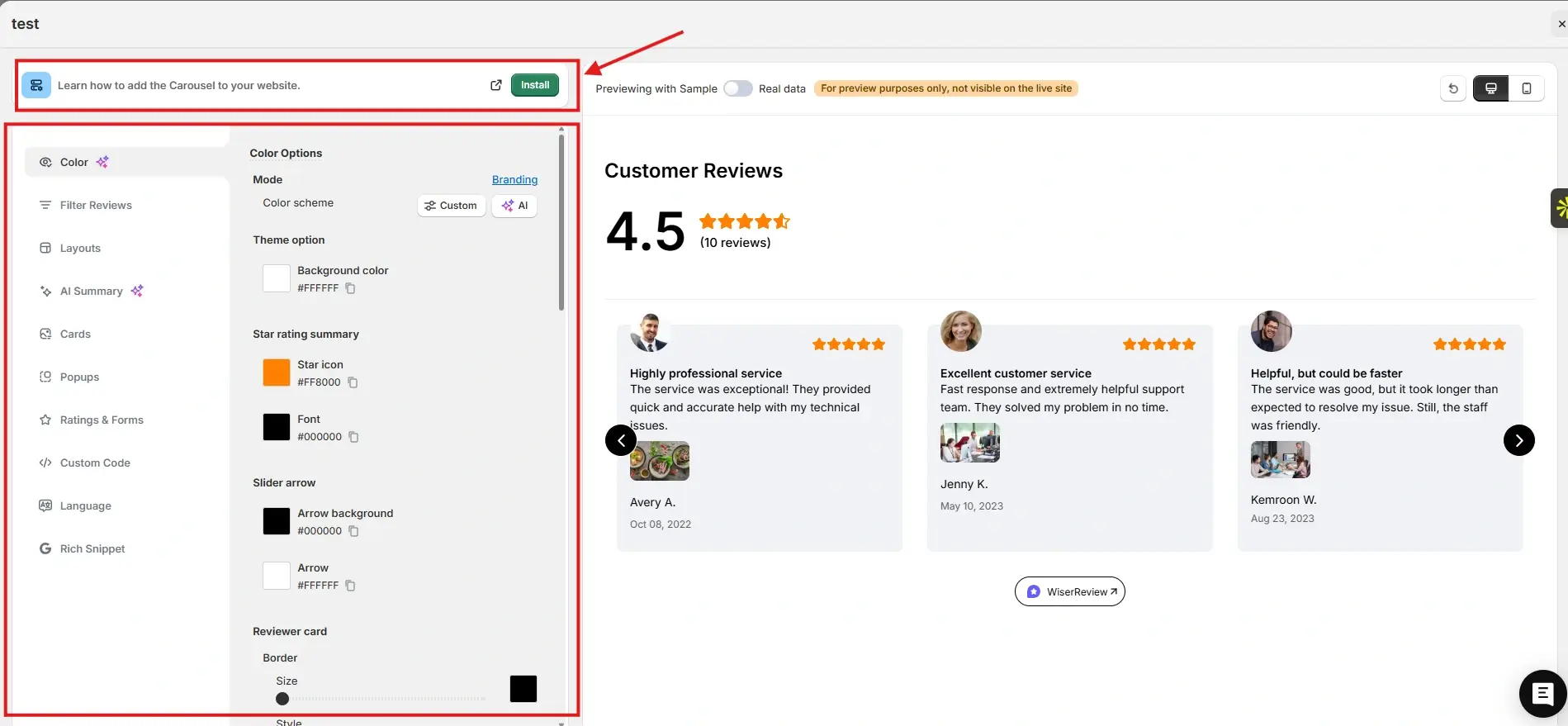
After that, go to the Widgets section. You will see multiple review widgets built to build trust and help visitors decide.
For this example, we chose the Carousel widget. You can customize it to match your brand colors and layout. Once everything looks right, click Install.
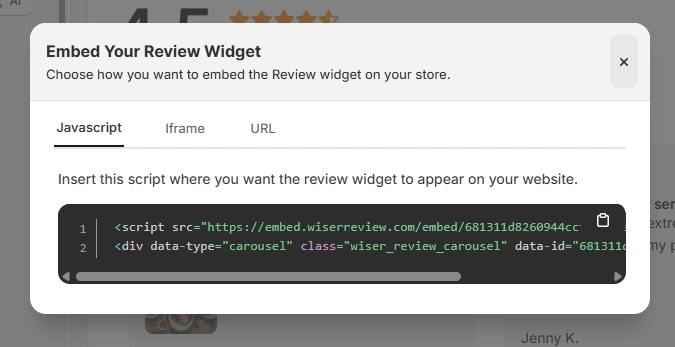
You will then see the JavaScript, iframe, and URL options for embedding the widget on your site.
Here is how the Wall of Love looks on the MyMunche website.
You can explore the platform further or book a demo to learn how to collect more reviews and show them where they matter most, based on our four years of experience working with over 1,100 brands.
How to embed reviews on Framer
After generating your WiserReview widget code, follow these Framer specific steps:
Log in to your Framer dashboard.
Open the project where you want to add reviews.
Navigate to the page or section.
Add an Embed component.
Paste the WiserReview embed code into the Embed field.
Adjust width and layout using Framer controls.
Preview responsiveness.
Publish the site.
For site wide or floating widgets:
Add the embed code to a shared layout or footer component.
Control visibility across pages.
Best practices for showcasing reviews on Framer
Framer pages convert best when the proof feels intentional.
1. Place reviews after key value sections
Framer pages often explain value through animations and visuals.
Place reviews:
After feature sections
Below pricing blocks
Before final CTA sections
2. Use short, scannable reviews
Framer users skim quickly.
Use:
One to two line testimonials
Clear outcomes
Star ratings or names
3. Use one primary review widget per page
Too many widgets reduce focus.
Use one main slider or badge instead of multiple sections.
3 Common mistakes to avoid when adding reviews to Framer
Even modern sites can lose impact.
1. Overloading pages with too many reviews
This distracts from product messaging.
Solution: Curate only the most relevant reviews.
2. Ignoring responsive behavior
Embeds may look different across devices.
Solution: Test desktop, tablet, and mobile views before publishing.
3. Showing generic testimonials
Generic feedback reduces trust.
Solution: Tag reviews and match them to the page goal.
All your reviews in one place
Collect reviews, manage every response, and display them on your Framer site.
Framer sites succeed when design, speed, and trust work together. Reviews add credibility without breaking the modern experience Framer is known for.
With WiserReview, you can embed clean, fast, and relevant reviews into Framer pages in minutes.
Start using WiserReview to turn your Framer site into a trust-driven conversion engine.
Frequently asked questions
Yes. Framer supports embed components for custom code.
No. You only paste the embed code into an Embed component.
No. Widgets load asynchronously and remain lightweight.
Yes. Use tags and multiple widgets.
Yes. All review control is handled inside WiserReview.
Article by
Krunal
Krunal Vaghasia is the founder of WiserReview and an eCommerce expert in review management and social proof. He helps brands build trust through fair, flexible, and customer-driven review systems. Read more.

 4 min
4 min