5 min
5 min 
Your store on Squarespace may look amazing, yet visitors are reluctant to make a purchase. What’s missing? They want assurance from others before committing to you.
Squarespace lets you build a beautiful website, but it doesn’t offer much control over reviews and testimonials. So if your business depends on customer trust, it’s going to fall flat quickly.
This is where WiserReview can help, where you can collect, manage, and display real customer feedback in a single place, no hacks, no restrictions.
This is a quick look at how the WiserReview extension works with Squarespace, the problems it solves, and what makes it suitable for growing sites that require trust.
What is WiserReview for Squarespace

WiserReview is an all-in-one review management platform created especially for Squarespace store owners.
It manages the entire review lifecycle, from automatic collection of customer feedback to moderation of responses and publishing them on your site with fully customizable widgets.
It’s designed and developed to help businesses build social proof and boost conversion rates by seamlessly integrating with the Squarespace platform.
Unlike manual collection, which gets ignored, and rigid widgets that clash with your brand, WiserReview simply fits into your Squarespace workflow.



All your reviews in one place
Collect reviews, manage every response, and display them where they matter most.
Key features of WiserReview
WiserReview for Squarespace is a comprehensive review engine that automates the entire lifecycle of customer feedback, from initial request to on-site display.
Automated review collection
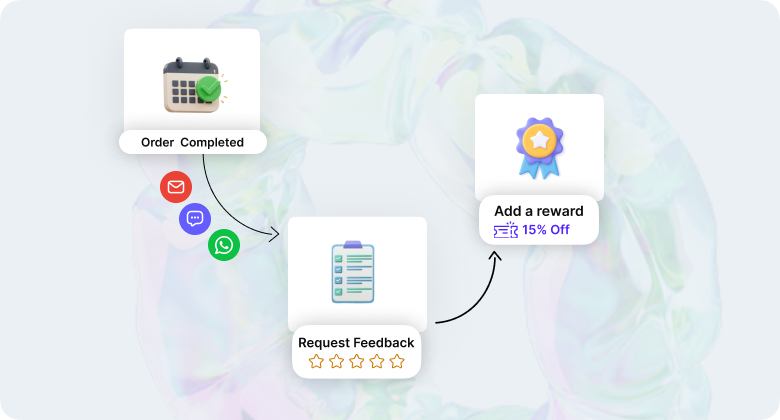
WiserReview eliminates manual follow-ups by sending review requests at precisely the right moment. The system triggers emails, SMS, or WhatsApp messages after order fulfillment or custom events you define.
- Multi-Channel Requests: Automatically send review invites via email, SMS, WhatsApp, or direct shareable links.
- Event-Based Triggers: Requests can be scheduled to send automatically after a purchase, delivery, or custom event, reaching customers when their experience is fresh.
- Reminders & Rewards: The platform can send automated reminders to non-responders and offer incentives, such as discount codes, for submitting reviews.
Multiple review formats

Modern customers want more than just star ratings. Testimonials that are collected by WiserReview are of three types:
Text reviews with star ratings for quick, easy feedback
Photo reviews that show your products in real-world use
Video testimonials that create the strongest trust signals
Custom Questions: Review forms are fully customizable, allowing businesses to ask critical questions to their audience.
Review management

With WiserReview, you have full control over the reviews that are displayed on your site. The review management dashboard lets you filter reviews by star rating, tag reviews by product or category, and manage reviews before they are posted.
- AI-Powered Control: Uses AI to automatically flag spam, profanity, or low-quality content. It can also perform sentiment analysis to hold negative reviews for manual response while auto-publishing positive ones.
- Import/Export: Seamlessly migrate existing reviews from platforms like Google, Facebook, Judge.me, or CSV files.
- Tagging & Filtering: Organize feedback by SKU, product variation, or custom tags to ensure only relevant content appears on specific pages.
Displaying reviews on your site

WiserReview offers flexible display options that integrate directly into your Squarespace pages without coding.
- Dynamic Widgets: Options include “Wall of Love” grids, review carousels, floating badges, trust badge, sidebar snippets, and real-time “nudge” popups.
- SEO & Rich Snippets: Automatically includes schema markup, allowing star ratings to appear directly in Google search results and organic listings.
- Google Shopping & Ads: Sync verified reviews to appear in Google Shopping feeds and Google Ads to boost click-through rates.

All your reviews in one place
Collect reviews, manage every response, and display them where they matter most.How to set up WiserReview on Squarespace
Setting up WiserReview takes less than 10 minutes. The process connects your Squarespace store, configures automation settings, and adds review widgets to your pages.
Step 1: Connect your Squarespace store
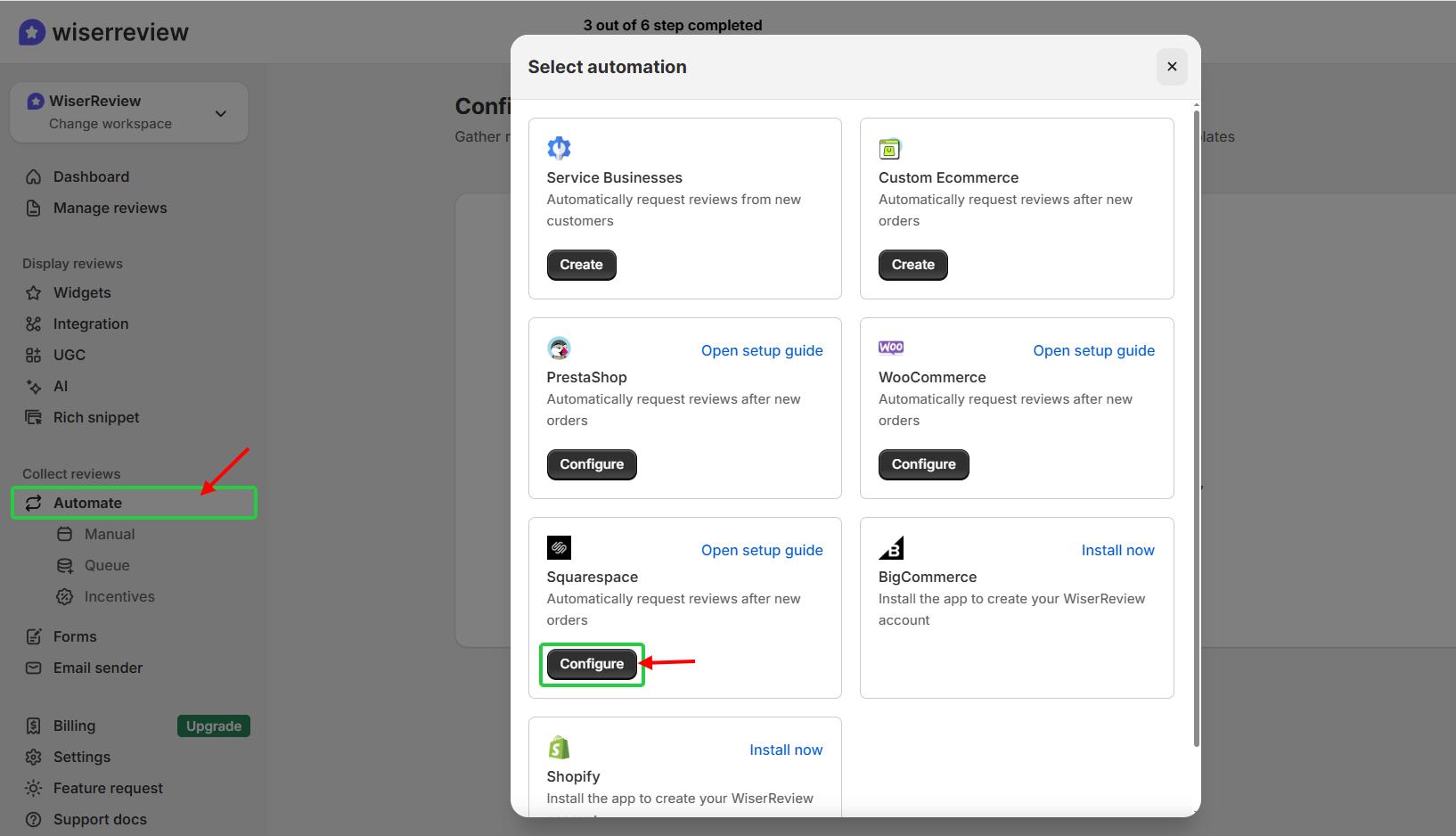
Sign up for WiserReview (free plan available) and navigate to the “Automate” section.
Click “add automation” and choose Squarespace.
Authorize Access: Click on “Login with Squarespace” and follow the instructions to authorize WiserReview to access your store’s order and product information.
Once connected, WiserReview automatically syncs your products and order data.
Step 2: Import existing reviews
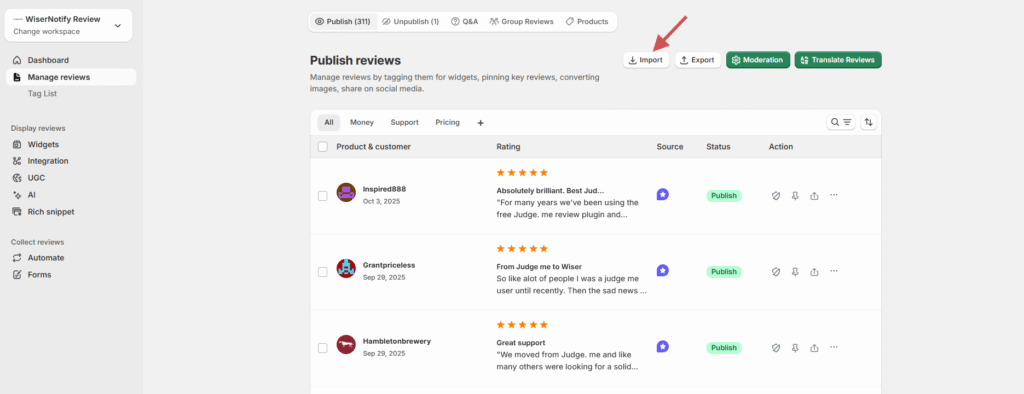
If you have reviews from other platforms like Judge.me or Google, go to Manage Reviews > Import Reviews in the WiserReview dashboard.
Upload your review CSV file or connect directly to the source platform to pull in your existing feedback.
Step 3: Create and customize widgets
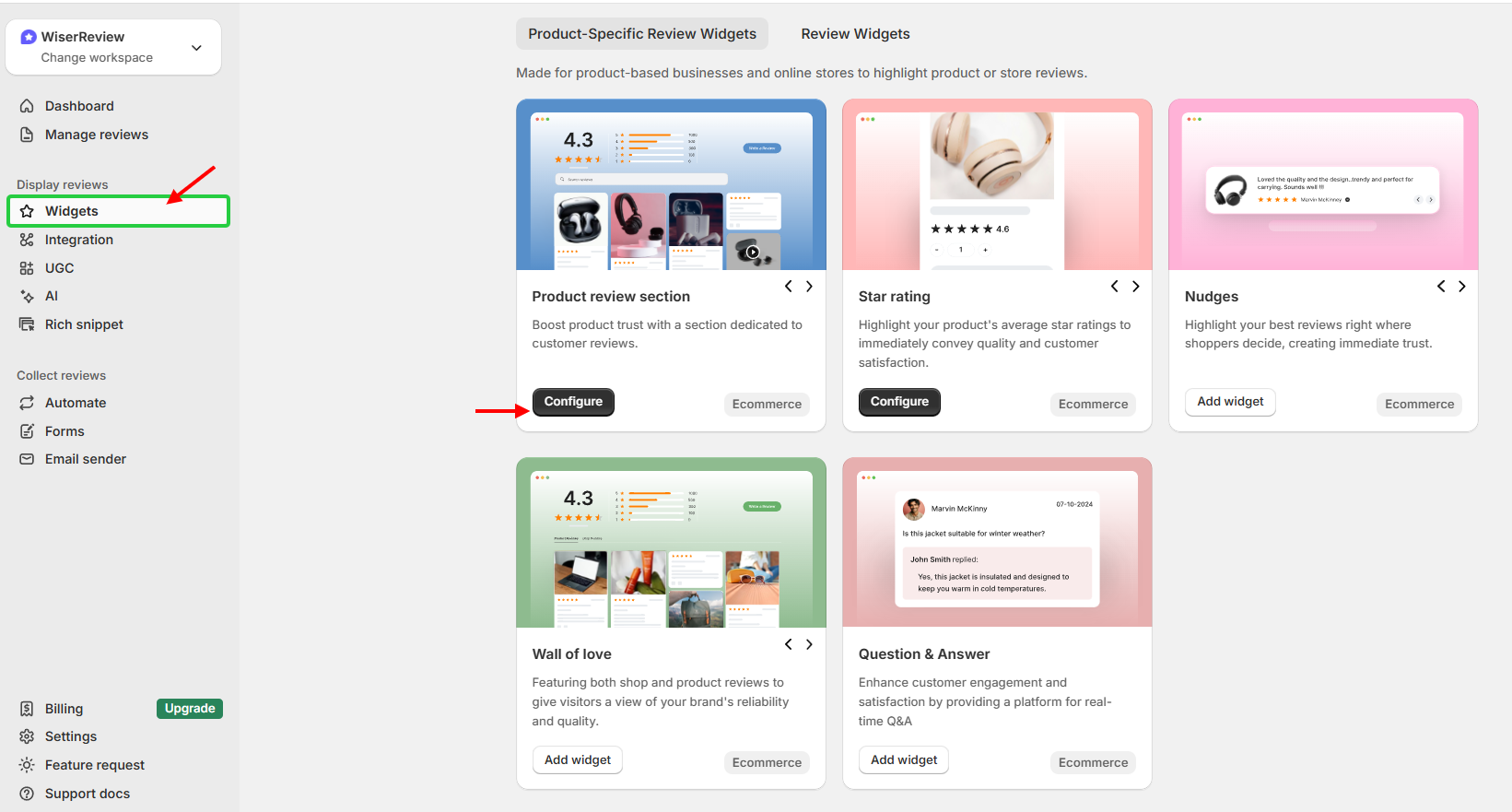
Go to the Widgets section in the WiserReview dashboard and select a style, such as the Wall of Love, Carousel, or Product Review Section.
- Design: Use the configuration panel to match the widget’s colors, fonts, and layout to your Squarespace site’s branding.
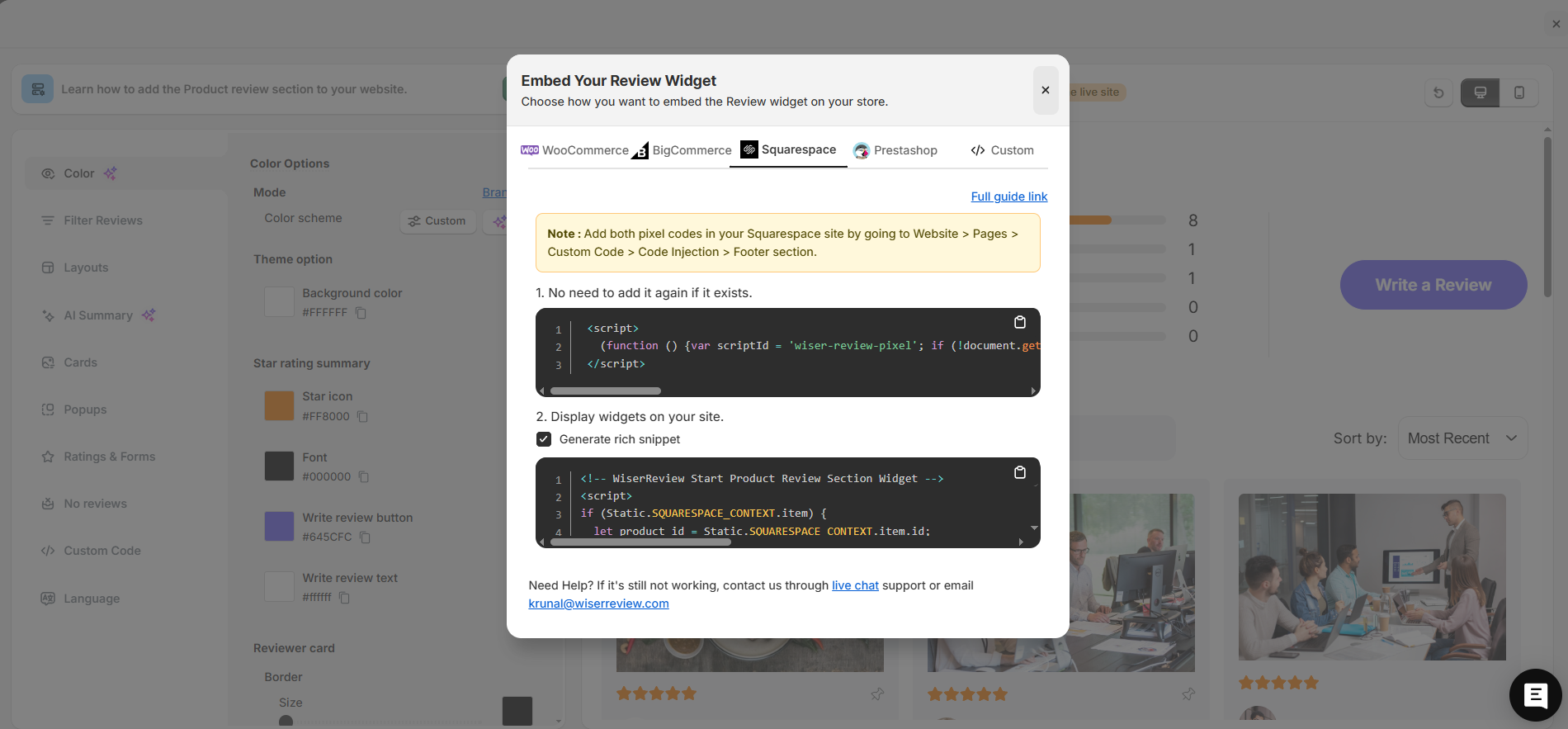
- Generate Code: Once customized, click Install or Get Code to generate your unique JavaScript embed snippet.
Step 4: Product grouping
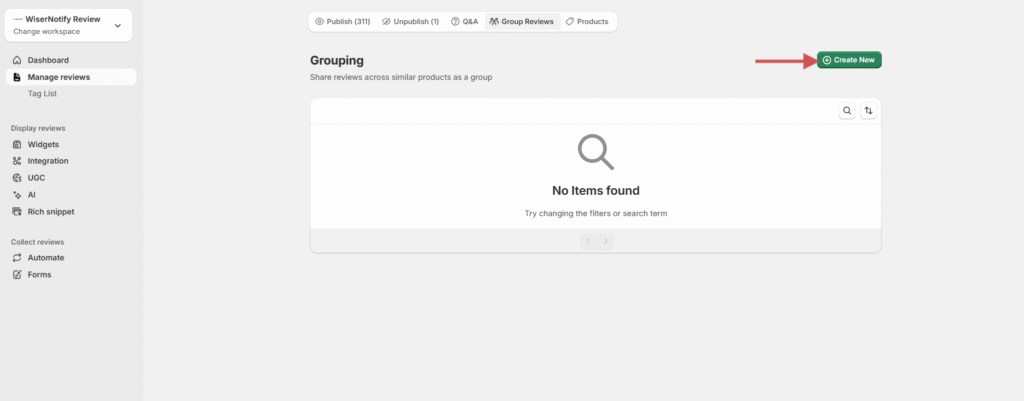
Combine reviews for similar or variant products (such as different colors or sizes).
Steps:
- Go to Manage Reviews → Product Grouping.
- Click Create Group.
- Select and add related products.
- Save the group.
Step 5: Integrate with Google Shopping
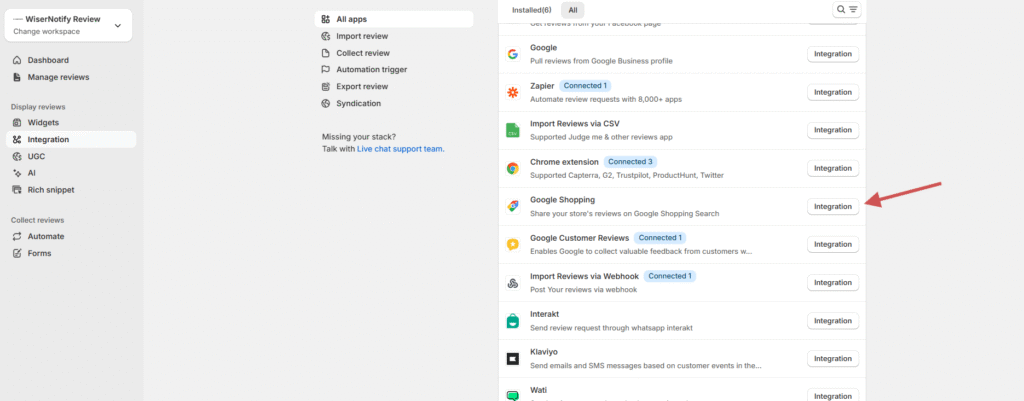
Connect your WiserReview account with Google Shopping to display product ratings in search results.
Steps:
- Go to Integrations → Google Shopping.
- Click Integration.
- Generate the Review Feed XML.
- Add the feed URL to your Google Merchant Center account.
Step 6: Multi-store review sync
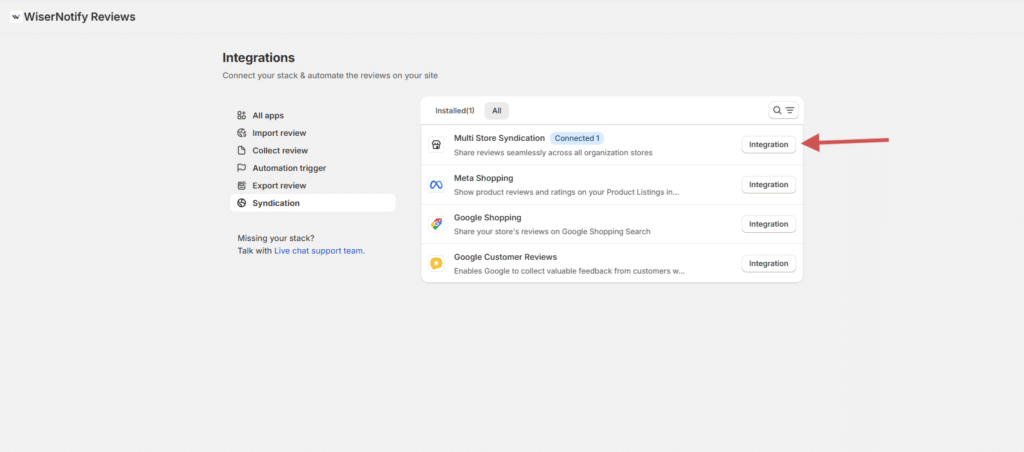
Sync reviews across multiple stores that share the same products or SKUs.
Steps:
- Go to Integrations → Multi-Store Sync.
- Connect your additional stores.
- Verify matching SKUs.
- Enable review sync automation.
Step 7: Install on Squarespace

For optimal performance, go to Settings > Advanced > Code Injection in Squarespace and paste the WiserReview script into the Footer section.
- Open the Squarespace page editor and click Edit.
- Add a new Code Block or Embed Block where you want the reviews to appear.
- Paste your widget’s embed code into the block and click Save.
Publish: Save and publish your changes to see the live reviews synced to your site.
All your reviews in one place
Collect reviews, manage every response, and display them where they matter most.Wrap up
WiserReview transforms how Squarespace merchants collect and display customer testimonials.
The platform automates the tiresome parts of review management while giving you creative control over how social proof appears on your site.
Whether you’re running a small Squarespace shop or managing multiple store locations, WiserReview scales with your needs.
Start collecting authentic reviews that build trust and drive conversions. Visit WiserReview to set up your Squarespace integration today.
Frequently asked questions
Yes. You can import reviews from Judge.me, Google, Facebook, and other tools using a CSV file.
Yes. WiserReview works for stores and service-based businesses. You can use custom forms and manual triggers without an online checkout.
There is a free plan for up to 10 reviews. Paid plans start at $9 per month and include video reviews, widgets, automation, and no branding.
No. Widgets load separately and do not affect page speed or site performance.

Krunal