Google review widget for GetResponse. Boost Trust. Drive Action.
Display Google reviews on your GetResponse emails and pages.
Showcase customer feedback where it matters most.

Dedicated review section for products.

Average star ratings on product pages.
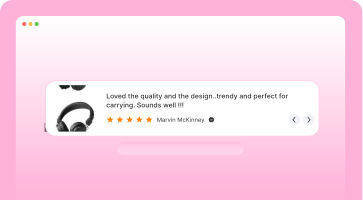
Best reviews where shoppers decide.

Shop and product reviews together.

Reviews in a dynamic carousel.

Auto-rotate reviews in a slider.
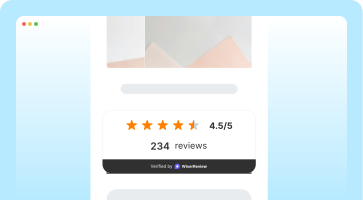
Review count badge for trust.
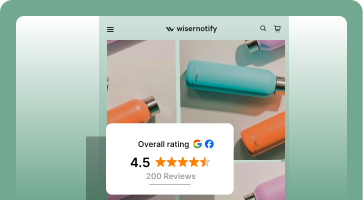
Social badge with star ratings.

Reviewer avatars in a carousel.
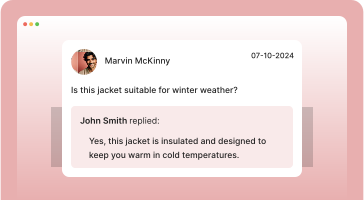
Product questions and answers.

Reviews in an engaging popup.

Reviews in a sidebar panel.

Social media content display.
Review widget that convert
A scrollable row of your Google reviews. Drop it on a product page or under your homepage hero.
This bottle keeps drinks cold for hours, so you can enjoy them fresh throughout the day. The matte finish gives it a clean, modern look. Read more
Ordered on a Friday and it arrived Monday morning. Packaging was solid and everything was exactly as pictured. Read more
Tracks steps and sleep accurately. Helpful notifications. Battery lasts about a week between charges. Read more
Stylish stand keeps my desk tidy. Posture improved. Great for remote work and long days at the screen. Read more
Reviews for better sales.

Google reviews, made for GetResponse
WiserReview helps you collect, manage, and showcase Google reviews. Perfectly built for users who want to boost trust, traffic, and sales with ease.
Effortless review collection
Quickly gather reviews via email, text, or direct links. Allow your customers to submit feedback with just a few clicks.
Seamless automation
Set up your review invitations once and let the system handle follow-ups for you. No more manual reminders.
Smart review management
Choose which collected reviews to feature in this widget using content moderation or curated selections. Curated widgets display a Testimonials badge so shoppers see they're hand-picked.

Display reviews your way
Easily integrate flexible review widgets into your GetResponse emails and landing pages. Just embed the code and boost credibility.
Built for GetResponse
WiserReview brings powerful review features, without tech hassle.

Quick setup
Get started quickly with simple integration.

Automatic sync
Sync your reviews automatically.

Custom-fit display
Customize review widgets to match your branding.

SEO-ready
Improve your visibility with Google review stars.
Best Google review widget
Arrived two days early and the quality is better than the photos.
Second order this month. Packaging is genuinely excellent.
Google Carousel
Scroll through your best Google reviews in a compact row. Fits product pages and homepage sections.
Fits exactly as described. Would buy again.
Support replied in under an hour on a Sunday.
Third purchase. Never had an issue.
Fits exactly as described. Would buy again.
Support replied in under an hour on a Sunday.
Third purchase. Never had an issue.
Auto Slider
Reviews glide past on their own, no clicking needed. Good for narrow strips above the footer.
Trust Badge
Your average rating and total review count in one small block, for any page where visitors hesitate.
Sidebar Snippet
A slim tab pinned to the edge of the screen. Stays out of the way until someone wants proof.
Google Review badge
Your Google rating shown with the Google mark, so visitors can see where the score came from.
Floating review badge
Sits in a page corner and follows the scroll, for long pages where reviews sit far from the buy button.
Avatar
Overlapping customer avatars with the rating beside them. A light touch for headers and checkout.
Better than the photos suggested.
Support replied within the hour.
Packaging is genuinely excellent.
Third order. Never had an issue.
Fits exactly as described.
Shipped same day, arrived early.
Review wall
Every review in a masonry grid. The one to use on a dedicated reviews page.
Fuel search with Google reviews
Show stars in ads, shopping, and search to boost clicks and traffic.
Google Ads ratings
Show star ratings on your ads to grab attention fast. Boost CTR and reduce cost per click with trusted proof.

Shopping feed integration
Push reviews into Google Shopping listings automatically. Build trust and win clicks before the product page even opens.
SEO snippets
Add review stars to your organic search results. Get better visibility, more clicks, and stronger credibility.
Who needs a Google review widget?
If you sell online and trust influences every sale, this is built for you. Add real customer voices exactly where buyers hesitate.
Ecommerce stores
Display authentic customer feedback next to product details. Build instant trust and boost conversions.
Fashion & apparel
Highlight reviews about fit, quality, and comfort. Let shoppers make confident decisions and reduce returns.
Beauty & wellness
Showcase glowing reviews to boost credibility for products like skincare, cosmetics, and health essentials.
Home & living
Let customers see reviews for home goods like furniture, decor, and kitchenware to inspire confidence before they buy.
Multi-brand operations
Centralize reviews across different stores or regions, tailoring widgets for each product line or audience.
Digital products & creators
Use customer feedback to show the value of your templates, courses, or downloads and increase trust.
Google reviews ready in minutes


Instant setup
Connect your Google profile and go live fast.
Auto-collect reviews
Send review requests automatically after a purchase or visit.
Flexible display options
Add carousels, popups, or badges anywhere on your site.
Other popular review widgets

Facebook review widget
Show real reviews from your Facebook page in a clean layout with star ratings and names. Auto-sync supported.
Perfect for: local pros, service businesses, personal brands.

Google seller ratings
Highlight your Google Seller Ratings in search or on-site using verified data. Supports stars and review count.
Perfect for: ecommerce stores running Google Ads.

Wall of love widget
Showcase all your best reviews in a clean grid or collage. Filter by source or tag.
Perfect for: testimonials page, about page, landing pages.

Video Testimonial widget
Display short customer videos with names and star ratings. Boosts trust with real faces and voices.
Perfect for: coaching, SaaS, services, personal brands.

Google review badge
A small sticky badge that shows real-time reviews as users browse your site. Works on all pages.
Perfect for: product pages, landing pages, checkout flows.
Google product review feeds
Send product-level reviews to Google Shopping using structured feed files. Boosts visibility and click-throughs.
Perfect for: product pages, cart upsells, post-purchase flows.
Add reviews where your visitors are
It works with WordPress, Webflow, Shopify, Wix, and more, no extra setup needed.

WordPress
Add Google reviews to WordPress

Custom HTML sites
Embed Google reviews with HTML

Google business profile
Sync Google reviews in real-time

Wix
Auto-sync Google reviews on Wix

Squarespace
Show Google reviews on Squarespace
30+ integration
View allReal words, real results
Google Review tactics for GetResponse
Smart placement of trust builds buyer confidence and drives sales. Here’s how to use reviews:
Leverage trust right from the start
Place Google reviews at the top of your GetResponse emails or landing pages to instantly establish credibility. This creates an immediate connection with users and shows them your brand is trusted by others.
How
Add the Google Review Widget to your GetResponse email builder. Choose a high-impact review or star rating to highlight, and align it with your call-to-action. Keep it simple to avoid distracting from your core message.
Strengthen confidence at conversion points
Show your best Google reviews near forms or checkout areas to reassure users. This boosts trust at key moments when users are about to make decisions.
How
Position the widget close to your form fields, and feature reviews that emphasize ease, value, and customer satisfaction. Add a “Verified” badge or subtle animation to further increase confidence.
Make testimonials seamlessly follow visitors
Keep your Google reviews visible as users browse. This ensures continuous trust-building, even as users scroll, without interrupting their experience.
How
Use the sticky widget feature and place it in a floating position on the page. Activate it after users have scrolled a bit to maximize visibility and feature a real-time review counter for extra impact.
Encourage action with social proof
When visitors hit your pricing or offer block, they’re on the fence. A strategically placed Google review here helps eliminate doubt and justifies the value.
How
Embed reviews from customers who mention ROI, results, or savings. Use a compact grid or side-by-side layout so reviews don’t crowd the pricing table. Highlight phrases like “worth every penny” or “paid for itself in a week.”
Utilize reviews to build a social proof funnel
Turn Google reviews into a continuous funnel for trust-building. As new reviews come in, feature them in follow-up emails or newsletters to keep potential customers engaged.
How
Embed the widget into your email newsletters and regularly update it with new reviews. This creates an ongoing stream of positive social proof and keeps your messaging fresh and relevant.
Leverage reviews for segmented campaigns
Showcase Google reviews tailored to specific segments of your audience. Different reviews can resonate with different groups, boosting relevance and conversions.
How
Customize the widget to filter reviews by product or service type, ensuring that the right reviews are shown to the right audience. For example, show reviews for a particular product to those who are viewing or interested in that specific product.
Add Google reviews
to GetResponse
Drop Google reviews into any GetResponse email or page. Build trust and drive more conversions.